

Check FTA linkage and tax-reporting outcomes
Use E-invoicing (FTA) for taxpayer registration/linkage and transaction detail for each tax report. These are different checks.
Before you start
- The taxpayer/company you intend to review.
Steps
- Open E-invoicing (FTA) and locate the taxpayer and environment.
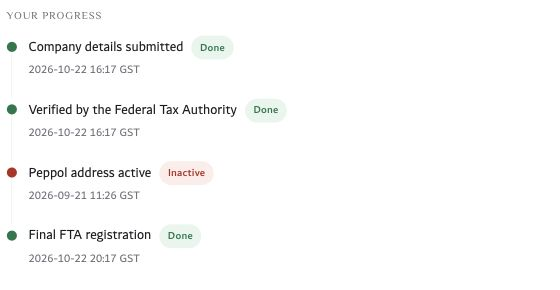
- Read the overall state, Next action and the progress stages: company details, FTA verification, active Peppol address and final registration.
- Review the FTA-returned company information. It is read-only here; the FTA is the source for those fields.
- If re-verification or offboarding is required, start from the relevant EmaraTax linkage action as the portal instructs. Involve your authorized administrator.
- For an individual invoice, open Transactions > document > FTA reporting (TDD). Check the TDD type, its transport result, FTA response and follow-up.
- Escalate rejected, unresolved or unexpected closed-linkage states with the taxpayer and transaction references.
The intended taxpayer is active in the required environment, and an invoice's tax-report response is understood independently of its buyer delivery.
Notes & troubleshooting
Do not confuse these
| Portal information | What it tells you |
|---|---|
| Active linkage | Registration/linkage readiness for that taxpayer and environment |
| TDD generated | A report was built; not an acceptance result |
| TDD sent / Reported | A transmission fact; inspect FTA acknowledgement |
| FTA Accepted (AP) | A positive response to the report shown |
| TDD Resubmit / Withdraw | A follow-up reporting action; inspect its own outcome |
Questions and field requirements
What does linking my company to Azdan in EmaraTax do?
In EmaraTax, a taxpayer names the Accredited Service Provider that sends and receives its e-invoices. When you choose Azdan there, EmaraTax sends you to this linking request. Azdan verifies your company with the Federal Tax Authority, registers its Peppol address (0235: followed by your TIN) and creates your Azdan account.
Until the FTA confirms the registration, the address stays on hold: nothing is sent or received for it. The E-Invoicing page in the console shows the current state.
Which e-mail address and mobile number do I enter?
The e-mail address must be the administrator address registered with the FTA in EmaraTax; the FTA compares it with its records and the request fails if it differs. It also becomes the e-mail of your first Azdan administrator account.
The mobile number is optional. Enter it in international format (for example +971551234567) or choose the country code and type the national number; spaces, brackets and dashes are ignored. It has 7 to 15 digits.
I created a free account. How do I connect my company with EmaraTax?
After signing in (and setting up multi-factor authentication) the console opens Connect with EmaraTax. Select Connect: Azdan remembers that your account started the connection and takes you to the official EmaraTax portal, where you select Azdan as your Accredited Service Provider. EmaraTax then sends you back to Azdan with your company's verified details.
On the confirmation step you tick two boxes: that the FTA's details are correct, and that the company joins the Azdan account you are signed in to. Azdan registers your Peppol address and the FTA confirms the linkage; your password, users, settings and plan stay as they are, and you receive a "company linked to your account" email.
- The connection is bound to your browser and expires after four hours; if it lapses, start again from Connect with EmaraTax.
- If you are sent to sign in when you come back from EmaraTax, sign in to the account you started from. Signing in to a different account does not link the company anywhere.
- A company that is already linked to another Azdan account is never moved automatically; Azdan reviews it.
What happens after I submit the linking request?
Your details are saved and verified with EmaraTax. You then confirm the Peppol address that was derived from your TIN; the confirmation box must be ticked.
- If the FTA verifies the company, its Peppol address is registered and you receive an activation e-mail for your Azdan account.
- If the details cannot be verified, check the e-mail address and TIN, return to EmaraTax and start a new linking request.
- Your Peppol address stays on hold until the FTA confirms the registration in its registry.
The page says the request expired or was already used. What now?
A linking request stays open for 10 minutes after EmaraTax hands you over to Azdan, and allows 3 verification attempts. After that, or once it has been completed, it cannot be reused.
Return to EmaraTax and start a new linking request; the new one replaces the old.
How do I re-verify the linkage, or end it (offboard)?
Both start in EmaraTax, under the linkage status with your service provider: choose Re-verify or Offboard and EmaraTax sends you to Azdan. There you sign in with the registered administrator e-mail (and optionally the mobile number), choose the action, give a reason of up to 500 characters and tick the confirmation.
Re-verifying refreshes your company's details with the FTA; your Peppol address keeps working. Offboarding takes your company off the Peppol network through Azdan and asks the FTA to remove the linkage; it is a critical action and is confirmed with the code from your authenticator app. While it is in progress no other linkage action can start.
Who can manage the linkage?
Only an account administrator (the Admin role) can re-verify or end the linkage. A Finance, Developer or Viewer user sees the E-Invoicing status page but cannot change it.
Form-field reference
| Field | Requirement | What to enter |
|---|---|---|
| Registered EmaraTax e-mail address | Required | The e-mail address of the administrator registered with the Federal Tax Authority in EmaraTax. The FTA checks it against its records; Azdan then uses it for the account and for notifications. A valid e-mail address, up to 254 characters. It is compared case-insensitively, so capital letters do not matter. EXAMPLE finance@yourcompany.ae |
| TIN (Tax Identifier Number) | Required | The 10-digit tax identifier the FTA issued to your company. It becomes the company's Peppol address (0235: followed by the TIN). Exactly 10 digits, starting with 1. This is not the 15-digit VAT TRN, which starts with 1 and ends with 03. EXAMPLE 1000000001 |
| Registered mobile number | Optional | The mobile number registered with EmaraTax, if you want it on the request. Choose the country code, then enter the national number. Optional. 7 to 15 digits; spaces, brackets and dashes are ignored. A number with a leading + is stored in international format. EXAMPLE +971551234567 |
| Country (calling code) | Optional | The country of the mobile number. It sets the calling code that is added in front of the national number. Optional. A two-letter country code; the United Arab Emirates (+971) is the default. EXAMPLE AE |
| Confirmation | Required | Confirms that you are authorised to link this company to Azdan as its e-invoicing service provider, and that the details shown are correct. Must be ticked before the request can be sent. |
| Reason | Required | Why you are re-verifying the linkage or ending it. The FTA requires a reason; it is recorded with the request and in the audit log. Required, 1 to 500 characters. A short sentence is enough. |
| Authenticator code | Required | Ending the linkage is a critical action, so it is confirmed with the current code from your authenticator app, or one of your recovery codes. The 6-digit code shown now, or a recovery code. After 5 wrong codes the action is locked for 10 minutes. EXAMPLE 123456 |
| Connect with EmaraTax | Required | Starts the official EmaraTax authorisation from your signed-in account. Azdan remembers that this account started the connection, then takes you to the EmaraTax portal, where you select Azdan as your Accredited Service Provider. EmaraTax sends you back with your company's verified details. Only an administrator can connect a company. The connection is bound to this browser and expires after four hours; start again from this screen if it lapses. |
| Target account confirmation | Required | Your explicit confirmation that the company EmaraTax verified joins the Azdan account you are signed in to. A company is linked to an account only with this confirmation; Azdan never links one by matching an email address. Required when signed in. If this is the wrong account, sign out and sign in to the right one; the linking request stays open until it expires. |
For the underlying invoice specification, see the official Peppol UAE specifications. Match technical rules to the version used by your deployment.
Product workflow reference: Azdan Help Center, reviewed 1 November 2026. Examples are illustrative.
Related guides
Azdan UAE E-Invoice documentation · ERP-neutral workflows. Confirm your deployment’s current labels, permissions and API contract before making changes.