

Find and check your Peppol participant ID
Use My Peppol participants to identify the address you send from or give to a supplier. The list is a registration reference, not a place to type a new identity.
Before you start
- Know the company and the test or production network you need.
Steps
- Open My Peppol participants.
- Locate the company or branch label. Read the full Peppol ID, including its scheme and colon.
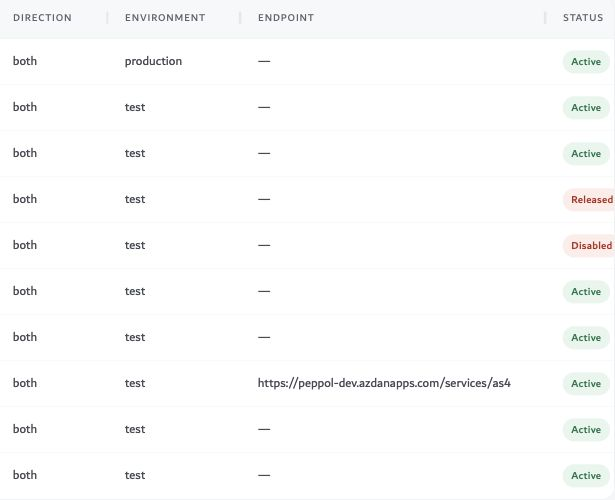
- Check Direction: outbound or both for sending, inbound or both for receiving.
- Check Environment and Status. Use an active registration in the intended network.
- Give trading partners the appropriate registered address. Ask Azdan to add, disable or change a registration when needed.
Your intended sender or recipient address is present with the required direction, network and active status.
Notes & troubleshooting
If you cannot use an ID
- A default badge is a convenience indicator; still confirm the company and network.
- A disabled or released registration is not a ready sender.
- Ask the trading partner to confirm its own full Peppol address.
- Contact your Azdan administrator if a company is missing or an endpoint must change.
Questions and field requirements
What is the difference between the TIN and the TRN?
The TIN (Tax Identifier Number) is the 10-digit identifier the FTA assigned to your company. It starts with 1 and is the identifier inside your Peppol address: 0235:1000000001.
The TRN (Tax Registration Number) is your 15-digit VAT registration number. It starts with 1 and ends with 03, for example 100123456700003, and goes on every invoice as the seller's or buyer's tax number.
The linking request asks for the TIN. The company profile and every invoice use the TRN.
Can an address on hold send or receive invoices?
No. A newly registered company address remains on hold until the FTA confirms it in its registry. Check the company’s E-Invoicing status before sending an invoice or asking a supplier to use the address.
For the underlying invoice specification, see the official Peppol UAE specifications. Match technical rules to the version used by your deployment.
Product workflow reference: Azdan Help Center, reviewed 1 November 2026. Examples are illustrative.
Related guides
Azdan UAE E-Invoice documentation · ERP-neutral workflows. Confirm your deployment’s current labels, permissions and API contract before making changes.