

Issue a credit note against an earlier invoice
Create a credit note with its own document number, issue date, currency and approved reason. Enter the original invoice number for every reason except a volume discount, where that reference must be left empty.
Before you start
- Approval for the correction, its reason and the original invoice number when required. The original invoice date is optional.
- The original parties, currency and the amount or lines being credited.
Steps
- Find the original invoice in Invoices or Transactions. Check the recipient, amounts and its current results.
- Open Send invoice and choose the manual or XML route. Select Credit note as the document type.
- Choose tax or commercial according to the approved scenario. Select the credit-note reason. Enter the original invoice number unless the reason is volume discount; the original invoice date is optional.
- Enter the credited lines and reason. Complete any additional buyer registration details requested for the scenario.
- Review the tax breakdown and credited amount, validate/review, and send only after approval.
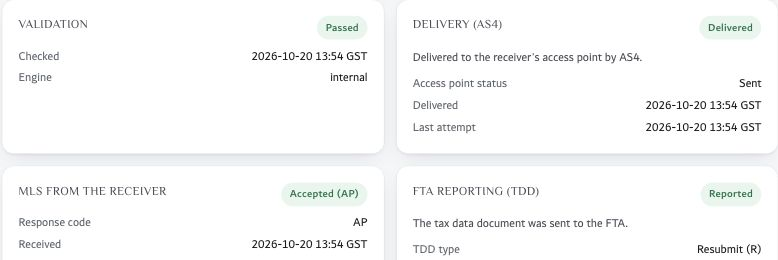
- Record the credit-note transaction ID alongside the original invoice reference. Check delivery, receiver response and FTA reporting.
The credit note has the correct reason, invoice reference where required, and its own transaction and reporting outcome. A volume-discount credit note has no original invoice number.
Notes & troubleshooting
Document combinations in current docs
| Kind | Invoice | Credit note |
|---|---|---|
| Tax | 380 | 381 |
| Commercial | 480 | 81 |
Questions and field requirements
These requirements describe the checks and inputs in Azdan. Choose the tax treatment appropriate to the actual supply, then resolve the validation findings before sending.
What does a credit note need?
A credit note reverses or corrects an invoice you sent earlier. It needs:
- A reason from the UAE list: a cancelled supply, a change in the consideration, a return of goods, a correction of VAT, an error in the invoice, or a volume discount.
- The original invoice number, for every reason except a volume discount, where it must be left empty.
- Its own number, issue date and currency, like an invoice.
A credit note does not need a payment due date.
Form-field reference
| Field | Requirement | What to enter |
|---|---|---|
| Reason for the credit note | Required | Why the original invoice is being corrected or reversed. The UAE rules accept only the reasons in the list. Required on every credit note. |
| Original invoice number | Required in some cases | The invoice this credit note corrects. Required for every reason except a volume discount, where it must be left empty. EXAMPLE INV-2026-0001 |
| Original invoice date | Optional | The issue date of the invoice being corrected, so the customer can find it. Optional, as a calendar date. EXAMPLE 2026-09-30 |
For the underlying invoice specification, see the official Peppol UAE specifications. Match technical rules to the version used by your deployment.
Product workflow reference: Azdan Help Center, reviewed 1 November 2026. Examples are illustrative.
Related guides
Azdan UAE E-Invoice documentation · ERP-neutral workflows. Confirm your deployment’s current labels, permissions and API contract before making changes.