
Save a customer for repeat invoicing
Save a customer once so their legal identity and address can be selected in the invoice wizard. The contact email does not determine Peppol delivery.
Before you start
- The customer's approved legal details and confirmed Peppol address.
Steps
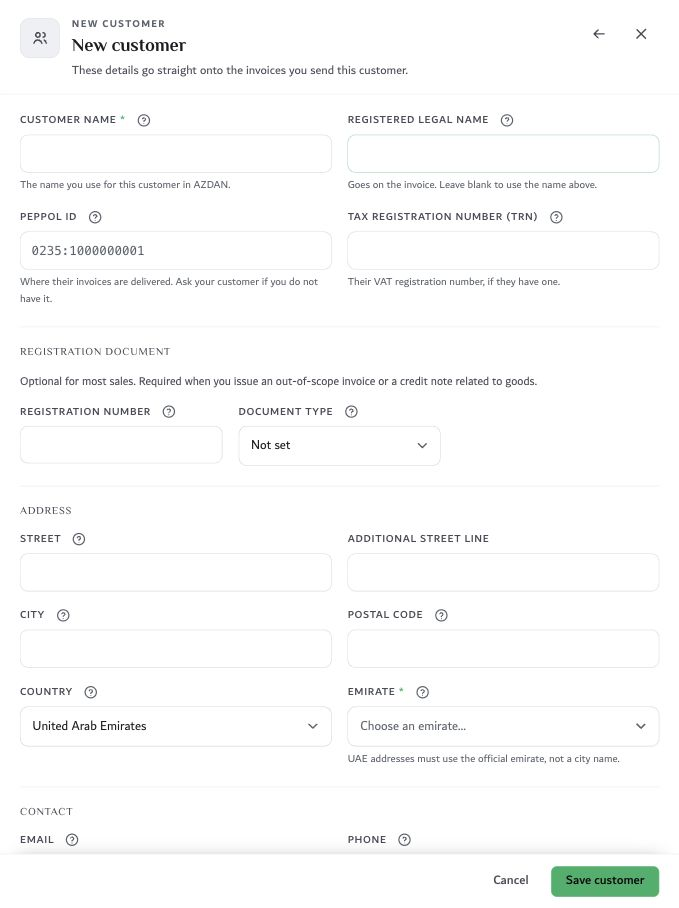
- Go to Customers and select Add customer.
- Enter the customer name. Add a registered legal name if it differs from the display name.
- Enter the Peppol ID and VAT TRN where applicable.
- Complete the registration document fields if the document scenario requires them, then enter the address. Choose the emirate for a UAE address.
- Add email and phone for your own reference, then select Save customer.
- Find the customer using Search. In Send invoice, use Choose customer or Choose a saved customer and verify the populated values.
The customer appears in the list and selecting it fills the intended buyer details on the invoice.
Notes & troubleshooting
Common issue
If the customer is absent, check your search and company access. If the panel reports missing information, complete the highlighted fields rather than replacing them with sample values.
Questions and field requirements
These requirements describe the checks and inputs in Azdan. Choose the tax treatment appropriate to the actual supply, then resolve the validation findings before sending.
What is a Peppol ID and where do I find my customer's?
A Peppol ID is the address a document is delivered to on the Peppol network, written as scheme:identifier. For a UAE company the scheme is 0235 and the identifier is its 10-digit TIN, for example 0235:1000000001; other countries use other schemes from the Peppol list.
Ask your customer for it, or look it up in their EmaraTax e-invoicing details. Each Peppol ID can belong to one customer in your account. A customer without a Peppol ID can be saved but cannot be sent a document.
Which customers need a TRN, and in what format?
Use the customer’s VAT TRN in the buyer tax field, separately from the TIN in its Peppol address. For a VAT-registered UAE buyer, the TRN has 15 digits, starts with 1 and ends with 03. If the buyer is not VAT-registered, use the invoice form’s non-registered-buyer treatment rather than inventing a TRN. Complete any additional registration-document fields required by the invoice scenario.
Which customer fields are needed to send an invoice?
To save a customer only the name is required. To send a document to them the invoice needs their Peppol ID, their legal name, a full address (street, city, country and, in the UAE, the emirate) and, for a UAE customer, their TRN. An out-of-scope invoice or a credit note related to goods also needs a registration document and number. The customer form marks each of these so they are filled in once.
Form-field reference
| Field | Requirement | What to enter |
|---|---|---|
| Customer name | Required | The name you use for this customer in Azdan. It appears in lists and pickers. Required, 1 to 200 characters. EXAMPLE Gulf Horizon Trading |
| Registered legal name | Optional | The name that goes on the invoice. Leave it blank to use the customer name. Optional, up to 200 characters. EXAMPLE Gulf Horizon Trading L.L.C. |
| Peppol ID | Required in some cases | Where this customer's invoices are delivered. Ask your customer if you do not have it. scheme:identifier with a 4-digit scheme from the Peppol list, for example 0235: followed by a UAE company's 10-digit TIN. Each Peppol ID can belong to one customer in your account. Required before you can send to this customer. EXAMPLE 0235:1000000001 |
| Tax registration number (TRN) | Required in some cases | Use the customer’s VAT TRN in the buyer tax field, separately from the TIN in its Peppol address. For a VAT-registered UAE buyer, the TRN has 15 digits, starts with 1 and ends with 03. If the buyer is not VAT-registered, use the invoice form’s non-registered-buyer treatment rather than inventing a TRN. Complete any additional registration-document fields required by the invoice scenario. |
| Registration number | Optional | The customer's trade licence, commercial licence or identity document number, for invoices that must identify the buyer legally. Optional for most sales; required on an out-of-scope invoice and on a credit note related to goods. Up to 80 characters. EXAMPLE CN-1234567 |
| Registration document | Required in some cases | Which document the registration number comes from. Required when a registration number is given for a UAE customer. A trade licence also needs its issuing authority. |
| Issuing authority | Required in some cases | Who issued the registration document: for a trade licence, the licensing authority; for a passport, the issuing country. Required for a trade licence. Up to 200 characters. EXAMPLE Dubai Department of Economy and Tourism |
| Street | Required in some cases | The street and building of the customer's address, as it should appear on the invoice. Required on every invoice, so fill it in here once. Up to 200 characters. EXAMPLE Sheikh Zayed Road, Office 1204 |
| City | Required in some cases | The city of the customer's address. Required on every invoice. Up to 120 characters. EXAMPLE Dubai |
| Postal code | Optional | The postal code, where the country uses one. Optional, up to 40 characters. EXAMPLE 00000 |
| Country | Required | The country of the customer's address. It decides whether the emirate and the TRN are required. Required, as a two-letter country code. EXAMPLE AE |
| Emirate | Required in some cases | The emirate of a UAE address, chosen from the list rather than typed as a city name. Required when the country is the United Arab Emirates. |
| Optional | A contact address for your own reference. Peppol delivery does not use it. Optional. A valid e-mail address, up to 200 characters. EXAMPLE accounts@customer.ae | |
| Phone | Optional | A contact number for your own reference. Optional, up to 60 characters. EXAMPLE +971 4 123 4567 |
For the underlying invoice specification, see the official Peppol UAE specifications. Match technical rules to the version used by your deployment.
Product workflow reference: Azdan Help Center, reviewed 1 November 2026. Examples are illustrative.
Related guides
Azdan UAE E-Invoice documentation · ERP-neutral workflows. Confirm your deployment’s current labels, permissions and API contract before making changes.