

Save an item with price and VAT defaults
Store frequently sold products or services to reduce repetitive entry. Item values are invoice-line defaults and should still be checked on each document.
Before you start
- Approved product/service description, unit, price, currency and VAT treatment.
Steps
- Open Items and select Add item.
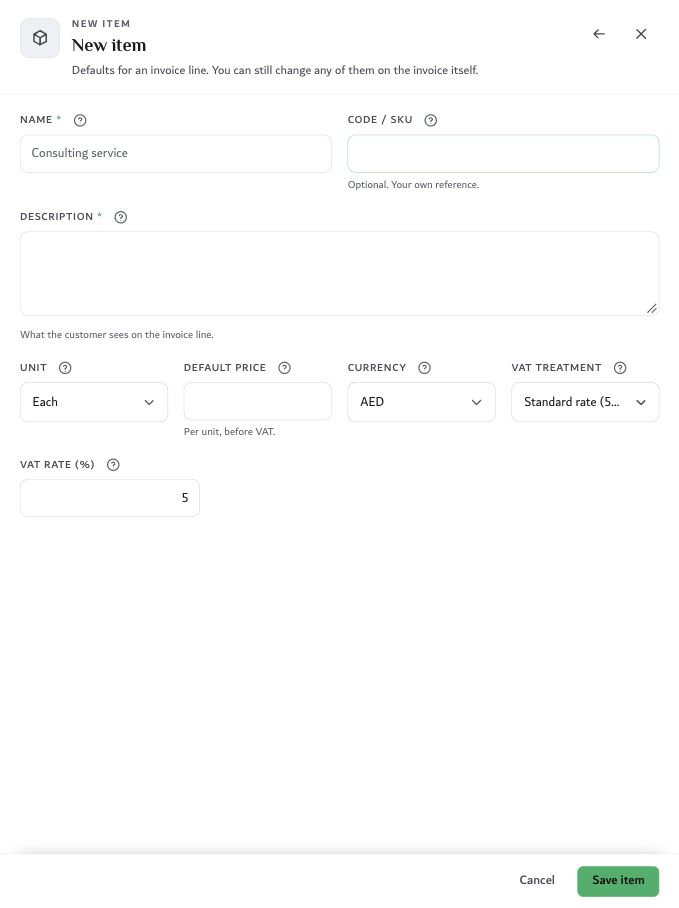
- Enter the name and invoice description. Add a code or SKU if your team uses one.
- Choose the unit and enter the price before VAT and its currency.
- Select the appropriate VAT treatment. Review the displayed VAT rate and any additional information requested.
- Select Save item. Search for the saved item, then select it with Choose item when preparing an invoice.
The item appears in the catalog and fills the expected description, unit, price and tax defaults on a new line.
Notes & troubleshooting
Observed treatment choices
| Choice | User action |
|---|---|
| Standard rate (5%) | Use only when this is the approved treatment for the supply |
| Zero-rated / Exempt | Use the correct distinct category; complete requested reasons |
| Outside the scope of VAT | Check the commercial/tax document scenario with finance |
| Reverse charge / Margin scheme | Complete the relevant scenario information; do not substitute a standard VAT category |
Questions and field requirements
These requirements describe the checks and inputs in Azdan. Choose the tax treatment appropriate to the actual supply, then resolve the validation findings before sending.
Which unit do I enter?
Every line needs a unit as a UN/ECE Recommendation 20 code; a line without one is refused. Common codes: EA (each), HUR (hour), DAY (day), KGM (kilogram), MTR (metre), LTR (litre), MON (month), C62 (unit). An item's unit is copied onto each line that uses it.
What is the item code for?
The code (or SKU) is your own reference for the product or service, for example the code in your accounting system. It is optional and up to 80 characters; no two items in your account can share one.
Why does an item need a description?
Every line of a UAE invoice must describe the goods or service, so an item carries the description (up to 1000 characters) and the line takes it over when you pick the item. You can still edit it on the invoice.
Form-field reference
| Field | Requirement | What to enter |
|---|---|---|
| Name | Required | The name of the product or service, as you find it in the item picker when you write an invoice. Required, 1 to 200 characters. EXAMPLE Consulting service |
| Code / SKU | Optional | Your own reference for the item, for example the code in your accounting system. Optional, up to 80 characters; no two items in your account can share a code. EXAMPLE SKU-001 |
| Description | Required | What the customer reads on the invoice line. Every UAE invoice line needs one, so the item carries it. Required, up to 1000 characters. |
| Unit | Required | The unit the item is sold in: each, hour, kilogram and so on. Copied to every invoice line that uses the item. Required on an invoice line, as a UN/ECE Recommendation 20 code (EA each, HUR hour, KGM kilogram, MTR metre, DAY day). EXAMPLE EA |
| Default price | Optional | The usual price of one unit before VAT. It fills the line when you pick the item and can be changed on the invoice. Optional. A number with up to 6 decimals. EXAMPLE 1500.00 |
| Currency | Optional | The currency of the default price. Optional. A 3-letter currency code, for example AED. EXAMPLE AED |
| VAT treatment | Optional | How VAT usually applies to this item: standard rate, zero rate, exempt, out of scope, reverse charge or margin scheme. Optional; standard rate when left empty. The invoice checks the treatment against the UAE rules when you send. |
| VAT rate (%) | Required in some cases | The VAT percentage that goes with the treatment. A percentage, for example 5. Standard rate is always 5; zero rate and reverse charge are 0. EXAMPLE 5 |
For the underlying invoice specification, see the official Peppol UAE specifications. Match technical rules to the version used by your deployment.
Product workflow reference: Azdan Help Center, reviewed 1 November 2026. Examples are illustrative.
Related guides
Azdan UAE E-Invoice documentation · ERP-neutral workflows. Confirm your deployment’s current labels, permissions and API contract before making changes.