

Track an invoice and interpret its statuses
Use Transactions for the business view of each exchange. Read the separate validation, delivery, receiver response and FTA reporting results rather than relying on one badge.
Before you start
- An invoice number, transaction ID, date range or recipient to search for.
Steps
- Open Transactions. Choose Outbound or Inbound using the direction tabs, then filter by status/date and search for the document. Older releases may use a direction dropdown.
- Leave Include MLS and TDD messages off for a simpler business-document list; enable it when investigating protocol/reporting traffic.
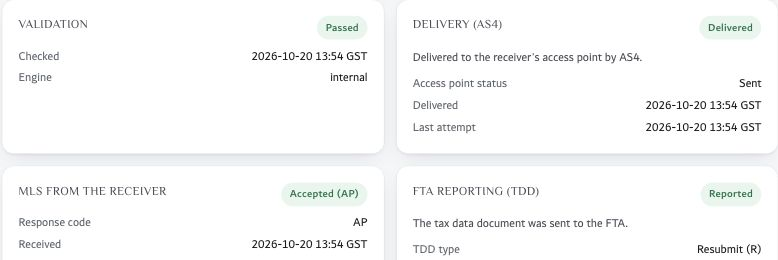
- Open the document link. Read Validation, Delivery (AS4), MLS from the receiver and FTA reporting (TDD).
- Read Status history and the recorded timestamps. Compare them with the detail cards when investigating an exception.
- Review Documents and Details. Save the transaction, correlation and AS4 message IDs when escalating.
- If delivery succeeded but the receiver or FTA rejected a later stage, resolve that stage. Do not submit the invoice again solely because a downstream result failed.
You can identify which stage succeeded or failed and what needs attention. Complete delivery is separate from payment and from FTA acceptance.
Notes & troubleshooting
Interpret the dimensions
| Signal | Meaning | Next step |
|---|---|---|
| Queued / Sending | Accepted or in transit | Monitor; investigate if persistently stuck |
| Delivered / AS4 Sent | Reached the receiving access point | Read receiver MLS and FTA response |
| Accepted MLS (AP) | Positive receiving-provider response | Continue normal reconciliation; not proof of payment |
| Business-level AB, where present | Additional business-application acknowledgement | Keep the evidence; availability varies |
| Rejected MLS (RE) | Negative receiver response | Read the reason and coordinate correction |
| FTA Reported | Can mean tax data was sent | Read the actual FTA response and follow-up |
| FTA Rejected / Needs attention | Tax reporting not accepted | Escalate or follow the approved correction process |
| Quarantined | Held for investigation | Contact Azdan before retrying |
Questions and field requirements
Does Delivered mean the buyer and FTA accepted the invoice?
Delivered records transport to the receiving access point. Read the receiver’s Message Level Status (MLS) and the FTA response separately. Neither transport delivery nor a positive MLS establishes payment or acceptance of the tax report.
Product workflow reference: Azdan Help Center, reviewed 1 November 2026. Examples are illustrative.
Related guides
Azdan UAE E-Invoice documentation · ERP-neutral workflows. Confirm your deployment’s current labels, permissions and API contract before making changes.