

Create and send documents
Validate a JSON or XML request in Test API
Run a dry check before sending an ERP request. Test API uses an API key rather than your portal sign-in session.
Before you start
- A permitted API key and current Developer docs.
- The sender participant, receiver details and intended environment.
Steps
- Open Test API and enter the API key. Keep Remember locally off on shared devices; storage is optional in the reviewed screen.
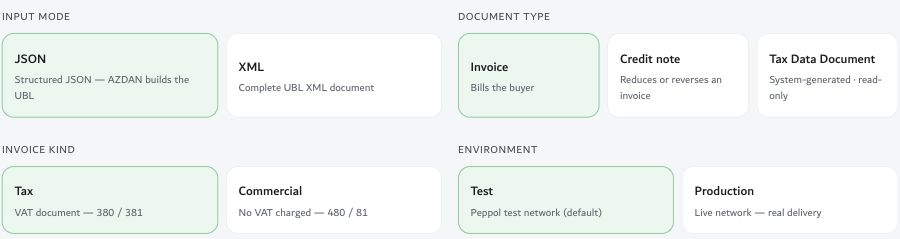
- Select JSON or XML, Invoice or Credit note, tax or commercial, and Test or Production as intended.
- Choose an active sender registered to your tenant in that network. Enter the receiver address; it must agree with the buyer in the document.
- Choose and load an example, then replace its business data. Use the generated current example rather than an old manual field list.
- Select Validate. Read each finding, including its rule code, message and field location.
- Correct the body and validate again. Any change to the exact request requires a fresh validation before Send is enabled.
- If an authorized send is intended, inspect the send headers and Idempotency-Key, then use Send to Peppol. Save the returned transaction ID and monitor it.
Check the result
Validation returns valid=true for a passing request. Validation alone creates no transaction and sends nothing to the receiver or FTA. A send returns a transaction for asynchronous processing.
Notes & troubleshooting
Use the current contract
| Topic | Current guidance |
|---|---|
| JSON lines | Use payload.lines from current examples; do not assume the manual's payload.lineItems path |
| Profile | PINT-AE; the October docs identify 1.0.4, with TDD rules separately versioned |
| TDD | System-generated and read-only; do not submit it as a tenant document |
| Idempotency | Use the Idempotency-Key header; reuse it for the identical retry |
| New document | A genuinely new document needs a new business identity as well as a new submission key |
Related guides
Azdan UAE E-Invoice documentation · ERP-neutral workflows. Confirm your deployment’s current labels, permissions and API contract before making changes.