By Azdan Business Analytics · Reviewed 22 November 2026. Azdan publishes this comparison and is one of the providers covered.
Azdan, Wafeq Platform Start, TronStride Aigentrix and Citytech InvoiceNet publish UAE e-invoicing prices and an online route to sign up. Zoho Books also qualifies if you want e-invoicing inside a paid accounting subscription. A registration form opens the provider relationship. To exchange real invoices, the business must complete the taxpayer checks and appoint its accredited service provider (ASP). Ministry of Finance ASP register
What can you do online before appointing an ASP?
On Azdan’s public registration page, the sequence is visible before you enter any details. You create an account, verify your email and then connect through EmaraTax. That distinction matters when the person comparing software is an accountant and someone else controls the business’s registered email.
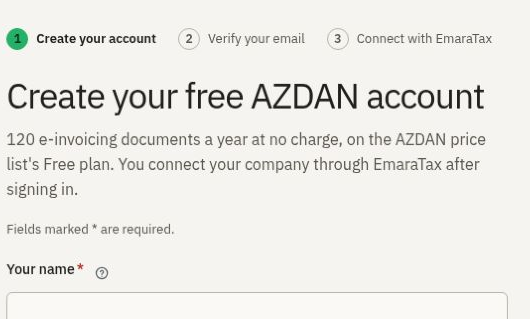
Keep those two people involved from the start. Use a company-controlled address for the account and agree who can approve the taxpayer connection. Wafeq’s instructions, for example, specify the email of the EmaraTax account administrator for verification. Wafeq setup guide
Five UAE providers with public prices and online signup
We included routes that publish a numerical price and document registration without a sales enquiry. Aiverix’s public calculator points its signup button to a sandbox, so we could verify a testing route only. We inspected public pages and guides without creating accounts or submitting invoices. Aiverix calculator
From an online account to a live taxpayer
- Match the provider to the register. Check the legal entity behind the product name. For example, the Ministry lists Citytech Software DMCC for InvoiceNet and TronStride FZC for Aigentrix. Save the relevant entry with the buying decision. Ministry of Finance register
- Choose the correct billing unit. In Wafeq’s portal, a live taxpayer uses a paid seat. Its sandbox is free. If your firm keeps books for several clients, identify who owns each taxpayer seat before putting a card on file. Wafeq billing guide
- Complete the taxpayer connection. Wafeq’s guide has the business select Wafeq FZ-LLC in EmaraTax, return to the provider and verify the TIN and registered admin email. Follow the instructions for your chosen provider and confirm the resulting linkage status. Wafeq live connection steps
- Give finance a way to check the result. Agree who will check delivery, who will check the reporting response and who will correct a rejected invoice. A useful handover includes a sample sales invoice, an incoming supplier invoice and a credit note.
Questions before you sign up
Can I test before I pay?
Wafeq documents a free sandbox and requires a subscription to connect a live taxpayer. Zoho offers a Books trial. Each route can help you evaluate the software, but your test evidence should say which environment produced it. Wafeq pricing · Zoho Books pricing
Which details should finance have ready?
The public forms vary. Azdan starts with personal and company account details plus a work email. Citytech’s organisation stage asks for the trade licence number and TRN. Wafeq also calls for access to the registered EmaraTax admin email. Azdan registration · Citytech registration · Wafeq onboarding
Start Azdan’s free registration if you want to create the account now and complete the EmaraTax connection with your authorised administrator.
Selection is based on the public evidence linked above. The comparisons use provider terms available on the review date. Check the UAE Ministry of Finance register.
Related guides
Free UAE e-invoicing plans and what upgrades cost · UAE e-invoicing providers with assisted onboarding and local support