.svg)


Short answer: A clinic - dental, aesthetic, wellness, or any outpatient specialty practice - can run its entire operation, patient intake, clinical workflow, billing, inventory replenishment, referral commissions, cost allocation, and profitability reporting, inside NetSuite as a single connected system. Below is a screen-by-screen walkthrough of what that looks like in practice, covering seven core workspaces: the patient journey tracker, the intake form, the accounting-impact ledger, indirect cost allocation, clinic replenishment, commission runs, and portfolio-level profitability analytics.
This reflects patterns observed across NetSuite implementations for multi-location clinic groups in the GCC region. Screens and figures below are illustrative of the workflow design, not a single client's live data.
Process flow in text
Patient and Referral -> Clinical Diagnosis -> Treatment Plan Approval -> Sales Order -> Deposit -> Scheduling and Logistics -> In-Clinic Re-diagnosis -> Treatment and Inventory Consumption -> Invoicing -> Settlement -> Indirect Cost Allocation -> Profitability Review
Every screen described below corresponds to a stage - or a rollup - in this chain.
The intake screen: where the financial record begins
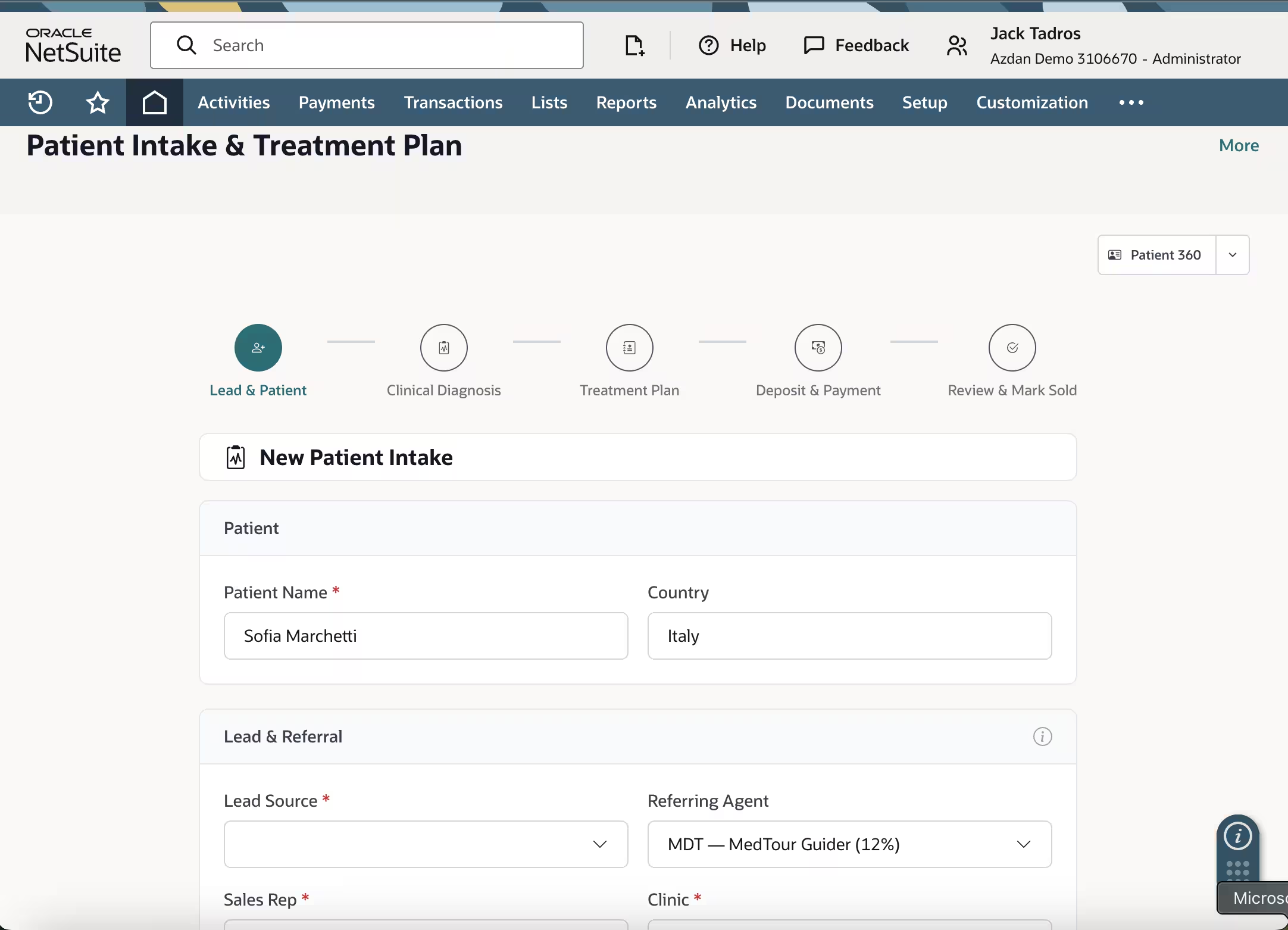
The patient record starts with a structured intake form, not a free-text lead sheet. Alongside standard demographic fields, the intake screen captures lead source and referring party - including any referral commission percentage - at the moment the patient enters the pipeline, before any clinical work has happened. This detail matters more than it looks: commission calculation later in the journey depends on having a clean, timestamped source record rather than a number reconstructed from memory at invoicing time. Sales rep or patient coordinator and clinic assignment are also captured here as required fields, which means every downstream transaction - the treatment plan, the sales order, the eventual commission run - inherits a consistent owner and location without anyone re-keying that information.
The patient treatment journey: a 12-step gated pipeline
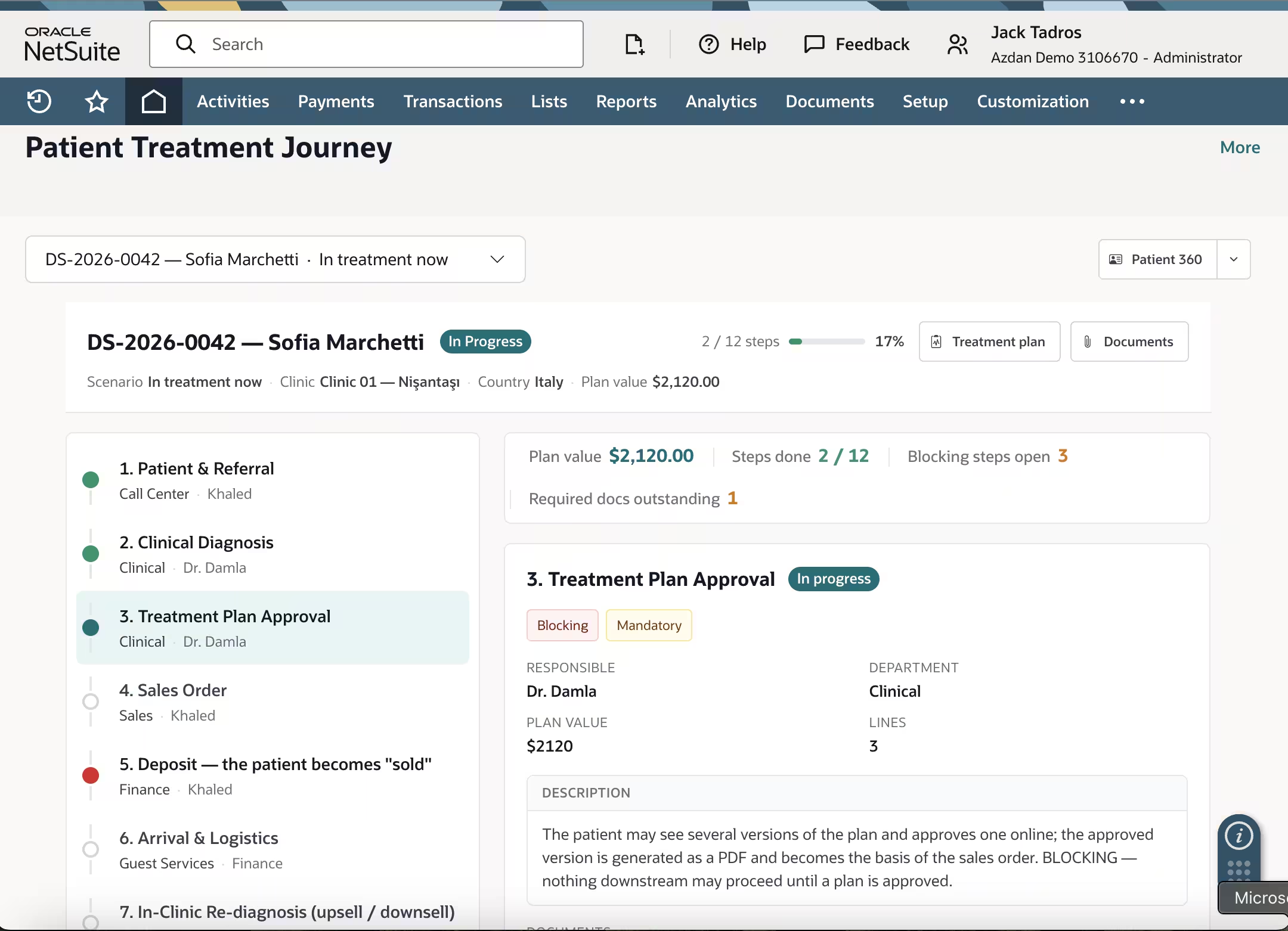
The core operational screen is a step-by-step tracker showing exactly where each patient sits across a 12-stage journey - Patient and Referral, Clinical Diagnosis, Treatment Plan Approval, Sales Order, Deposit, Scheduling and Logistics, In-Clinic Re-diagnosis, Treatment and Inventory Consumption, Invoicing, Settlement, Indirect Cost Allocation, and Profitability Review. What makes this more than a checklist is the tagging behind each step: some are marked Blocking, meaning nothing downstream can proceed until that step is complete, and some are marked Mandatory, meaning the step can be completed but never skipped. The Treatment Plan Approval step is a clear example - the patient may review several versions of a plan, but the approved version must be generated as a PDF and attached before a sales order can be raised. The screen also surfaces plan value, steps completed, blocking steps still open, and required documents outstanding as running counters, so a clinic operations lead can see at a glance which patients are stalled and why, rather than discovering it during a month-end review.
Accounting impact: every clinical event as a balanced journal entry
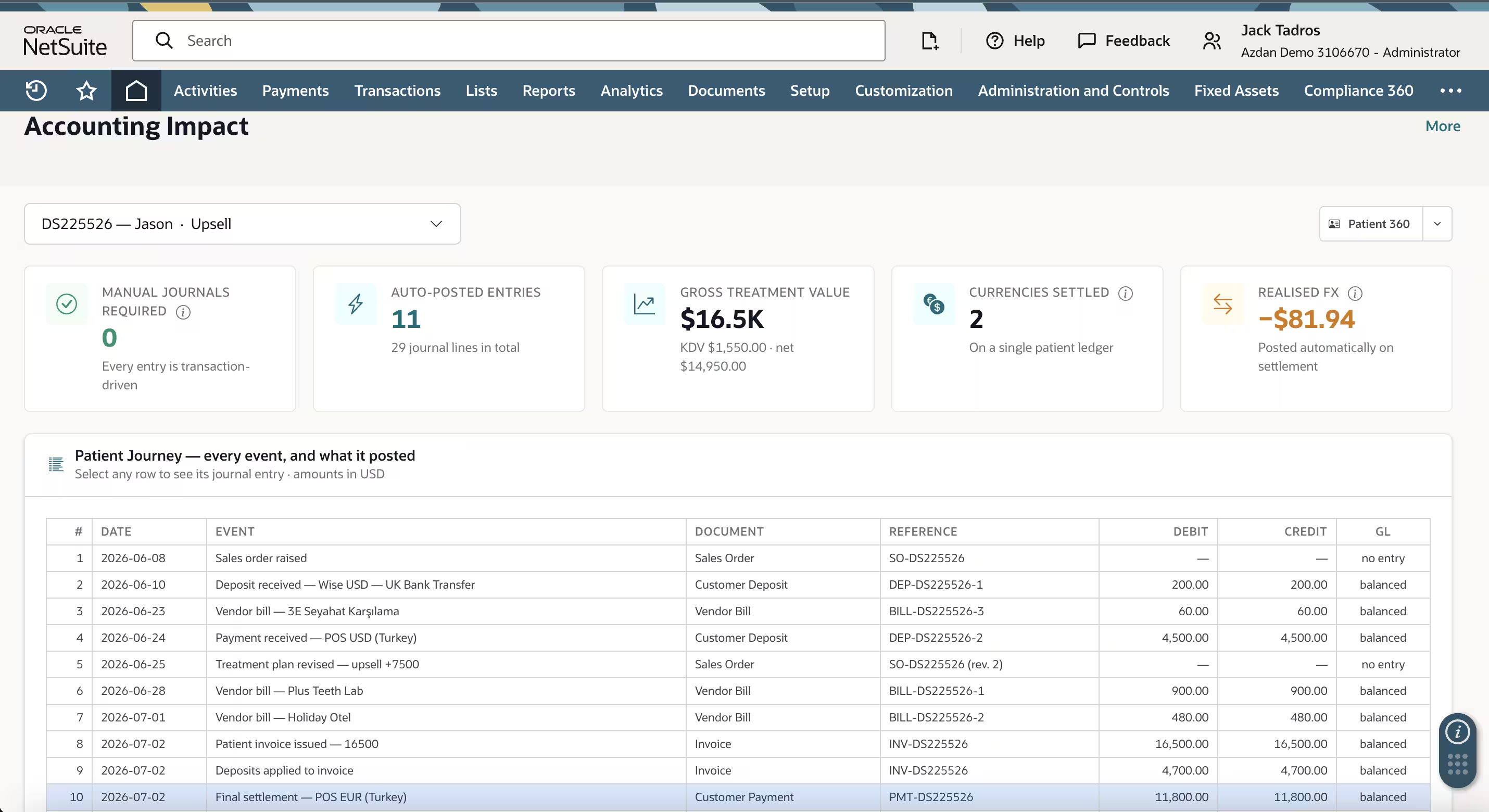
Behind each patient record sits a full accounting-impact view that lists every event in the journey - sales order raised, deposit received, vendor bills for lab work or specialist referrals, treatment plan revisions, the final invoice, deposits applied, and final settlement - alongside the document type, reference number, debit, credit, and posting status for each. The headline figure on this screen is not gross treatment value; it's the count of manual journals required, which in a well-designed system should read zero, because every entry is transaction-driven rather than hand-posted. For clinics that serve patients paying by different methods or, occasionally, in different currencies, this same view tracks currencies settled and realized FX gain or loss on a single patient ledger. Realized FX should post automatically at settlement, not as a manual period-end adjustment - a detail that saves real reconciliation time as patient volume grows.
Indirect cost allocation: turning shared costs into per-patient economics
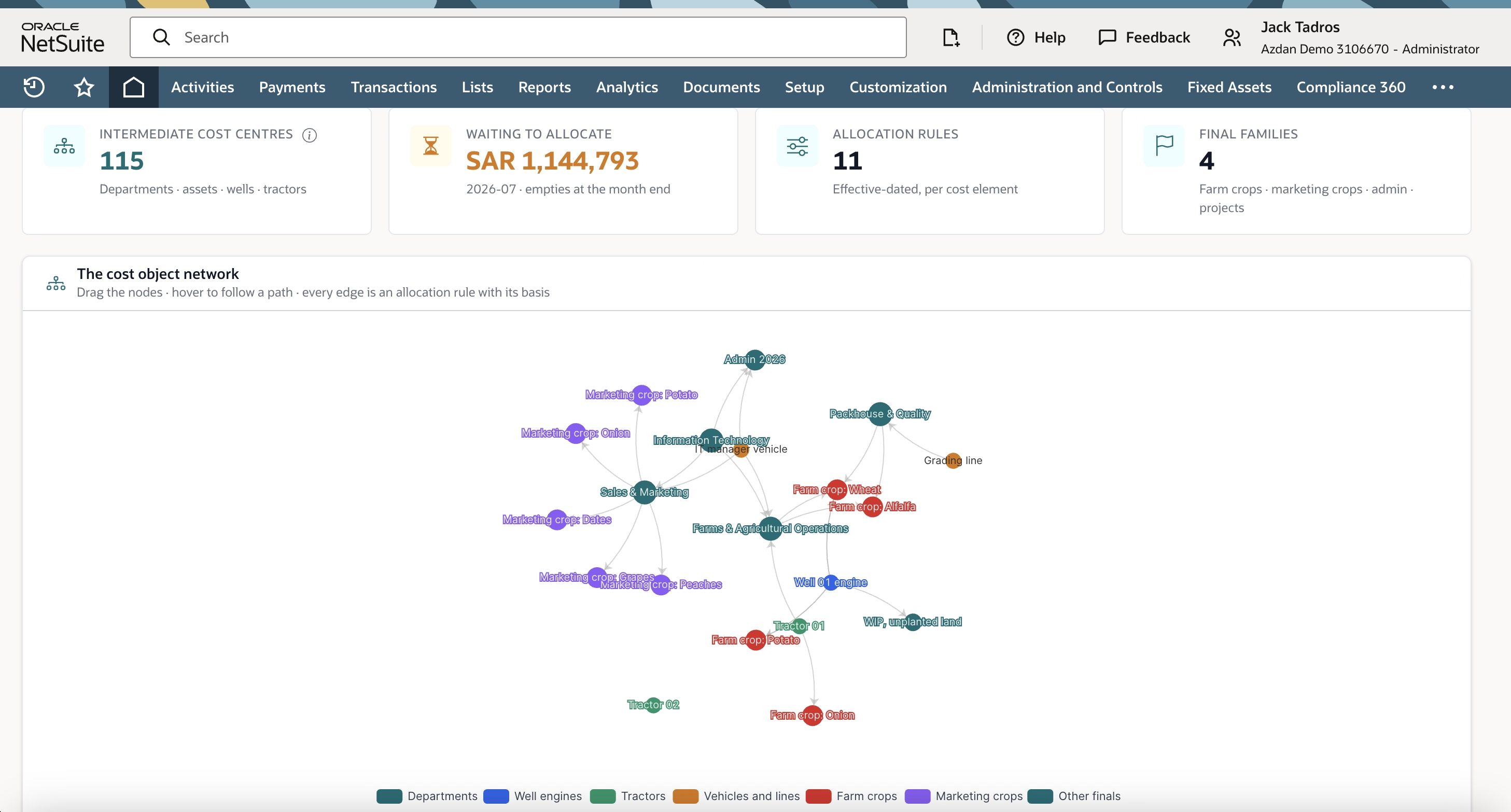
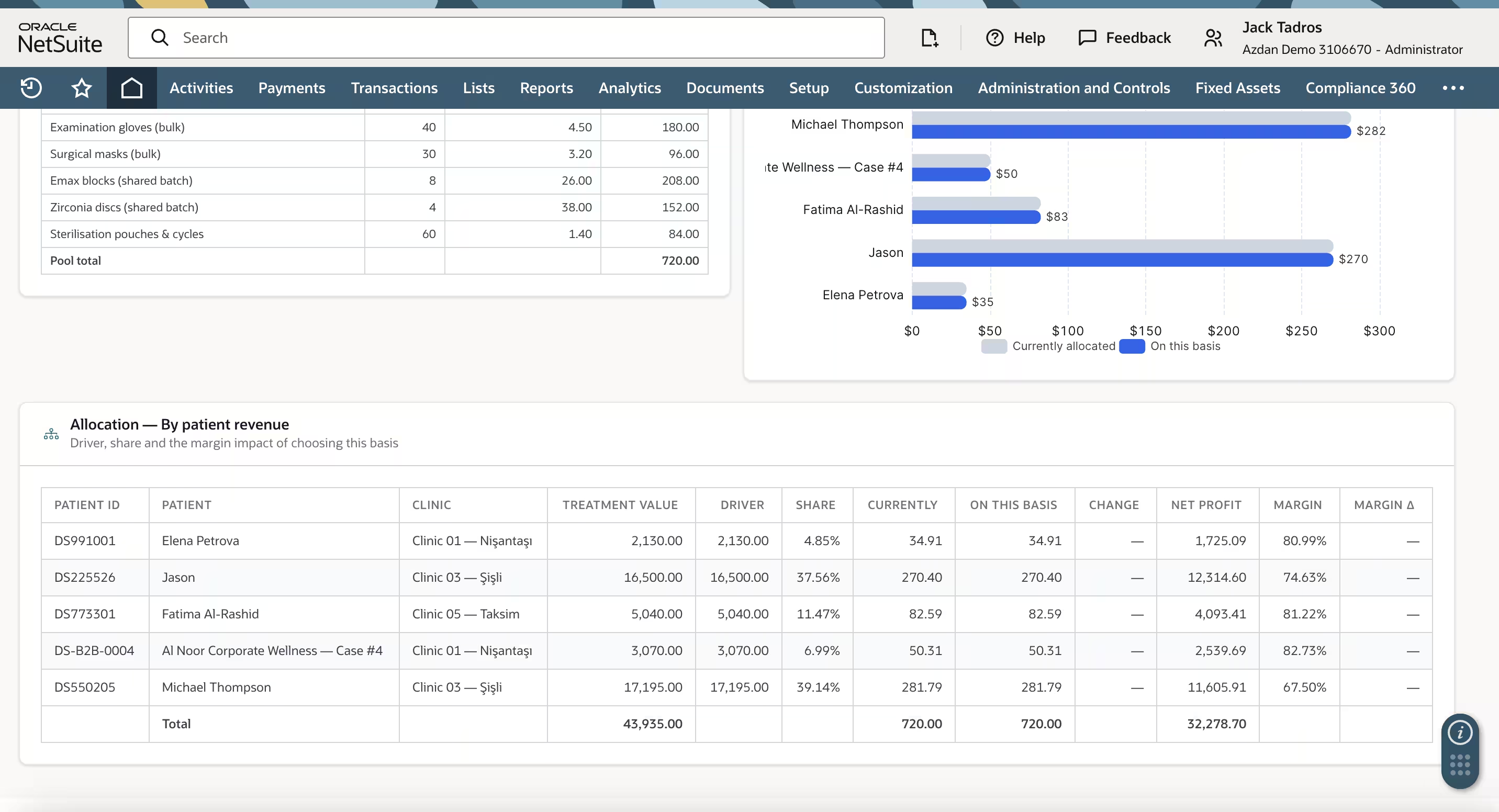
Clinics carry a category of cost that doesn't attach cleanly to any single patient - bulk consumables such as gloves and masks, shared batches of clinical materials, and sterilization supplies. The indirect cost allocation screen pools these shared costs into a single value for the period and then spreads them across patients using a selected allocation basis, most commonly share of total treatment value. Critically, this basis is presented as a business decision the clinic confirms, not a system constraint - the screen notes that multiple candidate allocation bases exist, and lets a finance lead preview the swing in allocated cost per patient before committing to a change. A "current vs proposed" comparison chart shows exactly how much each patient's allocated cost would move under the basis in force versus an alternative, so a clinic can validate that its allocation approach still reflects how resources are actually consumed as its patient mix shifts over time - for example, as upsell or corporate/B2B case volume grows relative to standard treatments.
Clinic replenishment: inventory tied directly to consumption
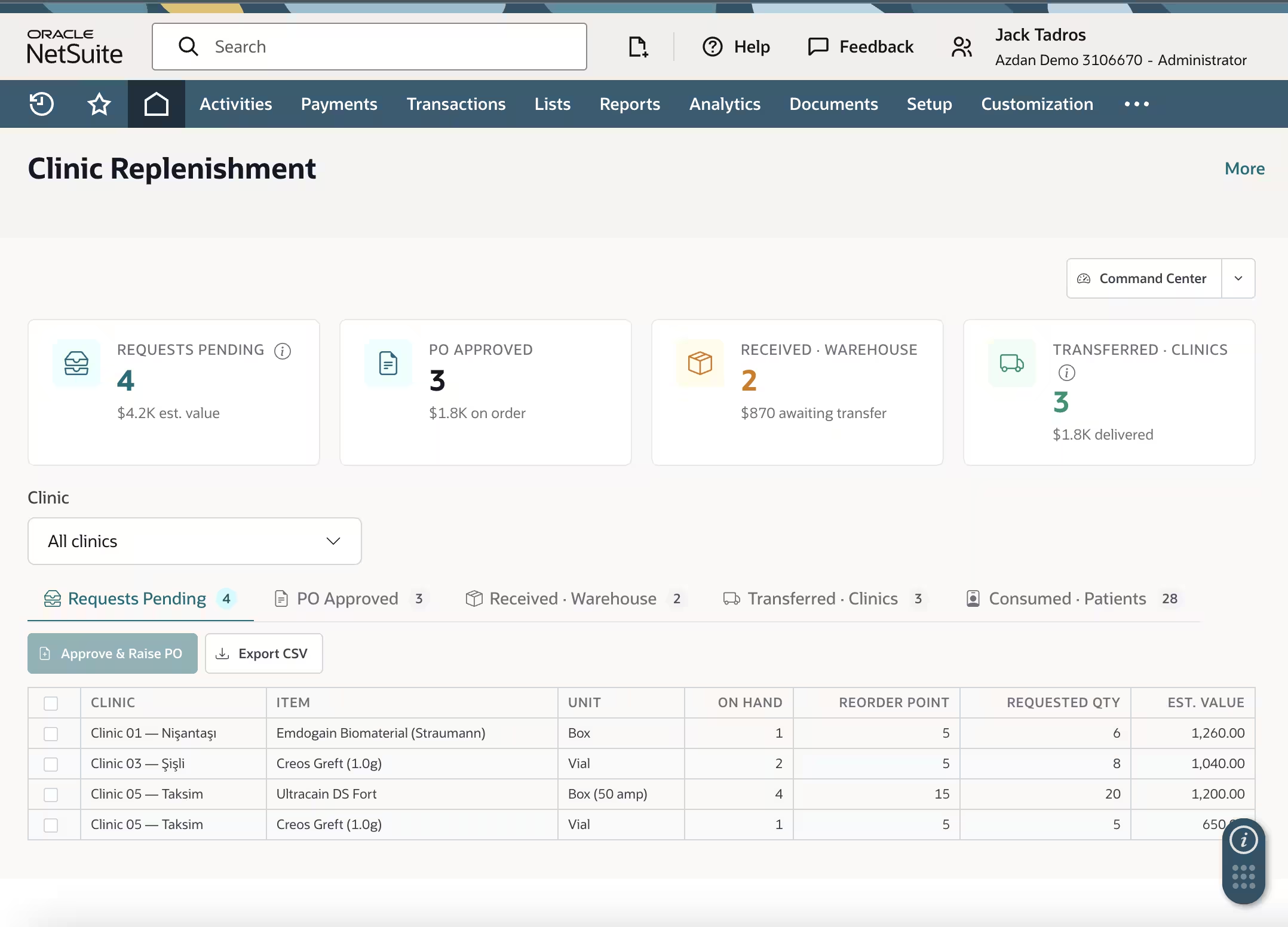
Because treatment consumables are tracked at the point of use, clinic replenishment becomes a live operational queue rather than a periodic stock count. The screen organizes inventory by status - requests pending, purchase orders approved, items received at the warehouse, items transferred to clinics, and items consumed by patients - with estimated value attached to each stage. A clinic can see, for instance, that a specific location is below its reorder point on a particular item, with the requested quantity and estimated cost already calculated, and approve a purchase order directly from that queue. Because this same consumption data feeds the indirect cost allocation pool described above, replenishment and cost allocation are not two separate systems reconciled at month-end - they draw from the same transactional record.
Commission runs: aligning payout logic with cancellation reason
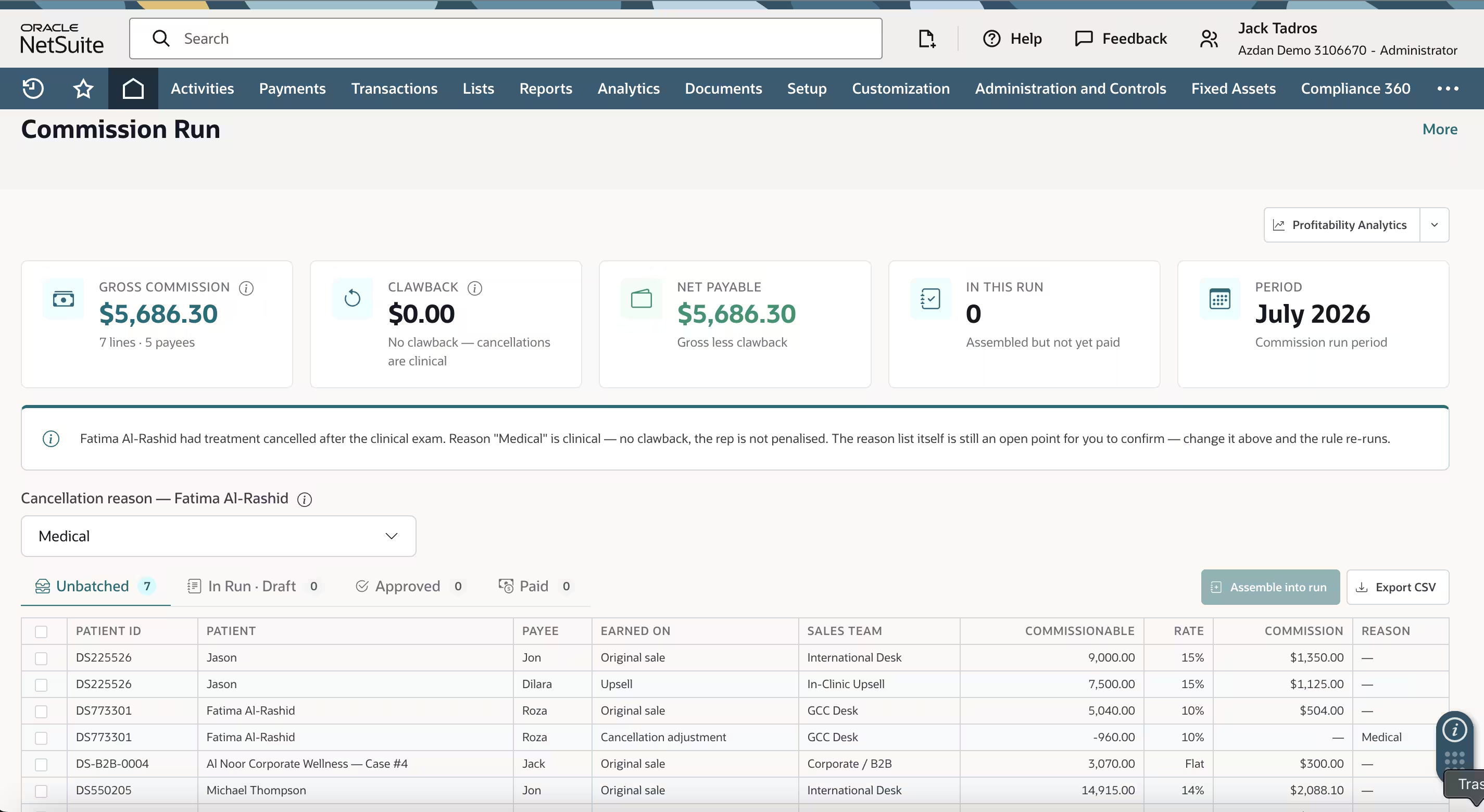
Referral and sales commissions are calculated per patient, per payee, and per sales team - distinguishing, for example, a call-center or referral desk, an in-clinic upsell team, and a corporate or B2B channel, each of which may carry a different commission rate or structure. The more consequential design decision on this screen is how it handles cancellations. When a treatment is cancelled after the clinical exam for a medical reason - the patient was found clinically unsuitable, for instance - the commission run should recognize that this was not a sales failure and should not claw back the rep's commission. A commercial cancellation, by contrast, typically does trigger a clawback. Encoding this distinction directly into the commission calculation, rather than adjudicating it manually case by case, keeps payouts consistent and defensible, and it's a detail that referral-driven clinic groups in particular tend to get right or wrong in ways that directly affect sales team trust.
Clinic command center and profitability analytics: the portfolio view
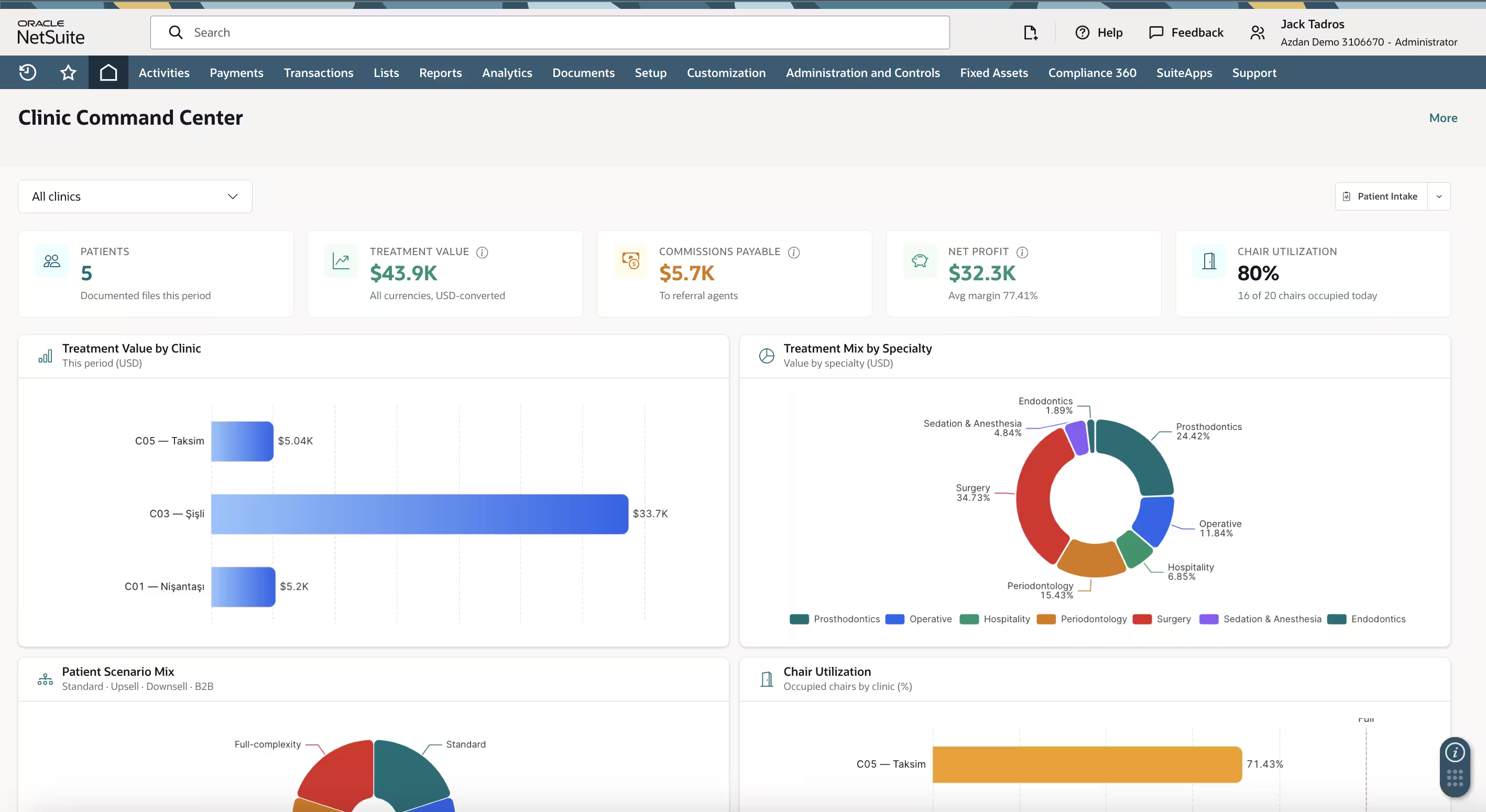
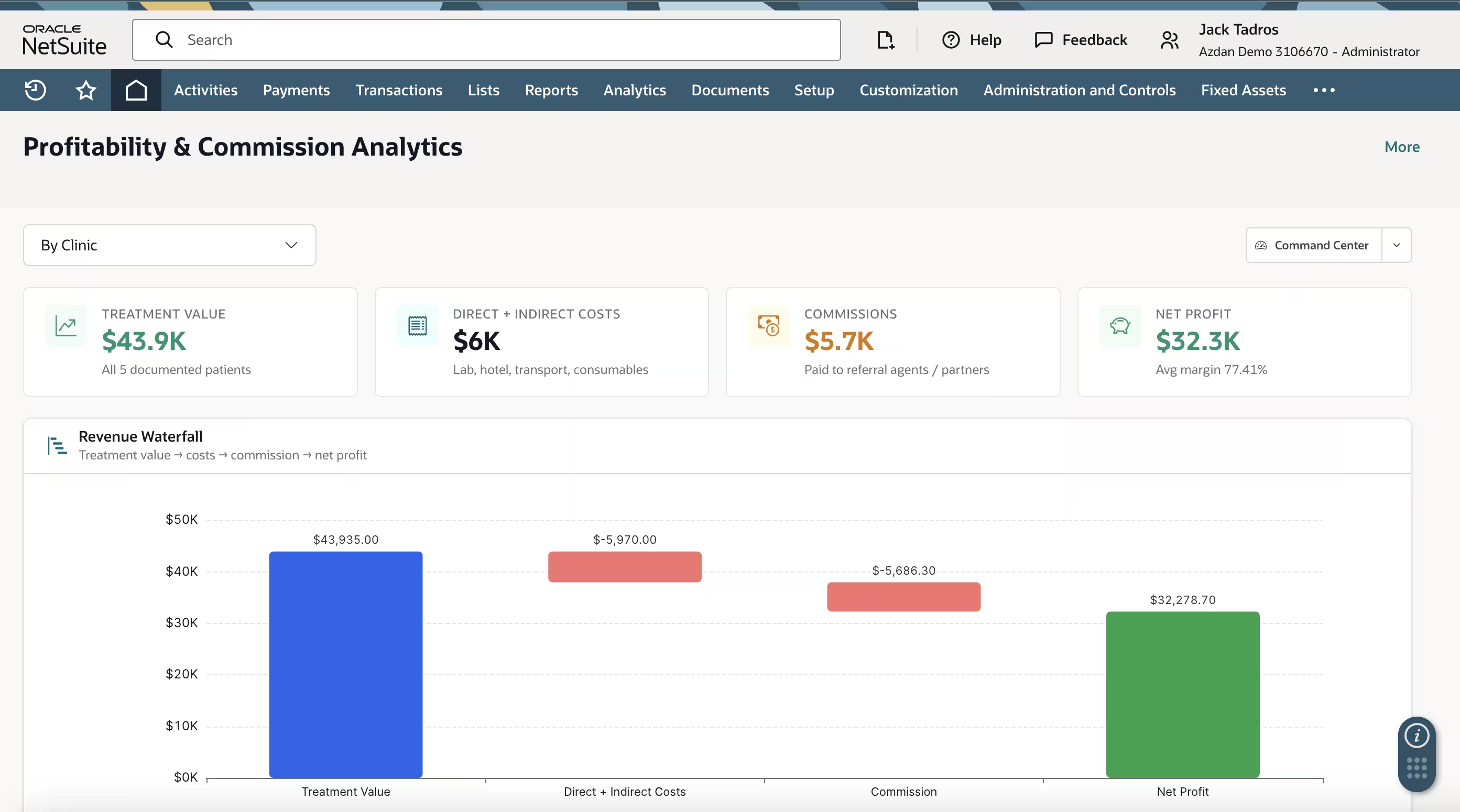
At the portfolio level, the same transaction chain rolls up into a command center showing patient count, treatment value, commissions payable, net profit, and chair utilization across all clinics, alongside a breakdown of treatment value by clinic and treatment mix by specialty. A companion profitability and commission analytics screen expresses the same data as a revenue waterfall - gross treatment value, less direct and indirect costs, less commission, arriving at net profit - plus a clinic-level rollup table showing patients, treatment value, costs, commission, net profit, and margin side by side. What makes this view meaningful rather than decorative is traceability: because every figure in the waterfall descends from a posted transaction earlier in the patient journey - the deposit, the vendor bill, the invoice, the commission line - a clinic can drill from portfolio net profit down to a single patient's ledger without leaving the system or reconciling a separate spreadsheet.
Why this matters for clinics evaluating an ERP
The pattern across all seven screens is the same: clinical milestones and financial transactions are the same event, not two records maintained in parallel systems and reconciled later. That single design choice is what allows a multi-location clinic group to close its books faster, trust its per-patient margin figures, and resolve commission disputes with a transaction trail instead of a negotiation.
Recommendation
For clinic groups operating two or more locations, running referral-based sales teams, or paying commissions on cancellable treatments, we recommend scoping the clinical workflow as a native part of the ERP implementation - sales orders, deposits, inventory consumption, and commission rules - rather than integrating a separate practice management system after go-live. Specific allocation bases, commission structures, and workflow gates should be confirmed against each clinic's own requirements during design.
Sources
- Azdan NetSuite implementation experience, GCC healthcare and clinic sector
- Oracle NetSuite platform documentation (transaction, inventory, and commission modules)
Related Azdan resources
- NetSuite Implementation for Multi-Location Clinics
- NetSuite Commission Management for Referral-Driven Sales Models
- Indirect Cost Allocation Methods in NetSuite
- Multi-Location Clinic Inventory and Replenishment in NetSuite
By Jack, Azdan - Leading Oracle NetSuite solution Provider