.svg)


First, the cycle on one page
Ask five people in a property company where a deal stands and you'll often get five answers. Sales says it's closed. Operations is waiting on a payment plan approval. Finance hasn't seen the cheques. Customer care has never heard of the buyer.
Nobody is lying. They're each reading a different file.
So before talking about NetSuite at all, here's the cycle we implement, because agreeing on this chain is most of the work:
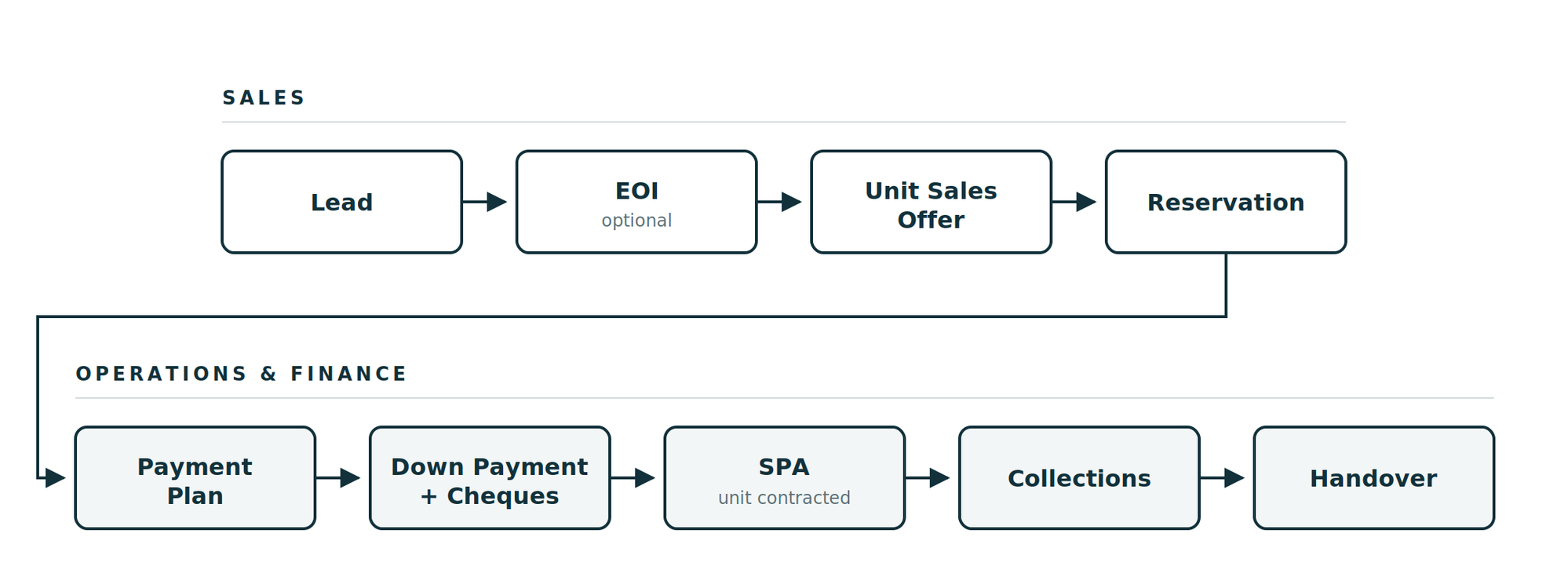
Step by step:
- A lead arrives - website form, broker, walk-in, campaign.
- The buyer pays an EOI to show they're serious, before picking a unit.
- Sales issues a Unit Sales Offer on a specific unit with a price, a handover date and a payment plan.
- Once that's approved, operations turns it into a Reservation.
- The payment plan gets applied - a standard one, or a custom one that needs its own approval.
- The down payment lands, cheques are collected and verified.
- The SPA is generated and the unit flips to Contracted.
- Collections run against the schedule until delivery.
- And when the buyer resells, swaps units or cancels, the same chain handles it.
After the SPA, three things can branch off it: resale, unit change, or termination. More on those further down.
The rest of this article walks through those steps and points out where they tend to go wrong.
The boring part first: your unit hierarchy
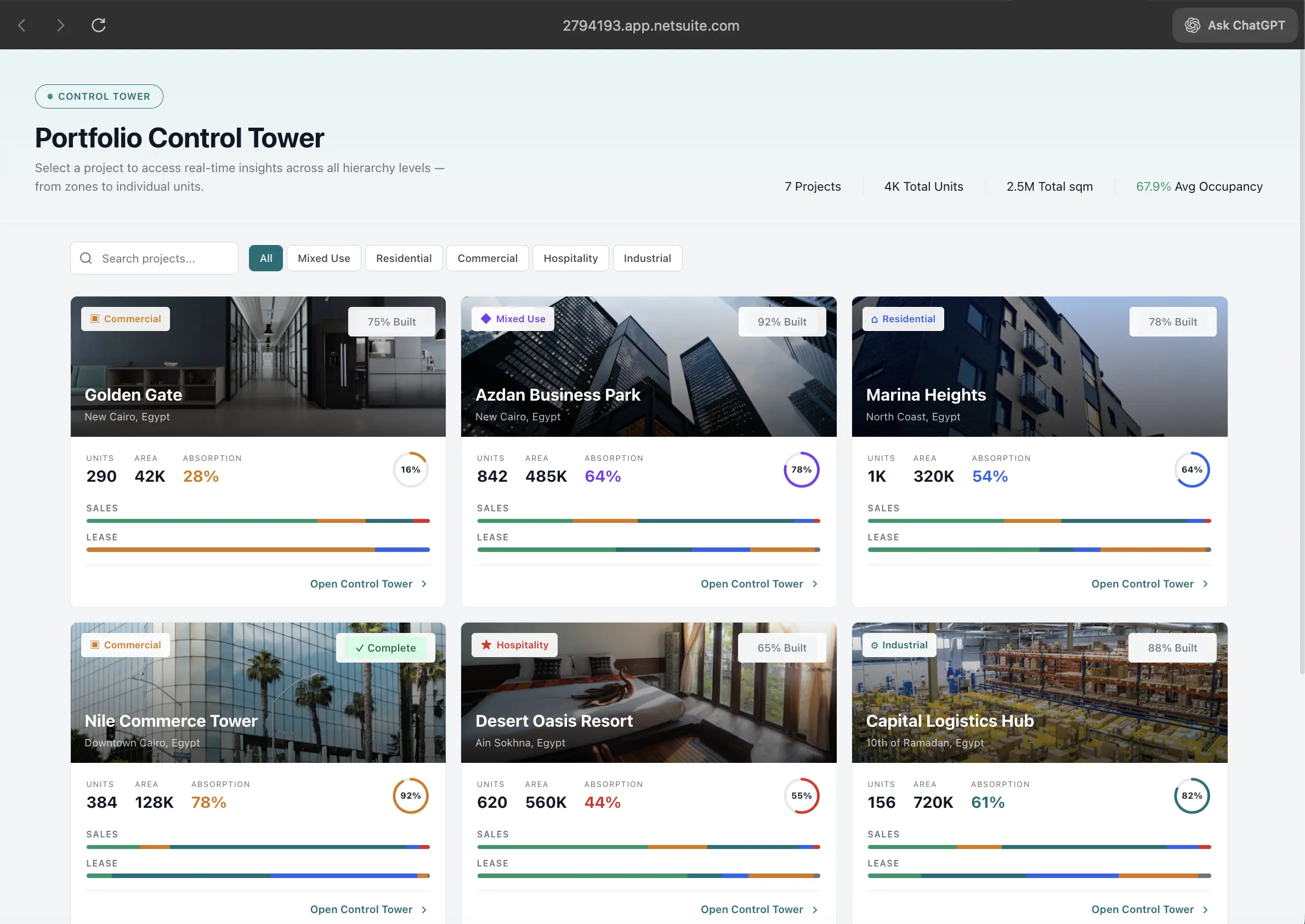
Property, then Zone, then Building, then Floor, then Unit. Every price, status, contract and report you'll ever run hangs off that tree.
This is the least exciting week of any implementation and it's the one people want to compress. Don't. If the unit master doesn't carry the type, model, area, amenities, layout drawing and its own history log, someone in sales will keep a side spreadsheet. And once that spreadsheet exists, it becomes the real system.
Two things we now insist on:
The unit's status field is the only thing that decides whether it can be sold. Available, Reserved, Contracted, Blocked. Not a note in a comment box, not a colour in someone's Excel.
And bulk uploads get approved before they touch live records. Development teams update prices and inventory in batches, and we've seen one bad file rewrite a whole tower's pricing on a Thursday afternoon. An approval step costs ten minutes and saves a week.
The portfolio view above only reads well because the structure underneath it is clean.
Leads duplicate. Plan for it.
Property is probably the worst industry for duplicate leads. The same buyer fills your web form on Sunday, calls the hotline Monday, walks into the gallery on Tuesday and gets registered by two different brokers that same week. Then two sales reps chase him and both think it's their commission.
The fix isn't clever. Duplicate detection on the mobile number catches most of it, because a buyer will change their email but not their phone.
Worth adding at the same time: a source field on every lead, and a saved search that surfaces leads with no activity in 30 days so a manager can reassign them. Leads don't go cold loudly. They just sit there.
Six months later, that source field is how a developer finds out which channel is actually producing closed deals rather than volume. It's usually not the one getting the biggest budget.
The offer is where your margin leaks
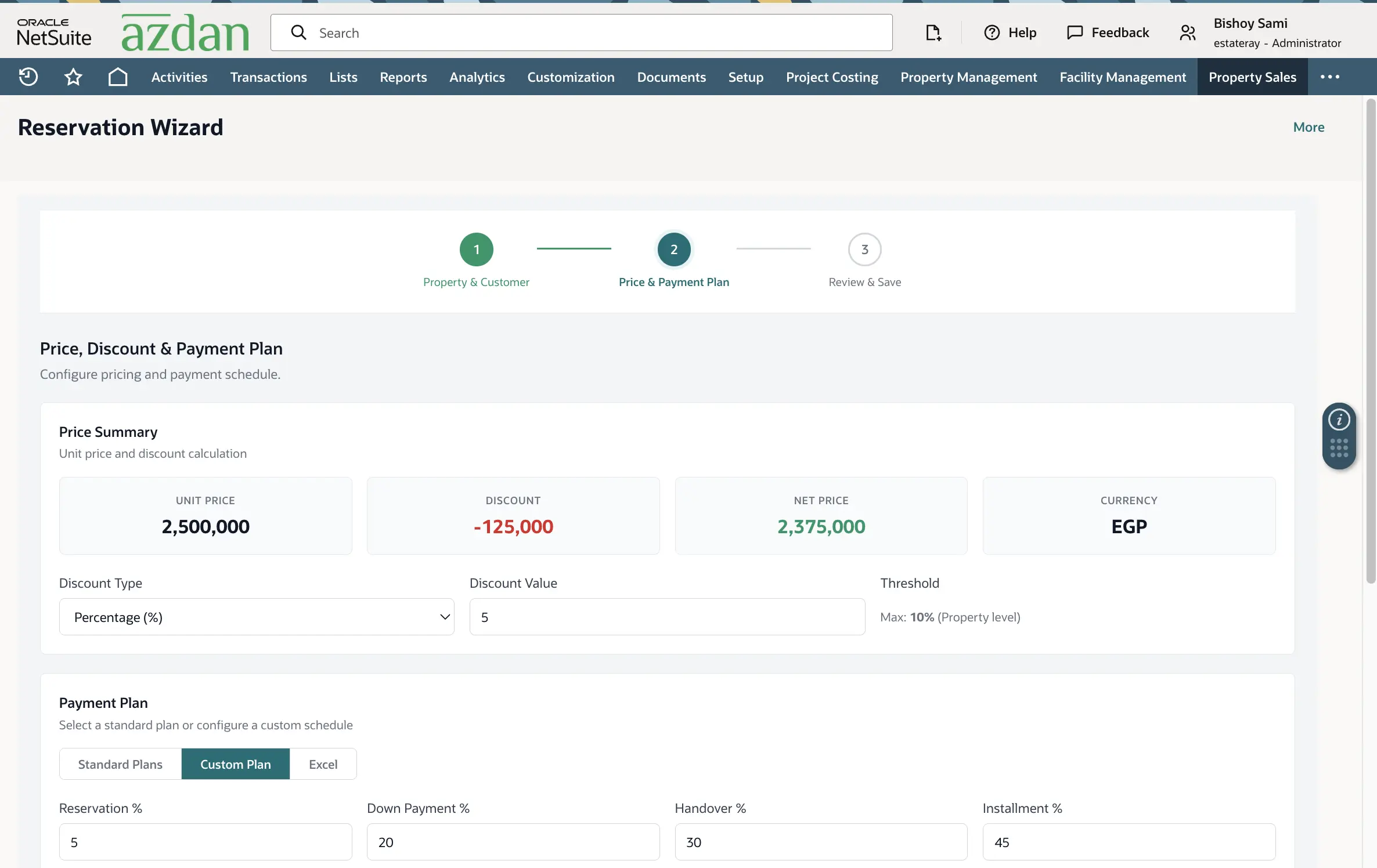
Development prices the units, so the rep isn't inventing numbers. What the rep picks is the unit, the handover date, the plan and the maintenance terms. Inside those limits, the offer should print and go out with nobody's approval, because when a buyer is sitting across the desk, speed is the product.
Discounts are the exception, and you can see how we handle it in the screen above: a maximum set at property level. Under it, the rep moves freely. Over it, the offer routes for approval automatically.
That one field quietly ends the "who approved this discount?" argument that otherwise shows up four months later when someone runs a margin report.
When the offer is approved, NetSuite emails operations with the client and unit details so the reservation can be prepared. No forwarding PDFs, no WhatsApp screenshots.
Payment plans, where generic ERP projects fall over
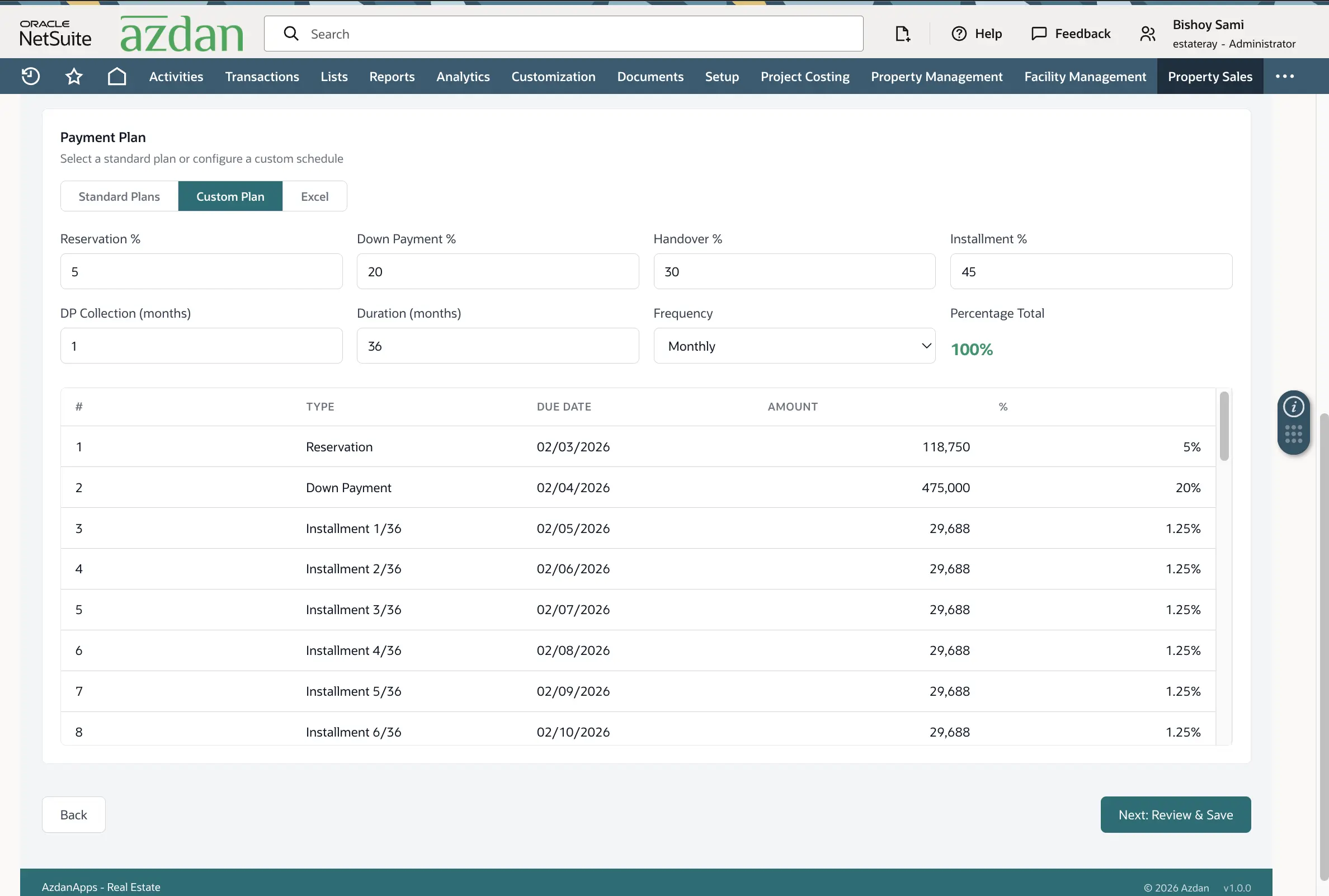
Standard plans are easy. Five-year, seven-year, predefined percentages for down payment, installments, handover and maintenance. The rep picks one, the schedule generates, done.
Custom plans are where the real work is. The screen above builds one live - percentages across reservation, down payment, handover and installments, a duration, a frequency, and a running total sitting at the top. If it doesn't hit exactly 100%, nothing saves. That sounds trivial until you've seen a contract signed on a plan that added up to 99.4% and nobody noticed until the last installment.
Custom plans also carry their own approval path and a mandatory calculation sheet attached. Sales teams need the flexibility, finance needs to see it. Both get what they want.
One detail that's cheap now and painful later: in this region the maintenance installment is usually due six months before delivery, not at handover. Build that into the schedule generator on day one, or you'll be writing a script to fix a few thousand schedules afterwards.
Cheques aren't a payment method, they're a process
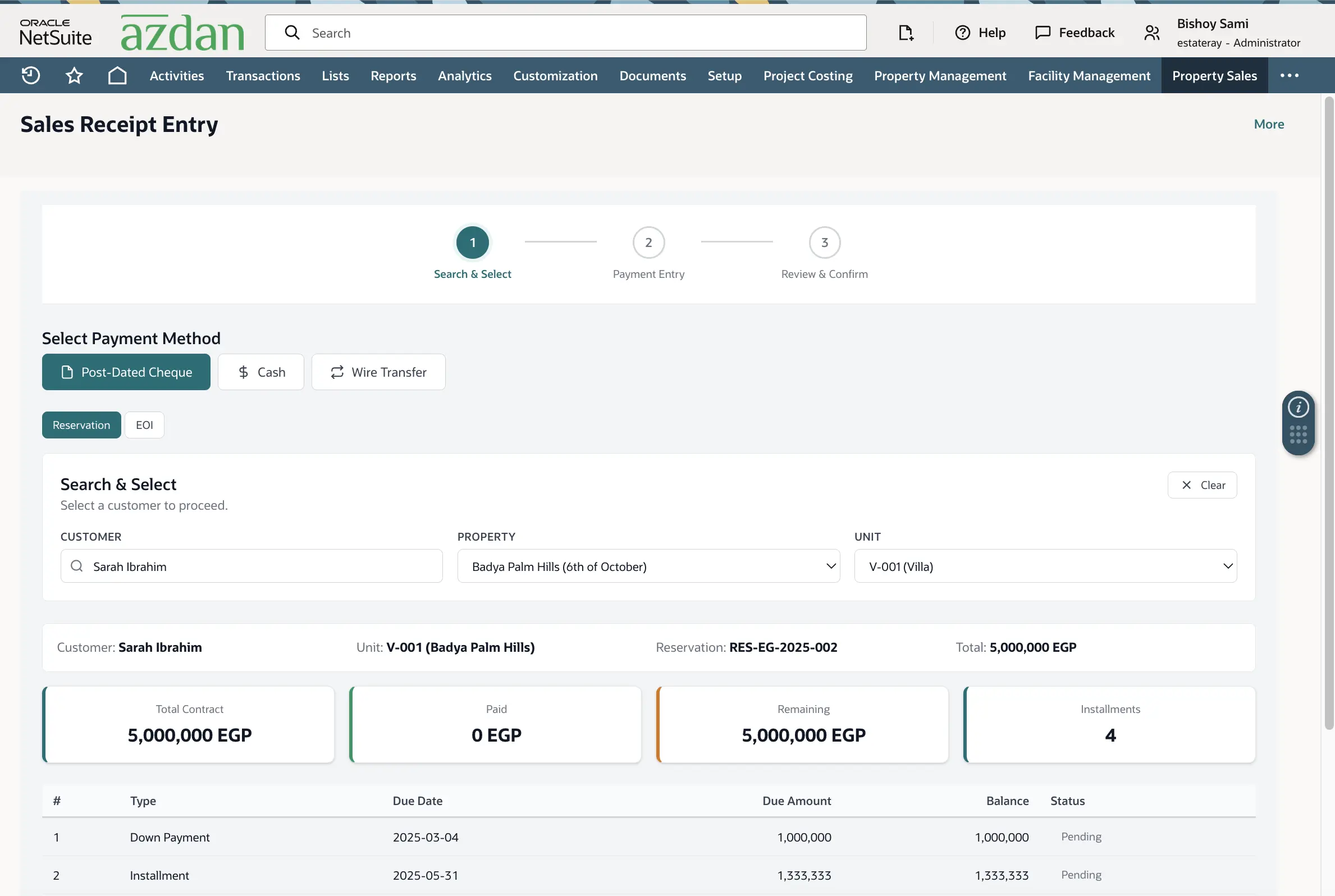
Post-dated cheques run collections across Egypt and the Gulf, and they're usually the least automated thing in the building. Physical cheques in a drawer, a spreadsheet tracking them, one person who knows where everything is.
What we build mirrors what the team already does on paper, just with a record behind each step. Operations drafts the PDC cover and submits it. Finance receives the physical cheques and marks each one Received. The cheques get linked to specific installments on the plan. Only once that set is complete does the system let the contract generate and the unit move to Contracted.
The receipt side handles the money coming in - a payment lands and gets applied across one or more installments from the actual schedule.
The reason to be fussy here is accounting. A cheque recorded, deposited, cleared or bounced each hits the books differently. Configure that once in the PDC preferences and finance stops posting manual journals for cheques, which is usually the single biggest hour saver of the whole project.
The contract should just be a print button
By the time you reach the SPA, the system already knows everything. Customer - up to four of them on one unit, which is normal here - unit, price, discount, plan, schedule, broker.
So the contract populates itself from the reservation and the only thing left for a human to do is hit Print. If your team is retyping contract details, something upstream is broken and the contract stage is just where you noticed.
Unit resale, the one everybody underestimates
Here's a scenario every developer knows. A buyer bought off-plan three years ago, paid 40% of the price, and now wants out - not to cancel, but to sell his contract to somebody else at a higher price. He's found the new buyer himself. He walks into your office on a Tuesday expecting it to take an hour.
If you're running this on spreadsheets, it takes two weeks and somebody always gets the numbers wrong.
The reason it's hard is that a resale isn't one transaction. It's a closing and an opening happening at the same time on the same unit, and the money has to survive the handoff intact.
Here's the order we build it in NetSuite:
- Customer care opens the resale request against the existing contract. Not sales - the seller is already a customer, and this is a service request, not a new lead.
- The system checks the seller's position. Total paid, outstanding balance, which installments are settled, which cheques are still sitting with finance undeposited. Nobody should be calculating this by hand.
- A legal or administration fee is applied if your policy has one. Most developers charge a percentage of the unit price or a flat transfer fee, and it's collected before anything moves.
- The old cheques get recalled. Every undeposited PDC belonging to the seller is pulled and returned to him, and the system marks them recalled rather than deleting them. You want that trail.
- A new contract is created for the buyer, linked to the old one on both sides. Open one and you can see the other. Six months later when someone asks who owned unit B-1204 in March, it takes ten seconds.
- The remaining balance moves to the new buyer, and he submits replacement cheques for every open installment.
- The old contract closes and the unit stays Contracted throughout - it never goes back to Available, because it was never actually free.
If the unit has already been handed over, there's an extra layer, and this is the part that catches finance teams out. The original invoice has to be reversed with a credit note for the full contract amount, then a new invoice issued to the new buyer, then the whole thing reconciled against what was already collected from the seller. Do that manually and your A/R ageing report is wrong for the next quarter.
A few things worth deciding before you configure any of it:
Who's allowed to approve a resale, and at what price? Some developers don't care what the seller sells for. Others cap the uplift, or take a cut of it. That's a policy call, and it needs to be a field with a rule behind it, not an understanding between two managers.
Does the buyer inherit the payment plan, or get a new one? Inheriting is cleaner and it's what most contracts say. But if your buyer wants different terms, you're now generating a fresh schedule against a partially paid contract, and that only works if the system carries the paid amount forward properly.
What happens if the seller's cheques already bounced? Resale is a favourite exit for a buyer in trouble. Make the resale request check for defaults and route it differently when it finds them.
Build all this in phase one. Resale requests start showing up the moment a project appreciates, and that's usually earlier than anyone plans for.
Everything else after the sale
Resale gets its own section because it's the messiest. The rest of the post-sales work follows the same principle - every one of these is a financial event, not paperwork.
Unit change. An upgrade or a downgrade by the same buyer. It's cancellation and resale logic mashed together - everything collected so far gets reapplied to the new unit's down payment, and a fresh schedule generates.
Termination. Penalty applied, refund calculated on what's left after it, unit blocked and handed back to development to reprice.
Handover. Customer statement verified first, appointment scheduled, signed forms attached to the contract and unit, handover invoice issued by A/R.
Leave any of these in email and your numbers stop reconciling inside a quarter.
Dashboards people actually use
Once the chain is clean, reporting stops being a project. Sell-through, absorption, overdue collections, pipeline, average price per square metre - they're all just readings off records people created while doing their normal job.
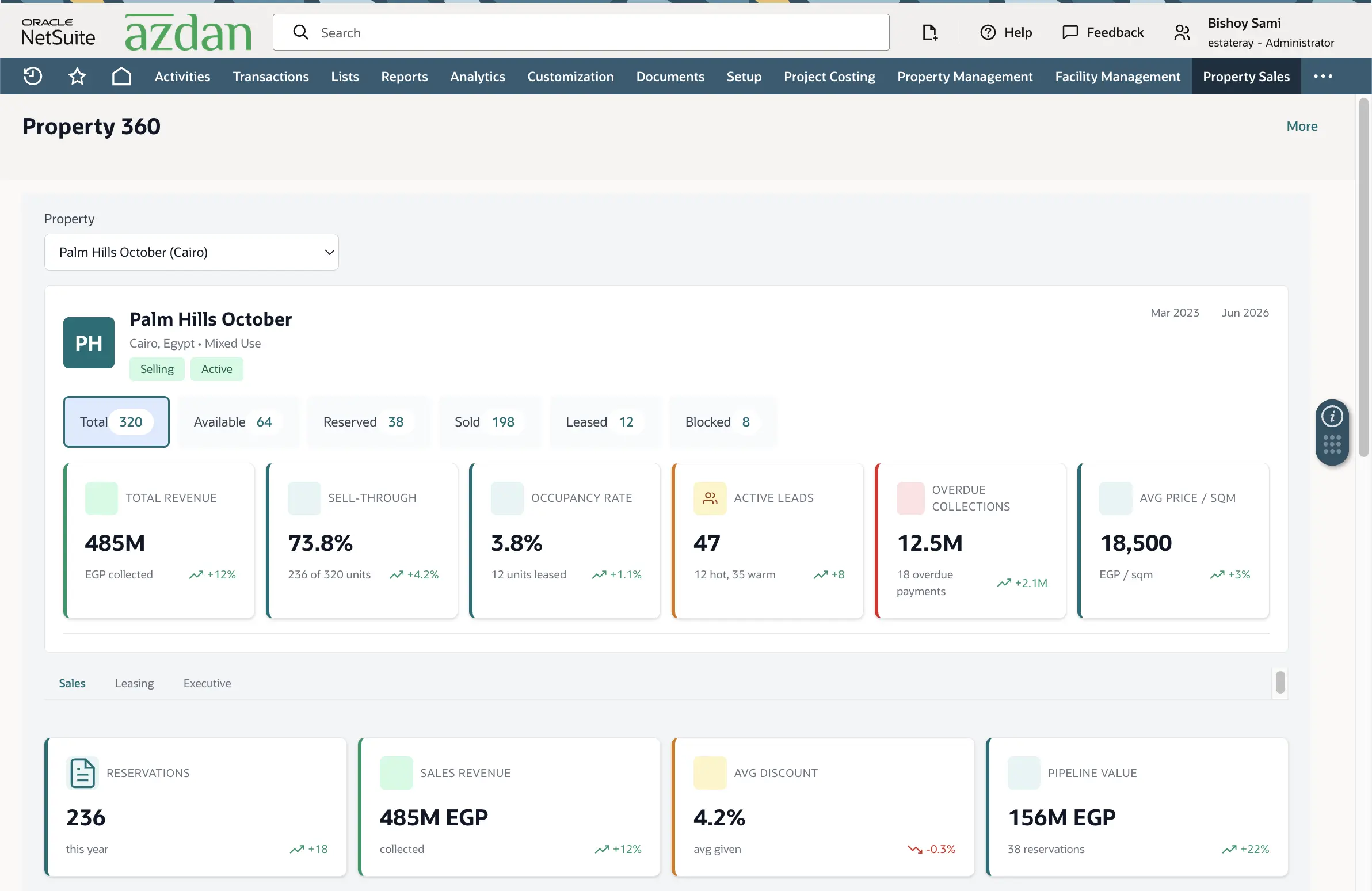
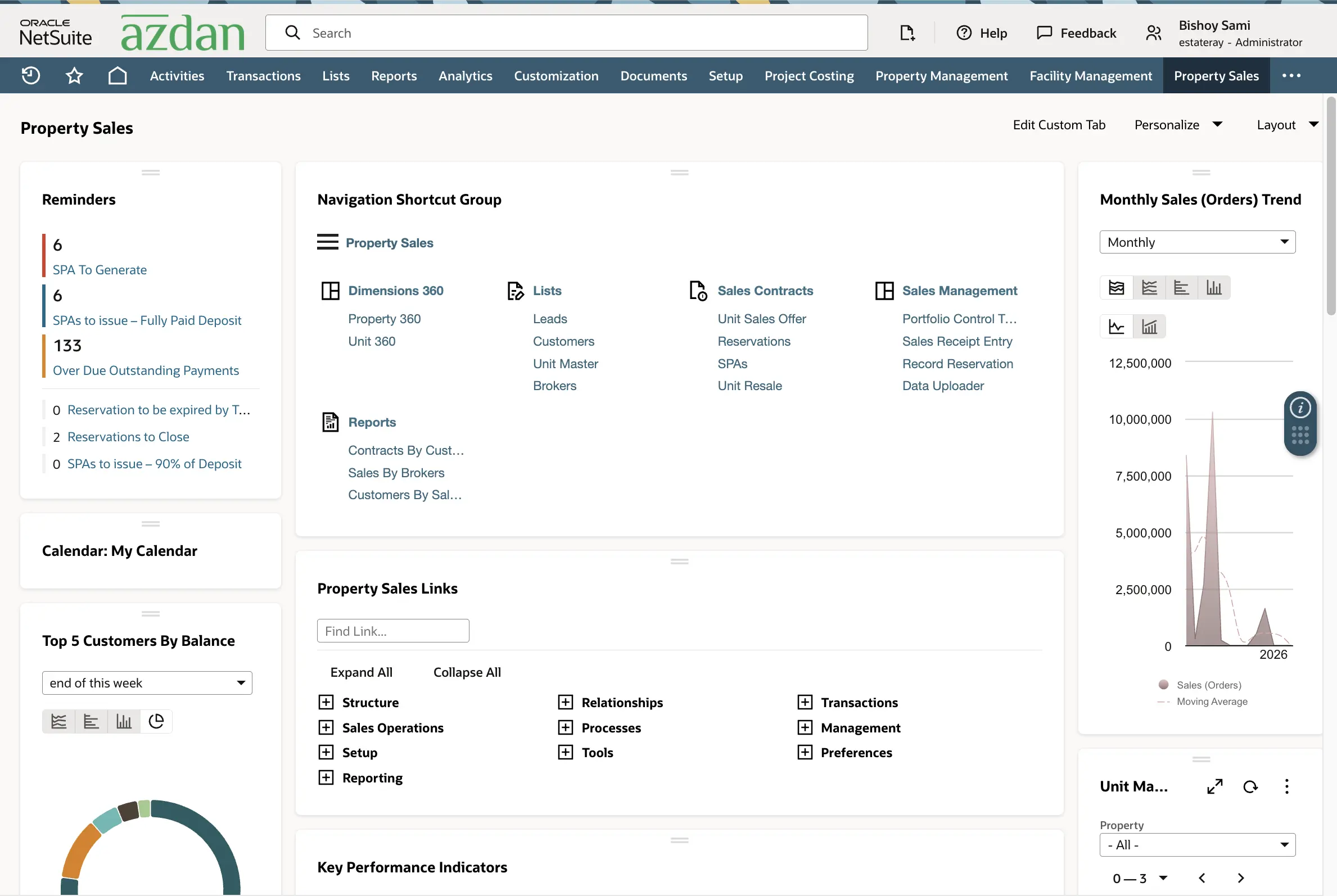
But the screen that changes behaviour is the second one. "6 SPAs to generate." "133 overdue outstanding payments." "2 reservations to close."
That's not a report, it's a to-do list. And a system with a to-do list on the home screen gets used. A system with beautiful reports and nothing to click gets opened once a month by the same three people.
If you're about to start one of these
Sort the unit hierarchy before you configure a single transaction screen. Put the discount ceiling on the property record and let everything underneath move without approval. Treat custom payment plans as a workflow with real approvals, never a free-text field. Model the cheque lifecycle properly, G/L impact and all. Build resale, unit changes and terminations in phase one, because they'll start happening in month three whether you've built them or not. And leave the role dashboards until last, but do build them, because that's where adoption lives or dies.
Most of this isn't clever NetSuite work. It's mostly deciding where a number is allowed to be created and who's allowed to change it after that. Get that right and the cycle mostly runs itself, which was the point of buying an ERP.
FAQ
Can NetSuite handle real estate payment plans out of the box?
It gives you the financial engine. The plan builder, the 100% validation, the custom-plan approval route and the schedule generation are configured and scripted as part of a property sales implementation.
How are post-dated cheques handled in NetSuite?
Operations drafts the cover, finance records receipt of the physical cheques, each cheque is linked to an installment, and every stage carries its own G/L treatment.
How does unit resale work in NetSuite?
Customer care raises a resale request against the existing contract. The system pulls the seller's paid amount and outstanding balance, applies the legal fee, recalls his undeposited cheques, creates a new contract for the buyer linked to the old one, and carries the balance across. If the unit was already handed over, the original invoice is credited and a new one issued to the buyer, then reconciled against what the seller had paid.
Can a buyer resell before handover?
Yes, and it's the most common case. The unit stays Contracted the whole way through - it never returns to Available, because it was never free.
What happens when a buyer wants to switch units?
A unit change combines cancellation and resale logic. Everything collected moves to the new unit's down payment, the old unit gets blocked and returned to development, and a new schedule is generated.
How long does a real estate NetSuite implementation take?
Depends on how many properties, how deep the approval matrix goes and how much post-sales scope you include. The order matters more than the timeline: master data, sales cycle, post-sales operations, then dashboards.