A SaaS business earns recurring revenue and still has to deliver something. For most, that means onboarding projects, consultants with billable hours, and in a growing number of cases physical goods that ship. The edition behind this reference is built for exactly that shape: subscription economics at the front, project and fulfillment delivery behind it. This is the leading practice reference for SaaS: every process area, the flow it follows, the rules that govern it, and a copy-ready skill file for each one.
How to Use This
Each process area below carries three things. A flow, which is the sequence the process actually runs in. A short set of rules specific to SaaS rather than generic ERP advice. And a skill file you can copy straight out of the page, written as markdown so it can be handed to an AI assistant, dropped into a project repository, or used as the basis for a design document.
The skill files are deliberately short. They are checklists for people who already know the domain, not tutorials. Each one names the roles that own the process, the flow, the rules, what to verify before go-live, and the failure modes that recur.
Methodology note. This reflects the Anything As A Service Standard edition as applied by Azdan across its NetSuite delivery in the UAE, Saudi Arabia, and Egypt. Module availability differs by edition and license, so confirm against your own before treating any rule as available. Where a point is a recommendation from delivery experience rather than a documented rule, it is labeled as one.
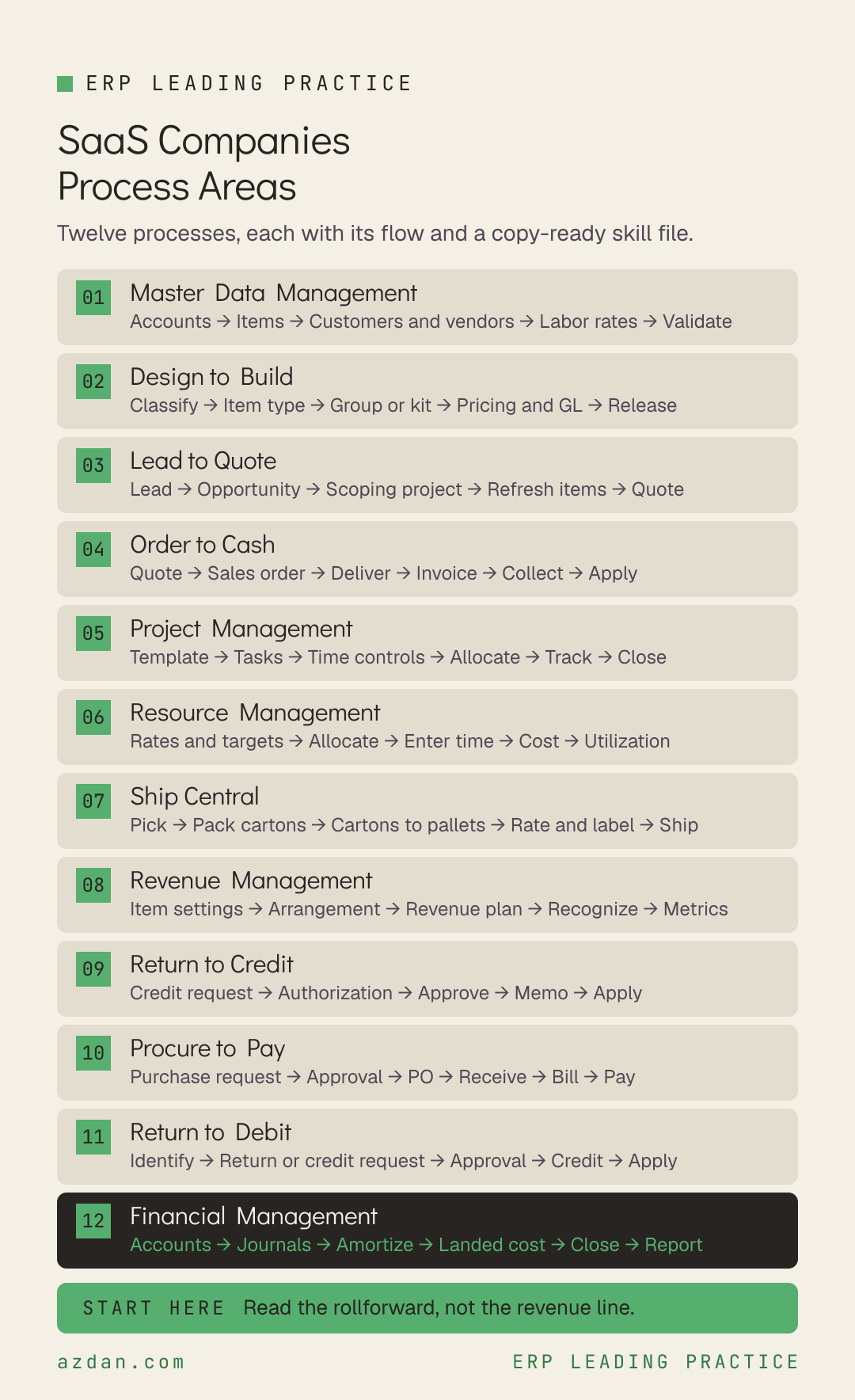
The 12 Process Areas
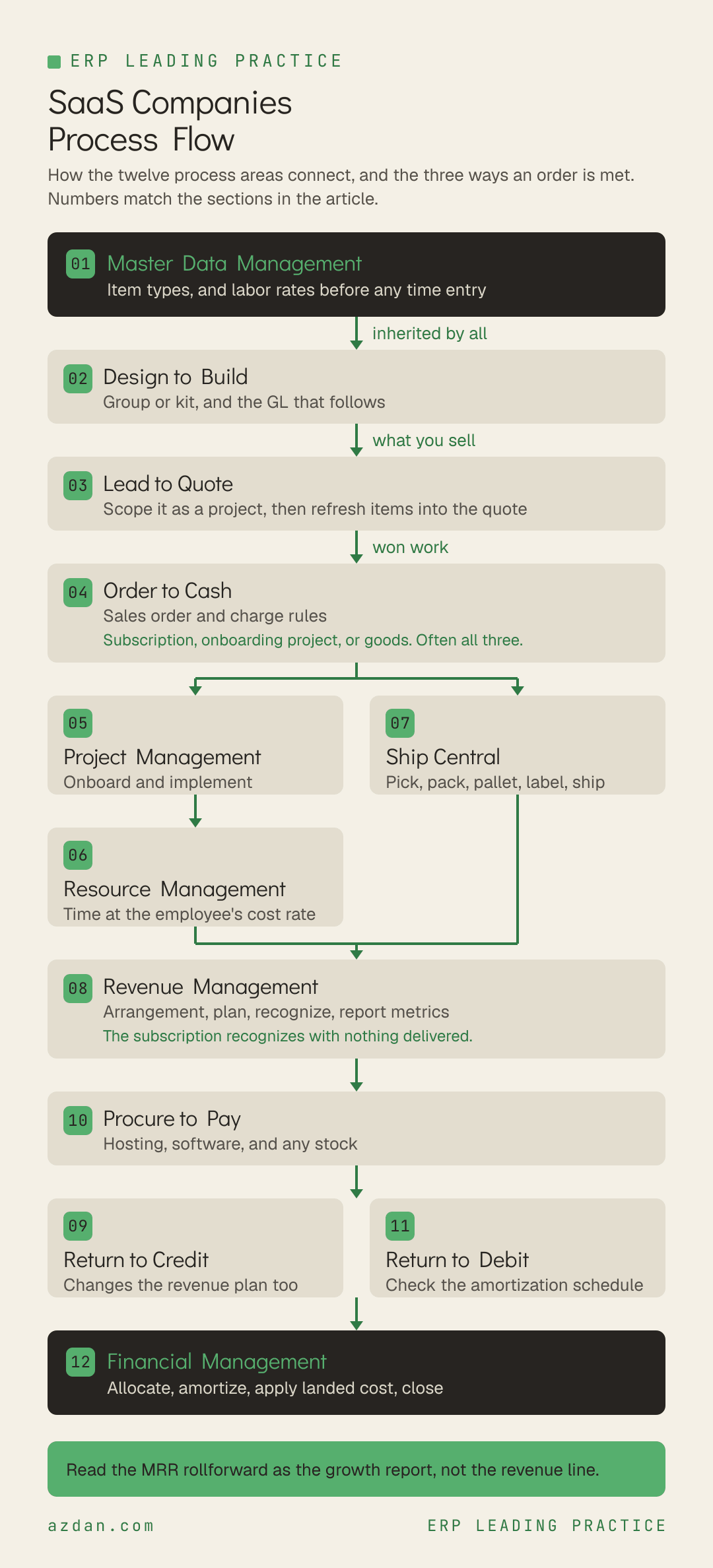
Master Data Management → Design to Build → Lead to Quote → Order to Cash → Project Management → Resource Management → Ship Central → Revenue Management → Return to Credit → Procure to Pay → Return to Debit → Financial Management
Process area
Primary owner
What it covers
Master Data Management
Controller
Accounts, customers, vendors, employees and items.
Design to Build
Inventory Manager
The item strategy, and the one decision in it that is easy to get wrong: whether a multi-item offering is a group or a kit.
Lead to Quote
Sales Rep
Recording and managing selling activities for new customers.
Order to Cash
Sales Rep
Transacting with the customer, fulfilling, billing and collecting.
Project Management
Operations
Onboarding and implementation delivery.
Resource Management
Project Manager
Labor cost, allocation and utilization for the delivery team.
Ship Central
Ship Central Manager
Fulfillment on a tablet or kiosk, with multilevel packing from items into cartons and cartons onto pallets.
Revenue Management
Controller
Recognition and the subscription metrics that sit on top of it.
Return to Credit
Accounts Receivable
Customer returns, credits and refunds.
Procure to Pay
Accounts Payable
Purchasing and vendor management, covering hosting and software as well as any physical goods the business stocks.
Return to Debit
Accounts Payable
Returns of vendor goods and services, and the vendor credits and refunds that affect accounts payable.
Financial Management
Controller
Everything that ensures accurate financial reporting, including one dependency that comes from holding stock and can reach backwards into a closed period.
1. Master Data Management
Accounts, customers, vendors, employees and items. In a recurring-revenue business with a delivery arm, the employee record is a costing record and the item record decides revenue behavior, so neither is administration.
Define accounts and segments → Create items → Load customers and vendors → Set employee labor rates → Validate
Leading practice rules
Master data must be maintained before process area transactions can be carried out.
Every item has an item type that drives its attribution and usage. The primary types are Inventory, Non-Inventory and Service.
Set a labor cost rate on the employee record before anyone enters time, because job costing takes its rate from there.
Skill file: Master Data Management
---
name: saas-master-data-management
description: NetSuite leading practice for Master Data Management in SaaS
---

# Master Data Management - SaaS Companies

## Roles
Controller, Inventory Manager, Operations, Accounts Receivable

## Process flow
Define accounts and segments → Create items → Load customers and vendors → Set employee labor rates → Validate

## Leading practice rules
- Master data must be maintained before process area transactions can be carried out.
- Every item has an item type that drives its attribution and usage. The primary types are Inventory, Non-Inventory and Service.
- Set a labor cost rate on the employee record before anyone enters time, because job costing takes its rate from there.

## Check before go-live
- [ ] Item types agreed across subscription, service and any physical goods
- [ ] A labor cost rate on every employee who will enter time, before time entry opens

## Known failure modes
- Time entered against an employee with no cost rate, which produces no cost at all, with no error and no warning

## Scope note
This reflects the Anything As A Service Standard edition. Confirm against your own licensed
modules and edition before treating any rule as available.
2. Design to Build
The item strategy, and the one decision in it that is easy to get wrong: whether a multi-item offering is a group or a kit. They price differently, post differently, and behave differently on a purchase order.
Roles: Inventory Manager, Controller, Sales Rep
Process flow
Classify the offering → Choose item type → Group or kit → Set pricing and GL → Release
Leading practice rules
Use item groups to add several items to an order efficiently without adding each one manually.
An item group's overall sales price is the aggregate of its individual items and cannot be defined separately. Individual item GL impacts behave natively once added to a sales order.
Use kit items where a multi-component item must be fulfilled but requires no actual assembly.
A kit's sales price is not the aggregate and can be defined. The kit gets its own GL account reflected on transactions, while cost of goods sold still derives from the components.
Kits cannot be added to purchase orders. Purchase the components instead.
Where items are tracked individually, use lot or serial numbered items so each unit can be traced.
Skill file: Design to Build
---
name: saas-design-to-build
description: NetSuite leading practice for Design to Build in SaaS
---

# Design to Build - SaaS Companies

## Roles
Inventory Manager, Controller, Sales Rep

## Process flow
Classify the offering → Choose item type → Group or kit → Set pricing and GL → Release

## Leading practice rules
- Use item groups to add several items to an order efficiently without adding each one manually.
- An item group's overall sales price is the aggregate of its individual items and cannot be defined separately. Individual item GL impacts behave natively once added to a sales order.
- Use kit items where a multi-component item must be fulfilled but requires no actual assembly.
- A kit's sales price is not the aggregate and can be defined. The kit gets its own GL account reflected on transactions, while cost of goods sold still derives from the components.
- Kits cannot be added to purchase orders. Purchase the components instead.
- Where items are tracked individually, use lot or serial numbered items so each unit can be traced.

## Check before go-live
- [ ] Every bundle classified as group or kit deliberately, with the pricing and GL consequence understood
- [ ] Kit GL accounts agreed with finance before the first kit is sold

## Known failure modes
- Choosing a group when the price needed to be set independently, or a kit when individual item GL treatment was wanted

## Scope note
This reflects the Anything As A Service Standard edition. Confirm against your own licensed
modules and edition before treating any rule as available.
3. Lead to Quote
Recording and managing selling activities for new customers. Where an engagement needs scoping before a price, the estimate is built as a project rather than written as a document.
Roles: Sales Rep, Operations, Project Manager
Process flow
Lead → Opportunity → Build scoping project → Refresh items from project → Quote
Leading practice rules
Where an opportunity needs scoping before a quote, create a project, populate the work breakdown structure, assign generic resources and set billing rules.
That structure produces the hours required, the expected timeline and the cost to the customer.
Use the Refresh Items from Project button to update the opportunity or estimate with forecast charges from task assignments and billing rules.
Skill file: Lead to Quote
---
name: saas-lead-to-quote
description: NetSuite leading practice for Lead to Quote in SaaS
---

# Lead to Quote - SaaS Companies

## Roles
Sales Rep, Operations, Project Manager

## Process flow
Lead → Opportunity → Build scoping project → Refresh items from project → Quote

## Leading practice rules
- Where an opportunity needs scoping before a quote, create a project, populate the work breakdown structure, assign generic resources and set billing rules.
- That structure produces the hours required, the expected timeline and the cost to the customer.
- Use the Refresh Items from Project button to update the opportunity or estimate with forecast charges from task assignments and billing rules.

## Check before go-live
- [ ] A scoping project required above an agreed deal value
- [ ] The scoping project kept as a baseline rather than overwritten once work starts

## Known failure modes
- Quoting the onboarding from memory, so there is no baseline to measure the delivery against

## Scope note
This reflects the Anything As A Service Standard edition. Confirm against your own licensed
modules and edition before treating any rule as available.
4. Order to Cash
Transacting with the customer, fulfilling, billing and collecting. In a subscription business the billing schedule and the revenue plan are separate mechanisms and run on different clocks.
Quote → Sales order → Fulfill or deliver → Invoice → Collect → Apply payment
Leading practice rules
Charge based billing supports labor, expenses and fixed fees in one engine, which matters where a subscription sits alongside an onboarding project.
Add charge rules so the billing setup matches the contract terms.
If you change the amount on the sales order you must also change it on the billing rule. There is no direct link between the two.
Once the customer signs, the sales order should not be altered, because it represents the agreed scope.
Skill file: Order to Cash
---
name: saas-order-to-cash
description: NetSuite leading practice for Order to Cash in SaaS
---

# Order to Cash - SaaS Companies

## Roles
Sales Rep, Accounts Receivable, Controller, Operations

## Process flow
Quote → Sales order → Fulfill or deliver → Invoice → Collect → Apply payment

## Leading practice rules
- Charge based billing supports labor, expenses and fixed fees in one engine, which matters where a subscription sits alongside an onboarding project.
- Add charge rules so the billing setup matches the contract terms.
- If you change the amount on the sales order you must also change it on the billing rule. There is no direct link between the two.
- Once the customer signs, the sales order should not be altered, because it represents the agreed scope.

## Check before go-live
- [ ] Billing schedules and revenue rules reviewed together for each order type
- [ ] A control so sales order amendments trigger a billing rule review

## Known failure modes
- Amending a sales order and assuming the billing rule follows, so the customer is billed the old amount

## Scope note
This reflects the Anything As A Service Standard edition. Confirm against your own licensed
modules and edition before treating any rule as available.
5. Project Management
Onboarding and implementation delivery. Several settings here look like preferences and behave like accounting policy, and they are set once and rarely revisited.
Roles: Operations, Project Manager, Controller
Process flow
Create from template → Tasks and milestones → Time and expense controls → Allocate → Track → Close
Leading practice rules
Create projects from a template so tasks and milestones arrive with estimated hours.
Limit project tasks to those required for reporting and billing. They are accounting controls, not a schedule.
Percent complete uses the Percent Complete Denominator, which can be planned time only or planned plus actual overrun. The two give different answers on a late project.
Classify Time as Productive without Utilized for pre-sales and training. Leave both unchecked for administrative work and bench time.
Budget by Project and Activity Code only, with one line per code. Project Tasks are not available on invoices, revenue arrangements or journal entries, so task-level budgets prevent actuals from matching.
Skill file: Project Management
---
name: saas-project-management
description: NetSuite leading practice for Project Management in SaaS
---

# Project Management - SaaS Companies

## Roles
Operations, Project Manager, Controller

## Process flow
Create from template → Tasks and milestones → Time and expense controls → Allocate → Track → Close

## Leading practice rules
- Create projects from a template so tasks and milestones arrive with estimated hours.
- Limit project tasks to those required for reporting and billing. They are accounting controls, not a schedule.
- Percent complete uses the Percent Complete Denominator, which can be planned time only or planned plus actual overrun. The two give different answers on a late project.
- Classify Time as Productive without Utilized for pre-sales and training. Leave both unchecked for administrative work and bench time.
- Budget by Project and Activity Code only, with one line per code. Project Tasks are not available on invoices, revenue arrangements or journal entries, so task-level budgets prevent actuals from matching.

## Check before go-live
- [ ] Percent Complete Denominator chosen deliberately and documented
- [ ] Time classification agreed for internal and pre-sales projects, not just client work

## Known failure modes
- Bench time classified as utilized, which flatters utilization and hides the real capacity position

## Scope note
This reflects the Anything As A Service Standard edition. Confirm against your own licensed
modules and edition before treating any rule as available.
6. Resource Management
Labor cost, allocation and utilization for the delivery team. This decides whether onboarding profitability is real, and it turns on one field being populated before the first timesheet.
Roles: Project Manager, Operations, Controller
Process flow
Set rates and targets → Allocate → Enter and approve time → Cost the time → Report utilization
Leading practice rules
Labor cost is the hourly cost on the employee record multiplied by hours worked, overridable on the project task assignment.
Ensure labor costs are entered on the employee before time entry, otherwise there will be no cost for labor.
Most organizations do not post time to the general ledger because payroll is journaled monthly and independently. Where that is the case, configure the project profitability report to include approved time entries as actual costs.
Where time is posted to the ledger, an adjustment journal is required so labor is not double counted against journaled salary.
The Available Hours column on utilization reports uses the target entered on the employee record.
Skill file: Resource Management
---
name: saas-resource-management
description: NetSuite leading practice for Resource Management in SaaS
---

# Resource Management - SaaS Companies

## Roles
Project Manager, Operations, Controller

## Process flow
Set rates and targets → Allocate → Enter and approve time → Cost the time → Report utilization

## Leading practice rules
- Labor cost is the hourly cost on the employee record multiplied by hours worked, overridable on the project task assignment.
- Ensure labor costs are entered on the employee before time entry, otherwise there will be no cost for labor.
- Most organizations do not post time to the general ledger because payroll is journaled monthly and independently. Where that is the case, configure the project profitability report to include approved time entries as actual costs.
- Where time is posted to the ledger, an adjustment journal is required so labor is not double counted against journaled salary.
- The Available Hours column on utilization reports uses the target entered on the employee record.

## Check before go-live
- [ ] A recorded decision on whether time posts to the general ledger, with matching configuration
- [ ] Labor rates verified present on every employee before go-live

## Known failure modes
- Reviewing onboarding profitability while some resources carry no cost rate, so margin is overstated

## Scope note
This reflects the Anything As A Service Standard edition. Confirm against your own licensed
modules and edition before treating any rule as available.
7. Ship Central
Fulfillment on a tablet or kiosk, with multilevel packing from items into cartons and cartons onto pallets. In scope only where physical goods move, and it carries a prerequisite that cannot be worked around afterwards.
Roles: Ship Central Manager, Packing Administrator, Packing Operator, Warehouse Manager
Process flow
Pick → Pack cartons → Cartons to pallets → Rate and label → Ship
Leading practice rules
Configure system rules to drive Ship Central behavior and support your packing and shipping procedures.
Configure carton and pallet sizes and their labels for use in the packing process.
Printing integrates through PrintNode, a third-party hosted printing service.
Carrier integration runs through a ShipEngine account created using NetSuite's interface. A ShipEngine account created outside NetSuite cannot be integrated with Ship Central.
Orders packed in the app can be shipped from the app or separately through the NetSuite interface.
Skill file: Ship Central
---
name: saas-ship-central
description: NetSuite leading practice for Ship Central in SaaS
---

# Ship Central - SaaS Companies

## Roles
Ship Central Manager, Packing Administrator, Packing Operator, Warehouse Manager

## Process flow
Pick → Pack cartons → Cartons to pallets → Rate and label → Ship

## Leading practice rules
- Configure system rules to drive Ship Central behavior and support your packing and shipping procedures.
- Configure carton and pallet sizes and their labels for use in the packing process.
- Printing integrates through PrintNode, a third-party hosted printing service.
- Carrier integration runs through a ShipEngine account created using NetSuite's interface. A ShipEngine account created outside NetSuite cannot be integrated with Ship Central.
- Orders packed in the app can be shipped from the app or separately through the NetSuite interface.

## Check before go-live
- [ ] ShipEngine account created through NetSuite, not separately, before go-live
- [ ] Carton and pallet sizes configured with their labels

## Known failure modes
- An existing ShipEngine account assumed to be reusable, discovered during testing when it cannot be connected

## Scope note
This reflects the Anything As A Service Standard edition. Confirm against your own licensed
modules and edition before treating any rule as available.
8. Revenue Management
Recognition and the subscription metrics that sit on top of it. This is the process area a SaaS board actually reads, and the one where the revenue line is the least useful number available.
Set the deferred revenue account on the item, along with the revenue recognition rule and the forecast rule.
The revenue recognition rule stores the recognition method, where the amount is sourced from, and where the start and end dates are sourced from. It can be overridden per revenue element.
The subscription metrics dashboard carries customer churn, churn revenue lost, annual and monthly recurring revenue, and the revenue change from upsells and downsells.
Read the MRR rollforward as the growth report: what was added, expanded, contracted and churned, rather than the net revenue figure.
Read gross and net revenue retention together. Gross asks whether you kept what you had; net asks whether you grew it. Strong net with weak gross means customer loss hidden behind expansion.
Track customer acquisition cost as a trend rather than a single figure, and by segment where the mix varies.
Skill file: Revenue Management
---
name: saas-revenue-management
description: NetSuite leading practice for Revenue Management in SaaS
---

# Revenue Management - SaaS Companies

## Roles
Controller, Executive, Operations

## Process flow
Configure item revenue settings → Revenue arrangement → Revenue plan → Recognize → Report metrics

## Leading practice rules
- Set the deferred revenue account on the item, along with the revenue recognition rule and the forecast rule.
- The revenue recognition rule stores the recognition method, where the amount is sourced from, and where the start and end dates are sourced from. It can be overridden per revenue element.
- The subscription metrics dashboard carries customer churn, churn revenue lost, annual and monthly recurring revenue, and the revenue change from upsells and downsells.
- Read the MRR rollforward as the growth report: what was added, expanded, contracted and churned, rather than the net revenue figure.
- Read gross and net revenue retention together. Gross asks whether you kept what you had; net asks whether you grew it. Strong net with weak gross means customer loss hidden behind expansion.
- Track customer acquisition cost as a trend rather than a single figure, and by segment where the mix varies.

## Check before go-live
- [ ] Subscription metrics dashboard configured and reviewed at the same cadence as the management accounts
- [ ] Gross retention reported alongside net, never alone

## Known failure modes
- Reporting net revenue retention without gross, so churn stays invisible while expansion lasts
- Treating the revenue line as the growth number, which describes the past rather than the trajectory

## Scope note
This reflects the Anything As A Service Standard edition. Confirm against your own licensed
modules and edition before treating any rule as available.
9. Return to Credit
Customer returns, credits and refunds. In a subscription business the credit usually corrects a billing disagreement, and it touches the revenue plan as well as the receivable.
Create the credit from the originating transaction so it reconciles back to what was sold.
A credit against a subscription changes the revenue plan, not just the receivable. Check both.
Where physical goods come back, apply inventory status on receipt to control whether they become available for commitment.
Skill file: Return to Credit
---
name: saas-return-to-credit
description: NetSuite leading practice for Return to Credit in SaaS
---

# Return to Credit - SaaS Companies

## Roles
Accounts Receivable, Controller, Sales Manager

## Process flow
Credit request → Authorization → Approve → Credit memo → Apply or refund

## Leading practice rules
- Create the credit from the originating transaction so it reconciles back to what was sold.
- A credit against a subscription changes the revenue plan, not just the receivable. Check both.
- Where physical goods come back, apply inventory status on receipt to control whether they become available for commitment.

## Check before go-live
- [ ] Credit approval thresholds agreed and configured
- [ ] Revenue plan effect reviewed whenever a credit touches a recurring item

## Known failure modes
- Correcting the receivable while the revenue plan carries on recognizing the original amount

## Scope note
This reflects the Anything As A Service Standard edition. Confirm against your own licensed
modules and edition before treating any rule as available.
10. Procure to Pay
Purchasing and vendor management, covering hosting and software as well as any physical goods the business stocks.
Roles: Accounts Payable, Inventory Manager, Controller, Employee Center
Process flow
Purchase request → Approval → Purchase order → Receive → Vendor bill → Pay
Leading practice rules
A purchase request records a purchase that needs to be made and ensures it adheres to company policy and budget. After approval it converts into a purchase order.
Where a purchase order has not been completely fulfilled and the goods are no longer expected, close it. Check the vendor bill has not been posted before closing a line item.
Before raising a purchase order, perform reorder point planning to determine supply requirements against anticipated demand, and define the replenishment strategy.
Apply estimated landed cost at receipt where goods are imported, so inventory carries the right value from the moment it lands.
Use amortization schedules for costs paid in advance, such as annual hosting, so they are recognized in the period they belong to.
Skill file: Procure to Pay
---
name: saas-procure-to-pay
description: NetSuite leading practice for Procure to Pay in SaaS
---

# Procure to Pay - SaaS Companies

## Roles
Accounts Payable, Inventory Manager, Controller, Employee Center

## Process flow
Purchase request → Approval → Purchase order → Receive → Vendor bill → Pay

## Leading practice rules
- A purchase request records a purchase that needs to be made and ensures it adheres to company policy and budget. After approval it converts into a purchase order.
- Where a purchase order has not been completely fulfilled and the goods are no longer expected, close it. Check the vendor bill has not been posted before closing a line item.
- Before raising a purchase order, perform reorder point planning to determine supply requirements against anticipated demand, and define the replenishment strategy.
- Apply estimated landed cost at receipt where goods are imported, so inventory carries the right value from the moment it lands.
- Use amortization schedules for costs paid in advance, such as annual hosting, so they are recognized in the period they belong to.

## Check before go-live
- [ ] Purchase request approval routing configured before the first order
- [ ] Amortization schedules in place for prepaid hosting and licenses

## Known failure modes
- Closing a purchase order line after the vendor bill has posted, which leaves the payable inconsistent
- Prepaid annual costs expensed in the month paid, distorting twelve months of margin

## Scope note
This reflects the Anything As A Service Standard edition. Confirm against your own licensed
modules and edition before treating any rule as available.
11. Return to Debit
Returns of vendor goods and services, and the vendor credits and refunds that affect accounts payable.
Identify overcharge or cancellation → Vendor return or credit request → Approval → Vendor credit → Apply
Leading practice rules
Raise vendor returns and credits from the originating purchase transaction so the payable reconciles.
Where a prepaid service is cancelled mid-term, check the amortization schedule as well as the payable.
Skill file: Return to Debit
---
name: saas-return-to-debit
description: NetSuite leading practice for Return to Debit in SaaS
---

# Return to Debit - SaaS Companies

## Roles
Accounts Payable, Inventory Manager, Controller

## Process flow
Identify overcharge or cancellation → Vendor return or credit request → Approval → Vendor credit → Apply

## Leading practice rules
- Raise vendor returns and credits from the originating purchase transaction so the payable reconciles.
- Where a prepaid service is cancelled mid-term, check the amortization schedule as well as the payable.

## Check before go-live
- [ ] Open vendor credits reviewed within the close

## Known failure modes
- A cancelled annual service credited against payables while the amortization schedule keeps expensing it

## Scope note
This reflects the Anything As A Service Standard edition. Confirm against your own licensed
modules and edition before treating any rule as available.
12. Financial Management
Everything that ensures accurate financial reporting, including one dependency that comes from holding stock and can reach backwards into a closed period.
Maintain accounts → Post journals and allocations → Amortize → Apply landed cost → Reconcile → Close → Report
Leading practice rules
Whether landed cost can be applied depends on whether the accounting period is open or closed.
Applying landed cost after reopening a closed period adjusts cost of sales on fulfillments between the receipt date and today, moving a balance already agreed at close.
Use allocation schedules to distribute expenses across subsidiaries, departments, locations and classes rather than entering complex journals by hand.
Use amortization schedules where cost is paid in advance, posting to a deferred expense account.
Maintain inventory accuracy through a cycle count strategy that classifies items by movement velocity and sets a count frequency per class.
Skill file: Financial Management
---
name: saas-financial-management
description: NetSuite leading practice for Financial Management in SaaS
---

# Financial Management - SaaS Companies

## Roles
Controller, Accounts Receivable, Accounts Payable, Executive

## Process flow
Maintain accounts → Post journals and allocations → Amortize → Apply landed cost → Reconcile → Close → Report

## Leading practice rules
- Whether landed cost can be applied depends on whether the accounting period is open or closed.
- Applying landed cost after reopening a closed period adjusts cost of sales on fulfillments between the receipt date and today, moving a balance already agreed at close.
- Use allocation schedules to distribute expenses across subsidiaries, departments, locations and classes rather than entering complex journals by hand.
- Use amortization schedules where cost is paid in advance, posting to a deferred expense account.
- Maintain inventory accuracy through a cycle count strategy that classifies items by movement velocity and sets a count frequency per class.

## Check before go-live
- [ ] A policy for late vendor bills agreed in advance rather than decided monthly under pressure
- [ ] Cycle count classes and frequencies defined, where stock is held

## Known failure modes
- Reopening periods routinely for landed cost, so reported results move after sign-off

## Scope note
This reflects the Anything As A Service Standard edition. Confirm against your own licensed
modules and edition before treating any rule as available.
Where to Start
Master data first, then design to build, because the item strategy decides whether a bundle behaves as a group or a kit and those two are not interchangeable. Lead to quote and order to cash next. Project and resource management together, because a project cannot cost anything until labor rates exist on the employee record. Ship Central only where goods physically move, and it carries a hard prerequisite worth checking early. Revenue management, the two return processes, procure to pay and financial management run alongside.
The single highest-value habit across all of them: read the subscription metrics dashboard as the growth report rather than the revenue line. Revenue tells you what happened. The MRR rollforward, with gross and net retention read together, tells you why, and it is the only view that separates a good quarter from a lucky one.
Published by Azdan, an Oracle NetSuite Solution Provider operating across the UAE, Saudi Arabia, and Egypt. Guidance in this article reflects Azdan's process design work with SaaS businesses. Content checked August 2026.
Blog
News & Insights
Fresh thinking and real-world advice to help you scale smarter, faster, and with more clarity
.svg)