A distribution business runs the same eight process areas whether it turns over ten million or a billion. What separates the two is not which processes exist but how many of the decisions inside them were made deliberately. This is the leading practice reference for wholesale distribution: every process area, the flow it follows, the rules that govern it, and a copy-ready skill file for each one.
How to Use This
Each process area below carries three things. A flow, which is the sequence the process actually runs in. A short set of rules that are specific to distribution rather than generic ERP advice. And a skill file you can copy straight out of the page, written as markdown so it can be handed to an AI assistant, dropped into a project repository, or used as the basis for a design document.
The skill files are deliberately short. They are checklists for people who already know the domain, not tutorials. Each one names the roles that own the process, the flow, the rules, what to verify before go-live, and the failure modes that recur.
Methodology note. This reflects the Wholesale Distribution Standard edition as applied by Azdan across its NetSuite delivery in the UAE, Saudi Arabia, and Egypt. Module availability differs by edition and license, so confirm against your own before treating any rule as available. Where a point is a recommendation from delivery experience rather than a documented rule, it is labeled as one.
The Eight Process Areas
Master Data → Procure to Pay → Design to Build → Order to Cash → Ship Central → Return to Credit → Return to Debit → Financial Management
Process area
Primary owner
What it covers
Master Data Management
Inventory Manager
Items, customers, vendors and the segment structure everything else reports against.
Procure to Pay
Purchasing Manager
Purchasing and vendor management, from working out what to order through to paying the bill.
Design to Build
Inventory Manager
The item strategy itself: what is stocked, what is a kit, what is assembled.
Order to Cash
Sales
Transacting with the customer, fulfilling, billing and collecting.
Ship Central
Ship Central Manager
Fulfillment on a tablet or kiosk in the warehouse, with multilevel packing from items into cartons and cartons onto pallets.
Return to Credit
A/R Analyst
Customer returns, credits and refunds.
Return to Debit
Purchasing Manager
The vendor side of returns: sending goods back, and the vendor credits and refunds that follow.
Financial Management
Controller
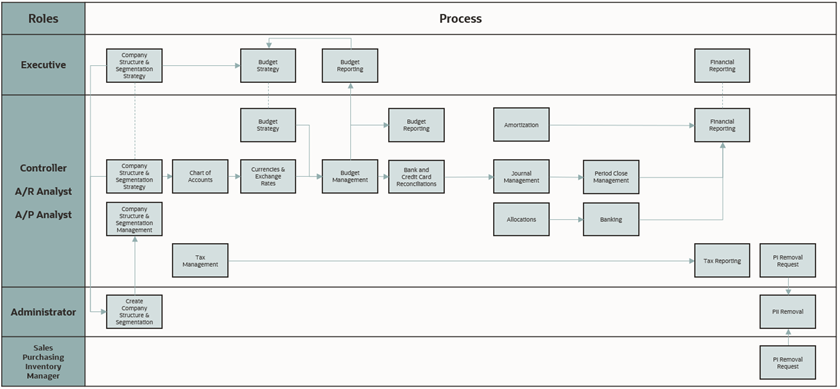
Segments, journals, reconciliation, period close and reporting.
Three further areas appear in the edition without detailed process content: Lead to Quote, Marketing to ROI, Call to Resolution. They are listed here for completeness and are not covered below, because the Standard edition does not document them at the same depth.
1. Master Data Management
Items, customers, vendors and the segment structure everything else reports against. In distribution this is not administration, it is the constraint: base unit of measure, drop ship flags and cost estimate type are all set here and inherited everywhere.
Define segments → Create item records → Set UOM and flags → Load customers and vendors → Validate before first transaction
Leading practice rules
Set the base unit of measure to the smallest unit sold or stocked. Everything converts up from it.
Flag items as drop ship or special order where they will not be stocked or need a vendor to fulfill.
For drop ship and special order items set cost estimate type to Purchase Order Rate, so estimated cost follows the actual vendor price on that order.
Use non-inventory item records for things you sell or buy but do not stock.
Assign default landed cost categories per item so estimated landed cost applies automatically at receipt.
Skill file: Master Data Management
---
name: wholesale-master-data-management
description: NetSuite leading practice for Master Data Management in wholesale distribution
---

# Master Data Management - Wholesale Distribution

## Roles
Inventory Manager, Purchasing Manager, Sales Manager, Controller

## Process flow
Define segments → Create item records → Set UOM and flags → Load customers and vendors → Validate before first transaction

## Leading practice rules
- Set the base unit of measure to the smallest unit sold or stocked. Everything converts up from it.
- Flag items as drop ship or special order where they will not be stocked or need a vendor to fulfill.
- For drop ship and special order items set cost estimate type to Purchase Order Rate, so estimated cost follows the actual vendor price on that order.
- Use non-inventory item records for things you sell or buy but do not stock.
- Assign default landed cost categories per item so estimated landed cost applies automatically at receipt.

## Check before go-live
- [ ] Base UOM agreed per item category and documented
- [ ] Drop ship and special order flags reviewed against the actual fulfillment model
- [ ] Landed cost categories created with the correct GL accounts and defaulted per item

## Known failure modes
- Base UOM set to a case when the business sells eaches, which breaks every conversion downstream
- Cost estimate type left at a standing figure on drop ship items, so estimated cost never matches the vendor

## Scope note
This reflects the Wholesale Distribution Standard edition. Confirm against your own
licensed modules and edition before treating any rule as available.
2. Procure to Pay
Purchasing and vendor management, from working out what to order through to paying the bill. This is where landed cost enters the chain, and where the timing decision that governs your period close is made.
Determine items to order → Raise purchase order → Receive goods → Apply estimated landed cost → Match vendor bill → Pay
Leading practice rules
Use the Order Items page to find items running low, then check whether another location can replenish by transfer order before buying again.
Apply estimated landed cost at receipt using cost categories such as freight, duty and insurance, so inventory is valued correctly from the moment it lands.
Create an inbound shipment record when one shipment carries goods from several purchase orders, and monitor it with the Open Inbound Containers Reminder.
Landed cost templates cannot be associated with an inbound shipment record. Components are entered manually there.
Landed cost cannot be applied to drop ship purchase orders at all, because the goods are never received into a location.
Hold negotiated vendor prices in quantity pricing schedules. One vendor per schedule, applicable to any number of items.
Skill file: Procure to Pay
---
name: wholesale-procure-to-pay
description: NetSuite leading practice for Procure to Pay in wholesale distribution
---

# Procure to Pay - Wholesale Distribution

## Roles
Purchasing Manager, Inventory Manager, A/P Analyst, Controller, Warehouse Manager

## Process flow
Determine items to order → Raise purchase order → Receive goods → Apply estimated landed cost → Match vendor bill → Pay

## Leading practice rules
- Use the Order Items page to find items running low, then check whether another location can replenish by transfer order before buying again.
- Apply estimated landed cost at receipt using cost categories such as freight, duty and insurance, so inventory is valued correctly from the moment it lands.
- Create an inbound shipment record when one shipment carries goods from several purchase orders, and monitor it with the Open Inbound Containers Reminder.
- Landed cost templates cannot be associated with an inbound shipment record. Components are entered manually there.
- Landed cost cannot be applied to drop ship purchase orders at all, because the goods are never received into a location.
- Hold negotiated vendor prices in quantity pricing schedules. One vendor per schedule, applicable to any number of items.

## Check before go-live
- [ ] Estimated landed cost defaults set per item category before first receipt
- [ ] A named owner for the estimate against actual landed cost comparison, run inside the close
- [ ] Reorder points, preferred stock levels, lead times and safety stock populated per item and location

## Known failure modes
- No estimated landed cost, so the actual freight bill is the first version of the truth and arrives after the period closed
- Buying stock that another warehouse already holds, because the transfer option was never checked

## Scope note
This reflects the Wholesale Distribution Standard edition. Confirm against your own
licensed modules and edition before treating any rule as available.
3. Design to Build
The item strategy itself: what is stocked, what is a kit, what is assembled. Distributors lean heavily on kits for multi-component orders that need no assembly, and kits carry three constraints worth knowing before design.
Classify the item → Choose type: inventory, non-inventory, kit or assembly → Define components → Set pricing and GL treatment → Release
Leading practice rules
Use kit items where several components ship together but require no assembly.
A kit's sales price is defined in its own right, not aggregated from its components, and the kit carries its own GL account. Cost of goods sold still derives from the components.
Kits cannot be added to purchase orders. Purchase the components instead.
Quantity on hand is not visible on a kit record. Available kit quantity only appears when a kit is added to a sales transaction.
Use the Available to Build SuiteApp to see how many kits or assemblies current inventory supports.
Skill file: Design to Build
---
name: wholesale-design-to-build
description: NetSuite leading practice for Design to Build in wholesale distribution
---

# Design to Build - Wholesale Distribution

## Roles
Inventory Manager, Sales Manager, A/R Analyst, Controller

## Process flow
Classify the item → Choose type: inventory, non-inventory, kit or assembly → Define components → Set pricing and GL treatment → Release

## Leading practice rules
- Use kit items where several components ship together but require no assembly.
- A kit's sales price is defined in its own right, not aggregated from its components, and the kit carries its own GL account. Cost of goods sold still derives from the components.
- Kits cannot be added to purchase orders. Purchase the components instead.
- Quantity on hand is not visible on a kit record. Available kit quantity only appears when a kit is added to a sales transaction.
- Use the Available to Build SuiteApp to see how many kits or assemblies current inventory supports.

## Check before go-live
- [ ] Every existing bundle audited against one question: does it physically exist on a pallet, or is it assembled at picking?
- [ ] Kit GL accounts agreed with finance before the first kit is sold

## Known failure modes
- Treating kits as stockable items, discovered when someone tries to count them or put them on a purchase order

## Scope note
This reflects the Wholesale Distribution Standard edition. Confirm against your own
licensed modules and edition before treating any rule as available.
4. Order to Cash
Transacting with the customer, fulfilling, billing and collecting. The distinctive part in distribution is pricing: there is no single price, so margin is only meaningful at the line.
Quote → Sales order → Allocate or drop ship → Fulfill → Invoice → Collect → Analyze margin
Leading practice rules
Use price levels to offer different pricing to different customer types.
Use price groups to cluster items so a customer can hold a negotiated position across a category rather than item by item.
Drop ship purchase orders are created from the sales order and go vendor direct to customer without touching inventory.
Adjust drop ship and special order behavior at the line, so a stocked item can ship direct when urgent and a drop ship item can be consumed from stock when it is there.
Set up locations and inventory statuses correctly so stock is actually available for commitment.
Report margin by item, customer and sales rep, and review both tails. An unusually high margin is as likely to be a pricing error as a low one.
Skill file: Order to Cash
---
name: wholesale-order-to-cash
description: NetSuite leading practice for Order to Cash in wholesale distribution
---

# Order to Cash - Wholesale Distribution

## Roles
Sales, Sales Manager, A/R Analyst, Warehouse Manager, Controller

## Process flow
Quote → Sales order → Allocate or drop ship → Fulfill → Invoice → Collect → Analyze margin

## Leading practice rules
- Use price levels to offer different pricing to different customer types.
- Use price groups to cluster items so a customer can hold a negotiated position across a category rather than item by item.
- Drop ship purchase orders are created from the sales order and go vendor direct to customer without touching inventory.
- Adjust drop ship and special order behavior at the line, so a stocked item can ship direct when urgent and a drop ship item can be consumed from stock when it is there.
- Set up locations and inventory statuses correctly so stock is actually available for commitment.
- Report margin by item, customer and sales rep, and review both tails. An unusually high margin is as likely to be a pricing error as a low one.

## Check before go-live
- [ ] Price levels and price groups modeled against the real customer hierarchy, not an idealized one
- [ ] Expected margin visible at quote entry rather than at month end

## Known failure modes
- Reporting an item-level average margin across all customers, which describes a price nobody actually pays
- Reviewing only the low margin tail, so pricing errors on the high side reach the customer first

## Scope note
This reflects the Wholesale Distribution Standard edition. Confirm against your own
licensed modules and edition before treating any rule as available.
5. Ship Central
Fulfillment on a tablet or kiosk in the warehouse, with multilevel packing from items into cartons and cartons onto pallets. Worth scoping deliberately, because its hardware integrations have a hard prerequisite.
Roles: Ship Central Manager, Ship Central Mobile Operator, Warehouse Manager, Warehouse Operator
Process flow
Pick → Pack into cartons → Transfer cartons to pallets → Generate labels → Ship
Leading practice rules
Orders packed in the app can be shipped from the app or separately through the NetSuite interface.
Printing integrates through PrintNode, a third-party hosted printing service.
Carrier integration runs through a ShipEngine account created using NetSuite's interface.
A ShipEngine account created outside NetSuite cannot be integrated with Ship Central. This is a prerequisite, not a preference.
Skill file: Ship Central
---
name: wholesale-ship-central
description: NetSuite leading practice for Ship Central in wholesale distribution
---

# Ship Central - Wholesale Distribution

## Roles
Ship Central Manager, Ship Central Mobile Operator, Warehouse Manager, Warehouse Operator

## Process flow
Pick → Pack into cartons → Transfer cartons to pallets → Generate labels → Ship

## Leading practice rules
- Orders packed in the app can be shipped from the app or separately through the NetSuite interface.
- Printing integrates through PrintNode, a third-party hosted printing service.
- Carrier integration runs through a ShipEngine account created using NetSuite's interface.
- A ShipEngine account created outside NetSuite cannot be integrated with Ship Central. This is a prerequisite, not a preference.

## Check before go-live
- [ ] ShipEngine account created through NetSuite, not separately, before go-live
- [ ] PrintNode provisioned and label printers mapped per packing station

## Known failure modes
- An existing ShipEngine account assumed to be reusable, discovered during testing when it cannot be connected

## Scope note
This reflects the Wholesale Distribution Standard edition. Confirm against your own
licensed modules and edition before treating any rule as available.
6. Return to Credit
Customer returns, credits and refunds. In distribution this runs at a volume that makes it operational rather than exceptional, and each return carries a disposition decision with a margin consequence.
Customer return request → Return authorization → Receive and inspect → Disposition → Credit or refund
Leading practice rules
Create the return authorization from the originating sales transaction so the credit reconciles back to what was sold.
Give returns disposition a rule keyed to condition and category: back to saleable stock, to damaged, or to write-off.
Apply inventory status on receipt to control whether returned goods become available for commitment.
Skill file: Return to Credit
---
name: wholesale-return-to-credit
description: NetSuite leading practice for Return to Credit in wholesale distribution
---

# Return to Credit - Wholesale Distribution

## Roles
A/R Analyst, Sales, Sales Manager, Warehouse Manager, Warehouse Operator

## Process flow
Customer return request → Return authorization → Receive and inspect → Disposition → Credit or refund

## Leading practice rules
- Create the return authorization from the originating sales transaction so the credit reconciles back to what was sold.
- Give returns disposition a rule keyed to condition and category: back to saleable stock, to damaged, or to write-off.
- Apply inventory status on receipt to control whether returned goods become available for commitment.

## Check before go-live
- [ ] Disposition rule written down and available where the goods are received
- [ ] Restock rate tracked, since it is the measure of whether disposition is a rule or a judgment call

## Known failure modes
- Disposition left to whoever opens the carton, producing inconsistent inventory value and unsellable stock back on the shelf

## Scope note
This reflects the Wholesale Distribution Standard edition. Confirm against your own
licensed modules and edition before treating any rule as available.
7. Return to Debit
The vendor side of returns: sending goods back, and the vendor credits and refunds that follow. Less visible than customer returns and equally capable of leaking margin.
Identify unwanted or damaged goods → Vendor return authorization → Approval → Ship back → Vendor credit → Apply
Leading practice rules
Create vendor return authorizations from the originating purchase transaction, for unwanted or damaged items.
Route vendor return authorizations for approval according to company policy, using dashboard alerts and email notification.
Match the vendor credit back to the return so the payable reconciles rather than drifting.
Skill file: Return to Debit
---
name: wholesale-return-to-debit
description: NetSuite leading practice for Return to Debit in wholesale distribution
---

# Return to Debit - Wholesale Distribution

## Roles
Purchasing Manager, Inventory Manager, Warehouse Manager, Controller, Sales Manager

## Process flow
Identify unwanted or damaged goods → Vendor return authorization → Approval → Ship back → Vendor credit → Apply

## Leading practice rules
- Create vendor return authorizations from the originating purchase transaction, for unwanted or damaged items.
- Route vendor return authorizations for approval according to company policy, using dashboard alerts and email notification.
- Match the vendor credit back to the return so the payable reconciles rather than drifting.

## Check before go-live
- [ ] Approval thresholds agreed and configured before go-live
- [ ] Open vendor returns reviewed as part of the close, not ad hoc

## Known failure modes
- Goods returned physically with no authorization raised, so the credit is chased by memory months later

## Scope note
This reflects the Wholesale Distribution Standard edition. Confirm against your own
licensed modules and edition before treating any rule as available.
8. Financial Management
Segments, journals, reconciliation, period close and reporting. In distribution the close has one dependency that no other process area can override, and it comes from landed cost.
Maintain segments → Post and reconcile → Apply landed cost → Review margin → Close period → Report
Leading practice rules
Whether landed cost can be applied depends on whether the accounting period is open or closed. This is the critical dependency.
If the vendor bill arrives after the period closed, reopening it and applying landed cost makes the costing engine adjust cost of sales on every fulfillment between the receipt date and today, moving an ending balance already agreed at close.
If the period is left closed, the landed cost is realized as an expense on the vendor bill and never enters inventory value.
Landed cost can be allocated across the whole transaction or at line level, by weight, value or quantity.
Use a saved search to compare estimated against actual landed cost and surface discrepancies before they become restatements.
Skill file: Financial Management
---
name: wholesale-financial-management
description: NetSuite leading practice for Financial Management in wholesale distribution
---

# Financial Management - Wholesale Distribution

## Roles
Controller, A/R Analyst, A/P Analyst, Senior Executive

## Process flow
Maintain segments → Post and reconcile → Apply landed cost → Review margin → Close period → Report

## Leading practice rules
- Whether landed cost can be applied depends on whether the accounting period is open or closed. This is the critical dependency.
- If the vendor bill arrives after the period closed, reopening it and applying landed cost makes the costing engine adjust cost of sales on every fulfillment between the receipt date and today, moving an ending balance already agreed at close.
- If the period is left closed, the landed cost is realized as an expense on the vendor bill and never enters inventory value.
- Landed cost can be allocated across the whole transaction or at line level, by weight, value or quantity.
- Use a saved search to compare estimated against actual landed cost and surface discrepancies before they become restatements.

## Check before go-live
- [ ] Estimate against actual landed cost comparison sits in the close checklist with a named owner
- [ ] A policy exists for late vendor bills, agreed in advance rather than decided monthly under pressure

## Known failure modes
- Reopening periods routinely for landed cost, so reported results move after sign-off and nobody frames it as a decision

## Scope note
This reflects the Wholesale Distribution Standard edition. Confirm against your own
licensed modules and edition before treating any rule as available.
Where to Start
If you are implementing all eight, the order matters. Master data first, because every other area inherits it. Then procure to pay, because that is where landed cost enters and landed cost is the only thing in this list that can retroactively change a reported result. Order to cash next, then the two return processes, then Ship Central if it is in scope. Financial management runs throughout rather than at the end.
The single highest-value check across all eight: confirm that estimated landed cost is applied at receipt, per item category, with defaults someone maintains. Without it, every freight invoice arriving after a period close forces a choice between restating a signed-off result and carrying inventory at the wrong value.
Published by Azdan, an Oracle NetSuite Solution Provider operating across the UAE, Saudi Arabia, and Egypt. Guidance in this article reflects Azdan's process design work with wholesale distribution businesses. Content checked August 2026.
Blog
News & Insights
Fresh thinking and real-world advice to help you scale smarter, faster, and with more clarity
.svg)


.png)