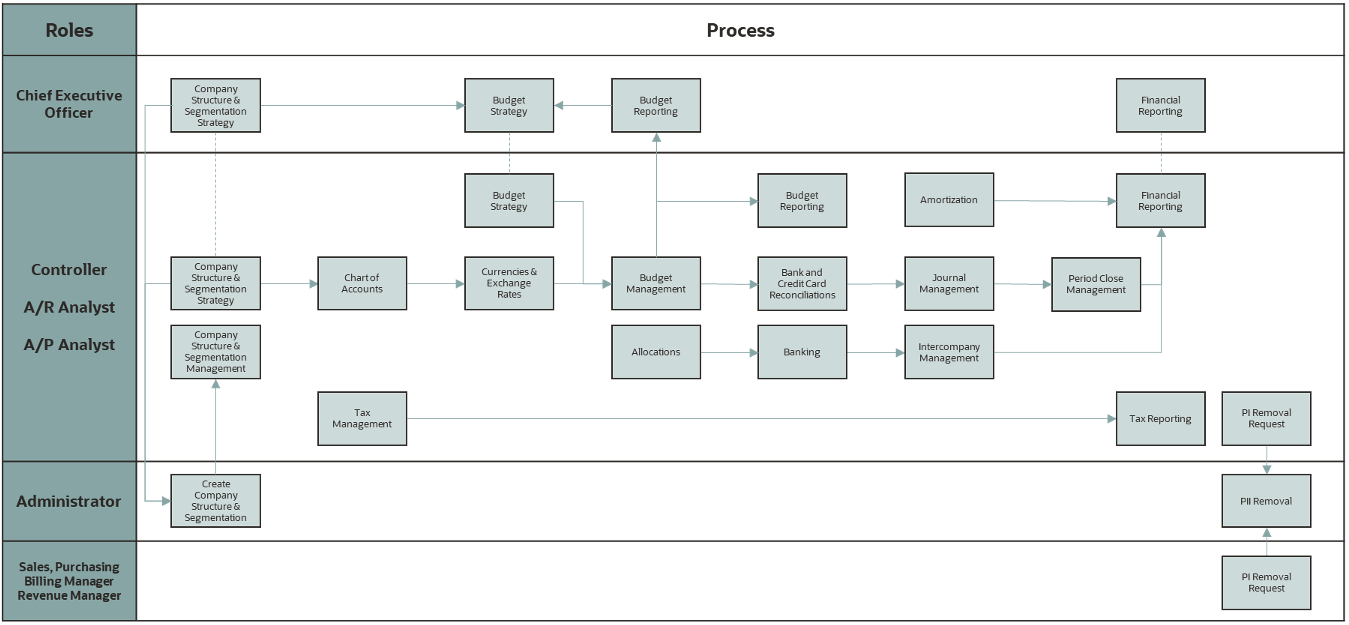
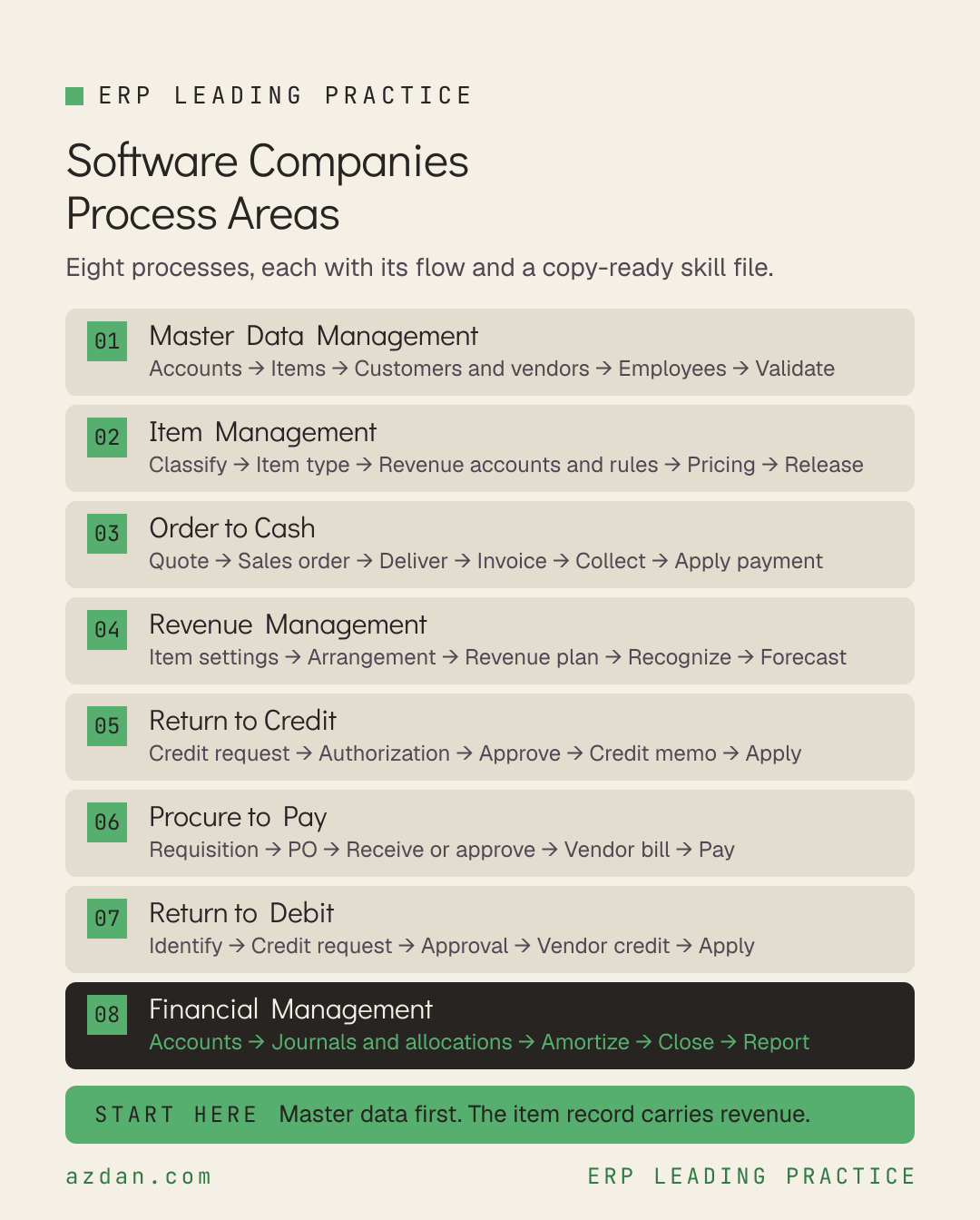
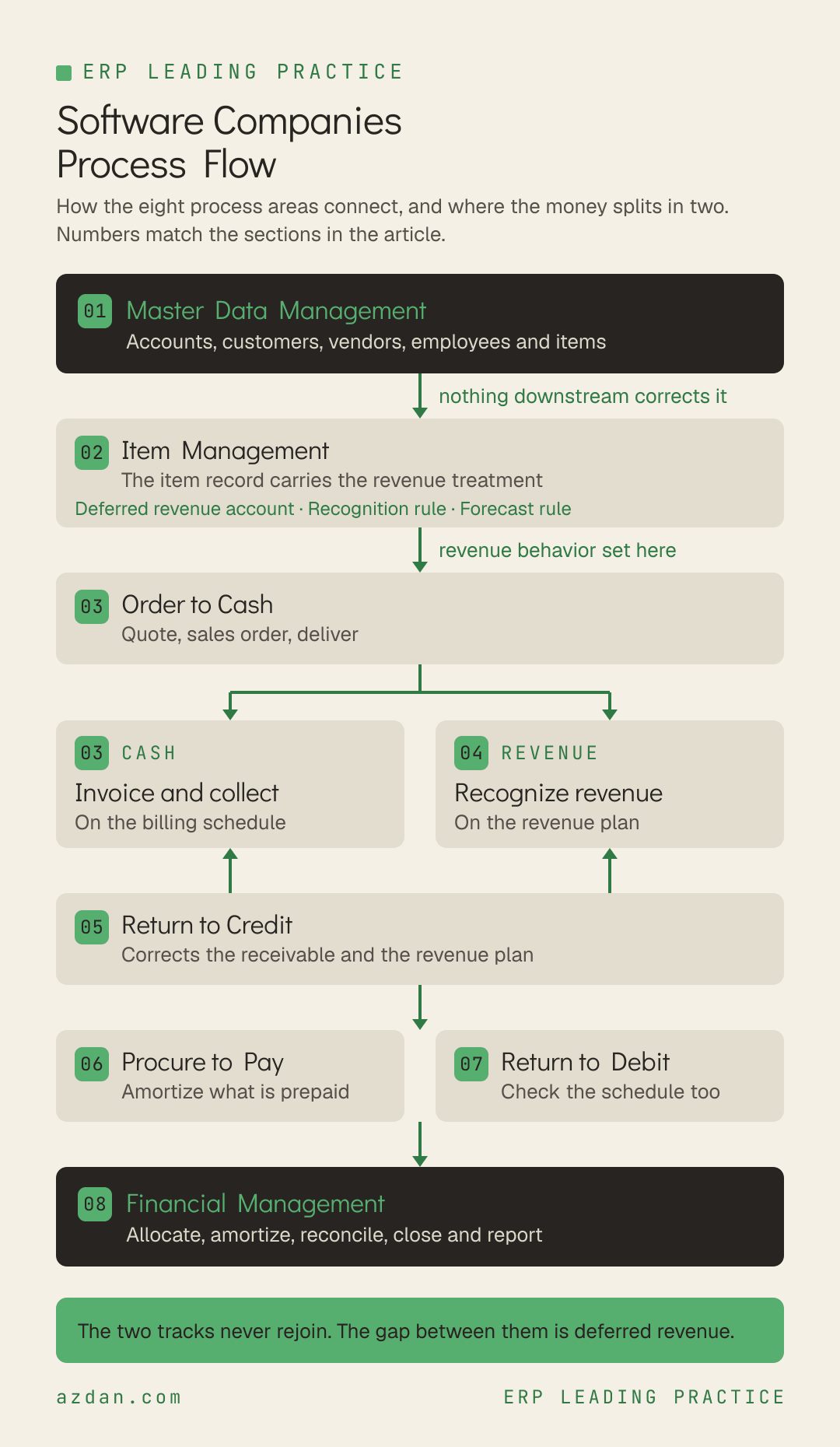
A software business runs the same eight process areas whether it is pre-revenue or listed. What separates the two is not which processes exist but how many of the decisions inside them were made deliberately. This is the leading practice reference for software: every process area, the flow it follows, the rules that govern it, and a copy-ready skill file for each one.
How to Use This
Each process area below carries three things. A flow, which is the sequence the process actually runs in. A short set of rules that are specific to software rather than generic ERP advice. And a skill file you can copy straight out of the page, written as markdown so it can be handed to an AI assistant, dropped into a project repository, or used as the basis for a design document.
The skill files are deliberately short. They are checklists for people who already know the domain, not tutorials. Each one names the roles that own the process, the flow, the rules, what to verify before go-live, and the failure modes that recur.
Methodology note. This reflects the Software Standard edition as applied by Azdan across its NetSuite delivery in the UAE, Saudi Arabia, and Egypt. Module availability differs by edition and license, so confirm against your own before treating any rule as available. Where a point is a recommendation from delivery experience rather than a documented rule, it is labeled as one.
The Eight Process Areas
Master Data Management → Item Management → Order to Cash → Revenue Management → Return to Credit → Procure to Pay → Return to Debit → Financial Management
Process area
Primary owner
What it covers
Master Data Management
Controller
Accounts, customers, vendors, employees and items.
Item Management
Controller
Items are the goods and services sold to customers and purchased from vendors.
Order to Cash
Sales
Transacting with the customer, fulfilling goods or services, billing, and collecting.
Revenue Management
Controller
The process area that distinguishes software from every other vertical.
Return to Credit
A/R Analyst
Initiating customer returns, recording and applying customer credits, and issuing refunds.
Procure to Pay
A/P Analyst
Purchasing and vendor management.
Return to Debit
A/P Analyst
Returns of vendor goods and services, and the vendor credits and refunds that affect accounts payable.
Financial Management
Controller
Everything that ensures accurate financial reporting, and the area the edition notes directly impacts the success of every other process performed in the system.
1. Master Data Management
Accounts, customers, vendors, employees and items. The edition is explicit that master data must be maintained before any process area transaction can be carried out, which makes this the gate rather than the groundwork.
Define accounts and segments → Create item records → Load customers and vendors → Set up employees → Validate before first transaction
Leading practice rules
Master data must exist and be correct before process area transactions run. Nothing downstream corrects a wrong master record.
Items are master data here, not a configuration afterthought, because the item record carries the revenue treatment.
Name changes can be applied to standard records and transactions, but not to elements you have customized.
Skill file: Master Data Management
---
name: software-master-data-management
description: NetSuite leading practice for Master Data Management in software
---

# Master Data Management - Software Companies

## Roles
Controller, A/R Analyst, A/P Analyst, Revenue Manager

## Process flow
Define accounts and segments → Create item records → Load customers and vendors → Set up employees → Validate before first transaction

## Leading practice rules
- Master data must exist and be correct before process area transactions run. Nothing downstream corrects a wrong master record.
- Items are master data here, not a configuration afterthought, because the item record carries the revenue treatment.
- Name changes can be applied to standard records and transactions, but not to elements you have customized.

## Check before go-live
- [ ] Item master reviewed by finance, not only by product or sales
- [ ] Customer and vendor records loaded and validated before the first transaction

## Known failure modes
- Treating the item master as a product catalog rather than the place revenue behavior is defined

## Scope note
This reflects the Software Standard edition. Confirm against your own
licensed modules and edition before treating any rule as available.
2. Item Management
Items are the goods and services sold to customers and purchased from vendors. In software this is the single highest-leverage process area, because the item type drives how the item behaves everywhere and the item record is where revenue treatment is set.
Roles: Controller, Revenue Manager, Sales Manager
Process flow
Classify the offering → Choose item type → Set revenue accounts and rules → Set pricing → Release
Leading practice rules
Every item has an item type that drives the attribution and usage of that item. The primary types are Inventory, Non-Inventory and Service.
Use item types to differentiate and identify the information you need for each item, rather than relying on naming conventions.
Revenue recognition accounts are defined on items. Those accounts determine which general ledger accounts are posted to when revenue is deferred and recognized.
Software offerings usually span several item types: a subscription, a perpetual license, an implementation service and a support renewal do not behave alike and should not share one item design.
Skill file: Item Management
---
name: software-item-management
description: NetSuite leading practice for Item Management in software
---

# Item Management - Software Companies

## Roles
Controller, Revenue Manager, Sales Manager

## Process flow
Classify the offering → Choose item type → Set revenue accounts and rules → Set pricing → Release

## Leading practice rules
- Every item has an item type that drives the attribution and usage of that item. The primary types are Inventory, Non-Inventory and Service.
- Use item types to differentiate and identify the information you need for each item, rather than relying on naming conventions.
- Revenue recognition accounts are defined on items. Those accounts determine which general ledger accounts are posted to when revenue is deferred and recognized.
- Software offerings usually span several item types: a subscription, a perpetual license, an implementation service and a support renewal do not behave alike and should not share one item design.

## Check before go-live
- [ ] Every revenue-bearing item classified by type, with the classification agreed between finance and product
- [ ] Revenue accounts populated on every item before the first sale, not retrofitted

## Known failure modes
- One generic item type used across subscription, license and services, so revenue behavior has to be corrected transaction by transaction

## Scope note
This reflects the Software Standard edition. Confirm against your own
licensed modules and edition before treating any rule as available.
3. Order to Cash
Transacting with the customer, fulfilling goods or services, billing, and collecting. In software the fulfillment step is often notional, which changes where revenue recognition takes its trigger.
Quote → Sales order → Fulfill or deliver → Invoice → Collect → Apply payment
Leading practice rules
The sales order is where the revenue arrangement originates, so the terms agreed here govern recognition for the life of the contract.
Billing schedule and revenue plan are separate. Invoicing on a schedule does not recognize revenue, and recognizing revenue does not invoice.
Collect against the invoice, not against the contract value, because the two diverge by design in subscription models.
Skill file: Order to Cash
---
name: software-order-to-cash
description: NetSuite leading practice for Order to Cash in software
---

# Order to Cash - Software Companies

## Roles
Sales, Sales Manager, A/R Analyst, Controller, Revenue Manager

## Process flow
Quote → Sales order → Fulfill or deliver → Invoice → Collect → Apply payment

## Leading practice rules
- The sales order is where the revenue arrangement originates, so the terms agreed here govern recognition for the life of the contract.
- Billing schedule and revenue plan are separate. Invoicing on a schedule does not recognize revenue, and recognizing revenue does not invoice.
- Collect against the invoice, not against the contract value, because the two diverge by design in subscription models.

## Check before go-live
- [ ] Billing schedules and revenue rules reviewed together for each order type before go-live
- [ ] Non-standard contract terms routed past finance before signature

## Known failure modes
- Assuming an invoice and a revenue event are the same thing, which produces a deferred revenue balance nobody can explain

## Scope note
This reflects the Software Standard edition. Confirm against your own
licensed modules and edition before treating any rule as available.
4. Revenue Management
The process area that distinguishes software from every other vertical. Revenue treatment is configured on the item and executed through revenue plans, and the configuration has three parts that are easy to set once and never revisit.
Configure item revenue settings → Create revenue arrangement → Generate revenue plan → Recognize by period → Report and forecast
Leading practice rules
Deferred Revenue Account: set the deferred revenue account on the item.
Revenue Recognition Rule: defines the default pattern. The rule stores the recognition method, where the amount for recognition is sourced from, and where the start and end dates are sourced from. The default can be overridden per revenue element.
Rev Rec Forecast Rule: the default rule used for forecast reporting, which lets forecast revenue plans exist before actual plans are created. It may be the same rule or a different one.
Percent complete rules are not available as forecast rules. If your actual rule is percent complete, the forecast rule has to be something else.
Report deferred revenue by item, because that is the level at which the treatment was configured and therefore the level at which errors are visible.
The subscription metrics dashboard carries customer churn, churn revenue lost, annual and monthly recurring revenue, and the revenue change from upsells and downsells.
Read net and gross revenue retention together. One without the other cannot distinguish growth from concealment.
Skill file: Revenue Management
---
name: software-revenue-management
description: NetSuite leading practice for Revenue Management in software
---

# Revenue Management - Software Companies

## Roles
Controller, Revenue Manager, Chief Executive Officer

## Process flow
Configure item revenue settings → Create revenue arrangement → Generate revenue plan → Recognize by period → Report and forecast

## Leading practice rules
- Deferred Revenue Account: set the deferred revenue account on the item.
- Revenue Recognition Rule: defines the default pattern. The rule stores the recognition method, where the amount for recognition is sourced from, and where the start and end dates are sourced from. The default can be overridden per revenue element.
- Rev Rec Forecast Rule: the default rule used for forecast reporting, which lets forecast revenue plans exist before actual plans are created. It may be the same rule or a different one.
- Percent complete rules are not available as forecast rules. If your actual rule is percent complete, the forecast rule has to be something else.
- Report deferred revenue by item, because that is the level at which the treatment was configured and therefore the level at which errors are visible.
- The subscription metrics dashboard carries customer churn, churn revenue lost, annual and monthly recurring revenue, and the revenue change from upsells and downsells.
- Read net and gross revenue retention together. One without the other cannot distinguish growth from concealment.

## Check before go-live
- [ ] Forecast rule set on every item and confirmed not to be a percent complete rule
- [ ] MRR rollforward reviewed as the primary growth report rather than the revenue line
- [ ] Deferred revenue by item reconciled every period

## Known failure modes
- Forecast rule left unset, so forecast reporting is empty until actual revenue plans exist
- Attempting to use a percent complete rule for forecasting, which is not supported
- Net revenue retention reported without gross, so customer loss hides behind expansion

## Scope note
This reflects the Software Standard edition. Confirm against your own
licensed modules and edition before treating any rule as available.
5. Return to Credit
Initiating customer returns, recording and applying customer credits, and issuing refunds. In software the returned thing is usually access rather than goods, which makes the revenue consequence the substantive part.
Create the credit from the originating transaction so it reconciles back to what was sold and to the revenue arrangement it affects.
A credit against a subscription changes the revenue plan, not just the receivable. Check both.
Apply credits rather than leaving them open, so the receivable reflects what is actually collectable.
Skill file: Return to Credit
---
name: software-return-to-credit
description: NetSuite leading practice for Return to Credit in software
---

# Return to Credit - Software Companies

## Roles
A/R Analyst, Sales Manager, Controller, Revenue Manager

## Process flow
Credit request → Authorization → Approve → Credit memo → Apply or refund

## Leading practice rules
- Create the credit from the originating transaction so it reconciles back to what was sold and to the revenue arrangement it affects.
- A credit against a subscription changes the revenue plan, not just the receivable. Check both.
- Apply credits rather than leaving them open, so the receivable reflects what is actually collectable.

## Check before go-live
- [ ] Credit approval thresholds agreed and configured
- [ ] Effect on the revenue plan reviewed whenever a credit touches a recurring item

## Known failure modes
- Issuing a credit that corrects the receivable and leaves the revenue plan recognizing the original amount

## Scope note
This reflects the Software Standard edition. Confirm against your own
licensed modules and edition before treating any rule as available.
6. Procure to Pay
Purchasing and vendor management. In a software business this is weighted toward services, hosting, third-party licenses and contractors rather than physical goods.
Roles: A/P Analyst, Controller, Purchasing
Process flow
Requisition → Purchase order → Receive or approve → Vendor bill → Pay
Leading practice rules
Use amortization schedules where expense is paid in advance, so it posts to a deferred expense account and is recognized in the period it belongs to.
Match vendor bills to the commitment rather than paying against the invoice alone.
Recurring vendor costs with a predictable pattern are candidates for memorized transactions with dashboard reminders.
Skill file: Procure to Pay
---
name: software-procure-to-pay
description: NetSuite leading practice for Procure to Pay in software
---

# Procure to Pay - Software Companies

## Roles
A/P Analyst, Controller, Purchasing

## Process flow
Requisition → Purchase order → Receive or approve → Vendor bill → Pay

## Leading practice rules
- Use amortization schedules where expense is paid in advance, so it posts to a deferred expense account and is recognized in the period it belongs to.
- Match vendor bills to the commitment rather than paying against the invoice alone.
- Recurring vendor costs with a predictable pattern are candidates for memorized transactions with dashboard reminders.

## Check before go-live
- [ ] Amortization schedules in place for prepaid hosting, licenses and insurance
- [ ] Approval routing configured before the first purchase order

## Known failure modes
- Prepaid annual costs expensed in the month paid, distorting twelve months of margin

## Scope note
This reflects the Software Standard edition. Confirm against your own
licensed modules and edition before treating any rule as available.
7. Return to Debit
Returns of vendor goods and services, and the vendor credits and refunds that affect accounts payable. Lower volume in software than in distribution, and correspondingly easier to leave uncontrolled.
Roles: A/P Analyst, Controller, Purchasing
Process flow
Identify overcharge or cancellation → Vendor credit request → Approval → Vendor credit → Apply to payable
Leading practice rules
Raise vendor credits from the originating purchase transaction so the payable reconciles.
Where a prepaid service is cancelled mid-term, check the amortization schedule as well as the payable.
Skill file: Return to Debit
---
name: software-return-to-debit
description: NetSuite leading practice for Return to Debit in software
---

# Return to Debit - Software Companies

## Roles
A/P Analyst, Controller, Purchasing

## Process flow
Identify overcharge or cancellation → Vendor credit request → Approval → Vendor credit → Apply to payable

## Leading practice rules
- Raise vendor credits from the originating purchase transaction so the payable reconciles.
- Where a prepaid service is cancelled mid-term, check the amortization schedule as well as the payable.

## Check before go-live
- [ ] Open vendor credits reviewed within the close rather than ad hoc

## Known failure modes
- A cancelled annual service credited against payables while the amortization schedule keeps expensing it

## Scope note
This reflects the Software Standard edition. Confirm against your own
licensed modules and edition before treating any rule as available.
8. Financial Management
Everything that ensures accurate financial reporting, and the area the edition notes directly impacts the success of every other process performed in the system.
Maintain accounts and segments → Post journals and allocations → Amortize → Reconcile → Close period → Report
Leading practice rules
Use allocation schedules to distribute expenses across subsidiaries, departments, locations and classes rather than entering complex journals by hand.
Intercompany allocations work the same way but allow destination accounts in a different subsidiary from the source, with intercompany receivable or payable accounts specified on the schedule.
Use memorized journals with dashboard reminders for recurring postings such as accruals, so they are prompted rather than remembered.
Use budget categories to hold several budgets against the same item, customer, class, department and location, which is what allows baseline, mid-year and forecast versions to coexist.
Leverage the Cash 360 dashboard for cash position, cash flow management and cash flow forecasting.
Skill file: Financial Management
---
name: software-financial-management
description: NetSuite leading practice for Financial Management in software
---

# Financial Management - Software Companies

## Roles
Controller, A/R Analyst, A/P Analyst, Chief Executive Officer

## Process flow
Maintain accounts and segments → Post journals and allocations → Amortize → Reconcile → Close period → Report

## Leading practice rules
- Use allocation schedules to distribute expenses across subsidiaries, departments, locations and classes rather than entering complex journals by hand.
- Intercompany allocations work the same way but allow destination accounts in a different subsidiary from the source, with intercompany receivable or payable accounts specified on the schedule.
- Use memorized journals with dashboard reminders for recurring postings such as accruals, so they are prompted rather than remembered.
- Use budget categories to hold several budgets against the same item, customer, class, department and location, which is what allows baseline, mid-year and forecast versions to coexist.
- Leverage the Cash 360 dashboard for cash position, cash flow management and cash flow forecasting.

## Check before go-live
- [ ] Allocation schedules created and the due-schedule dashboard reminder enabled
- [ ] Budget categories agreed so versions do not overwrite each other

## Known failure modes
- Complex recurring journals entered manually every period, which is both slow and the most common source of close errors

## Scope note
This reflects the Software Standard edition. Confirm against your own
licensed modules and edition before treating any rule as available.
Where to Start
If you are implementing all eight, the order matters. Master data first, then item management, because in software the item record carries the revenue treatment and everything downstream inherits it. Order to cash and revenue management next, and design them together rather than in sequence, because the billing schedule and the revenue plan are two views of the same contract. The two return processes and procure to pay follow. Financial management runs throughout rather than at the end.
The single highest-value check across all eight: open any revenue-bearing item and confirm it has a deferred revenue account, a revenue recognition rule, and a forecast rule that is not a percent complete rule. Those three fields decide how revenue behaves for the life of every contract sold against that item, and they are set once and rarely revisited.
Published by Azdan, an Oracle NetSuite Solution Provider operating across the UAE, Saudi Arabia, and Egypt. Guidance in this article reflects Azdan's process design work with software businesses. Content checked August 2026.
Blog
News & Insights
Fresh thinking and real-world advice to help you scale smarter, faster, and with more clarity
.svg)