.svg)


Startups often choose a simple accounting platform, then face a migration when their business grows. At Azdan, we explored NetSuite QuickStart on launch day to assess a different approach: starting within the NetSuite ecosystem from day one.
Our review covers the setup experience, invoicing, startup dashboards, and Ask Oracle using an example account called ABC Company. This is an initial product evaluation, with further testing needed before recommending it for a specific business.
What Does NetSuite QuickStart Offer?
NetSuite QuickStart brings accounting, banking, invoicing, vendor management, subscriptions, and financial reporting into a self-service application. Eligible early-stage U.S. technology startups can use the free offering with up to five users, without beginning with a conventional ERP implementation project.
The application also includes startup-specific metrics such as monthly recurring revenue (MRR), burn rate, and runway, alongside connectivity with external AI tools such as ChatGPT and Claude through Model Context Protocol (MCP).
Its navigation groups tasks under familiar areas such as Sales, Receivables, Payables, Subscriptions, Accounting, and Banking. For a small team, that structure makes it easier to locate everyday financial activities without navigating a full enterprise deployment.
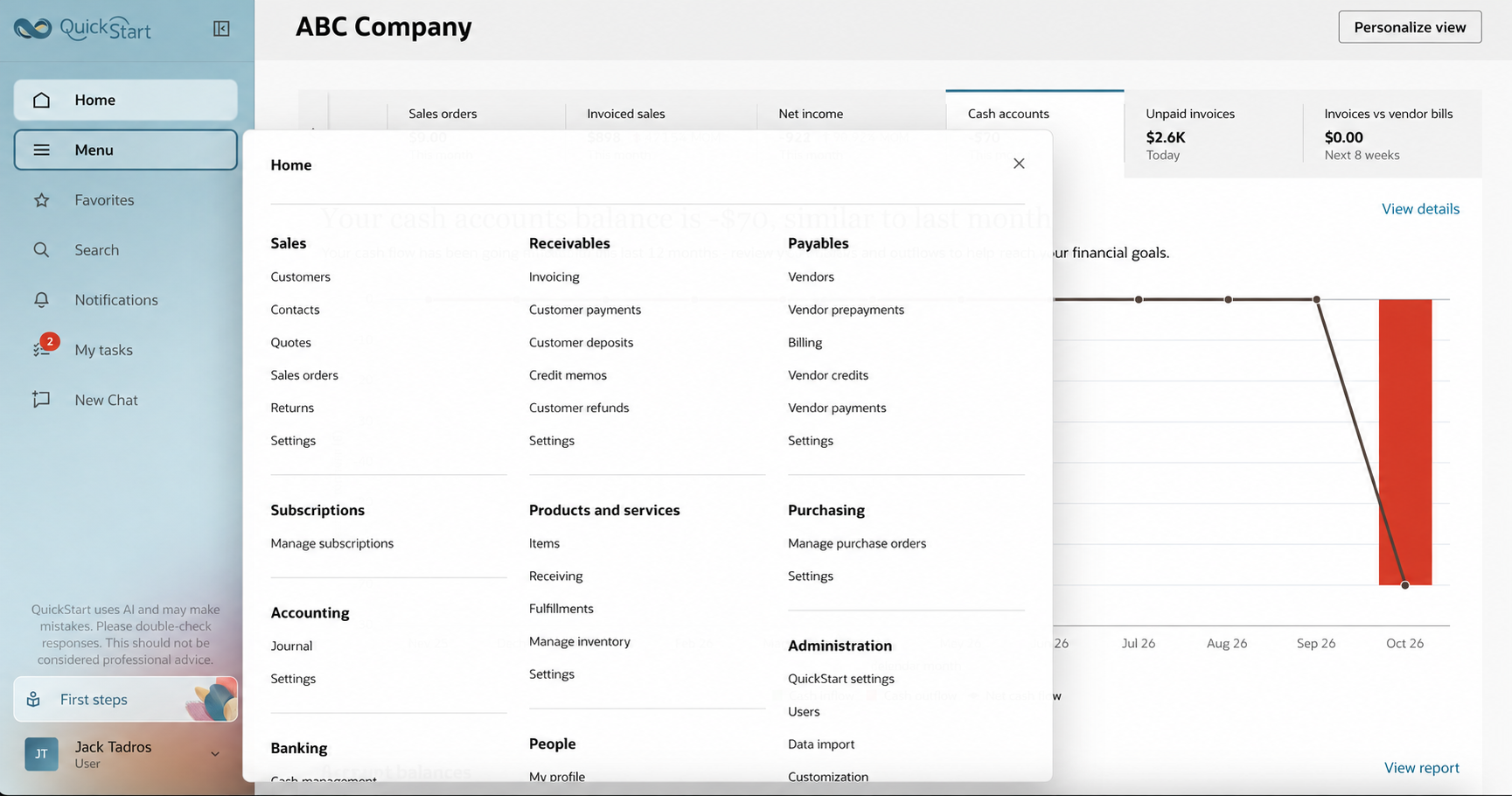
QuickStart’s financial and operational navigation.
First Steps: Setting Up QuickStart
The First Steps checklist turns onboarding into a set of practical tasks. It guides users through reviewing their financial structure, assigning access, and preparing the account for transactions.
Start by reviewing the personalized chart of accounts, then invite co-founders, finance staff, or advisors and assign appropriate permissions. Add the company’s jurisdiction and tax details, and configure online payments if customers will pay directly from invoices.
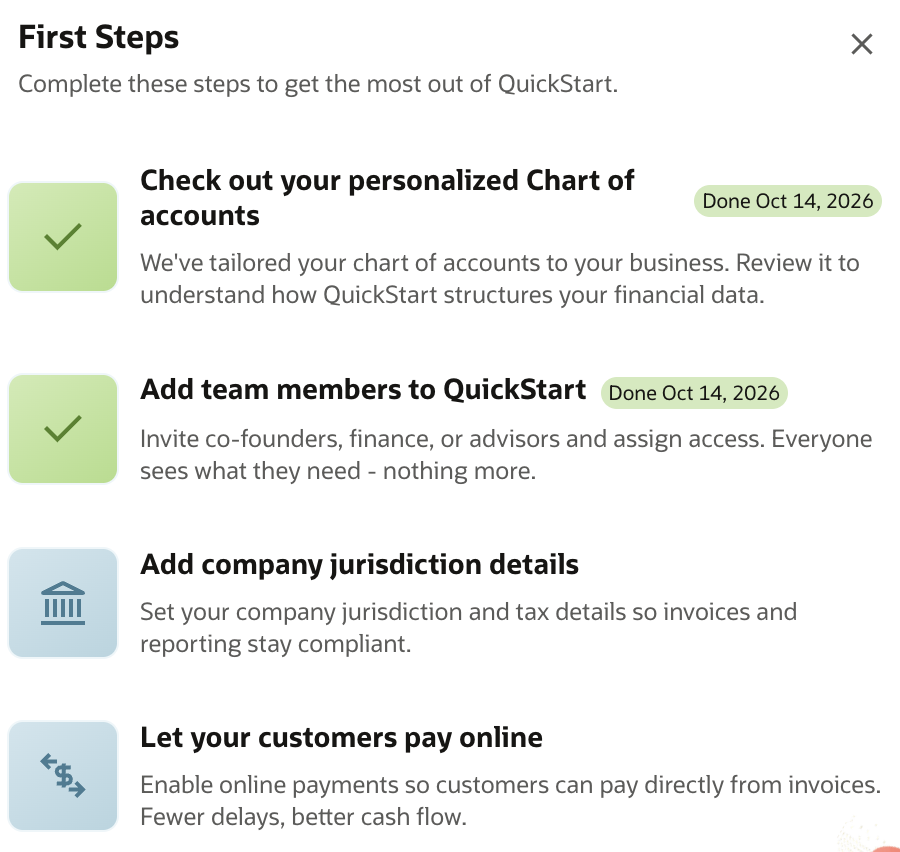
First Steps: financial setup, team access, and payment readiness.
Next, create the first customer invoice and vendor bill, and connect a supported bank or card account to import activity. Businesses with recurring revenue can create their first subscription to automate billing and begin populating subscription metrics.
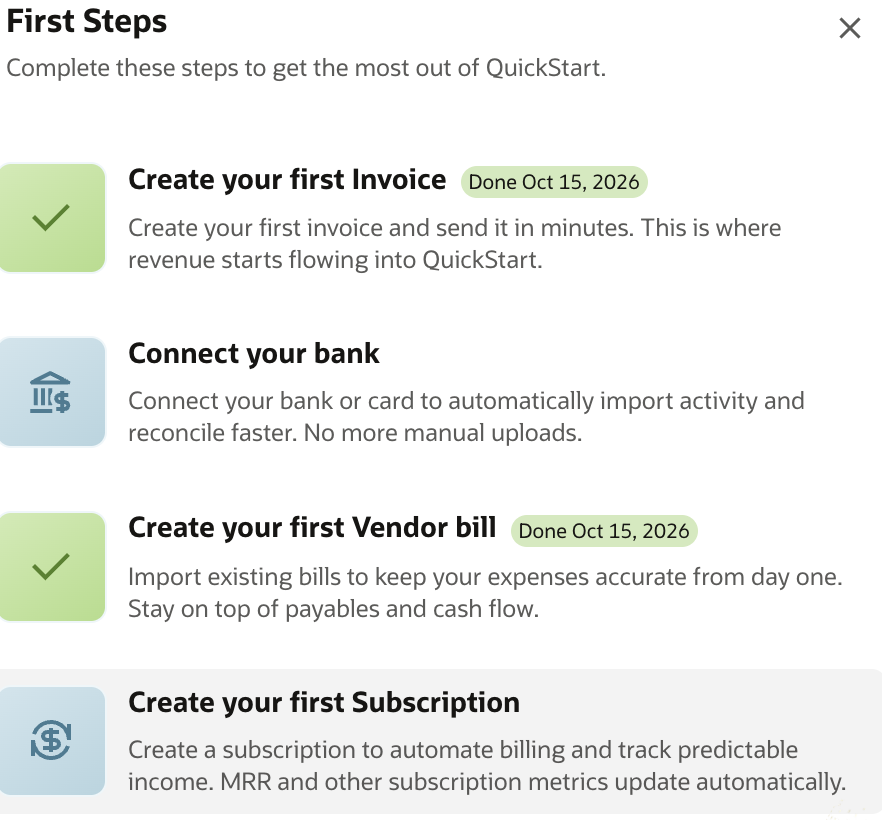
First Steps: begin invoicing, banking, payables, and subscriptions.
The screenshots show completed and outstanding tasks in the example account; they do not indicate that every setup step has been tested. From Azdan’s perspective, the checklist is a useful starting point, while opening balances, accounting policies, and permissions still deserve careful review.
Invoicing and Daily Financial Tasks
The invoicing workspace shows two open invoices totaling $2,597, alongside supplier bills requiring attention. Users can review customer balances, due dates, and payment tasks in the same workspace, helping founders connect incoming cash with upcoming obligations.
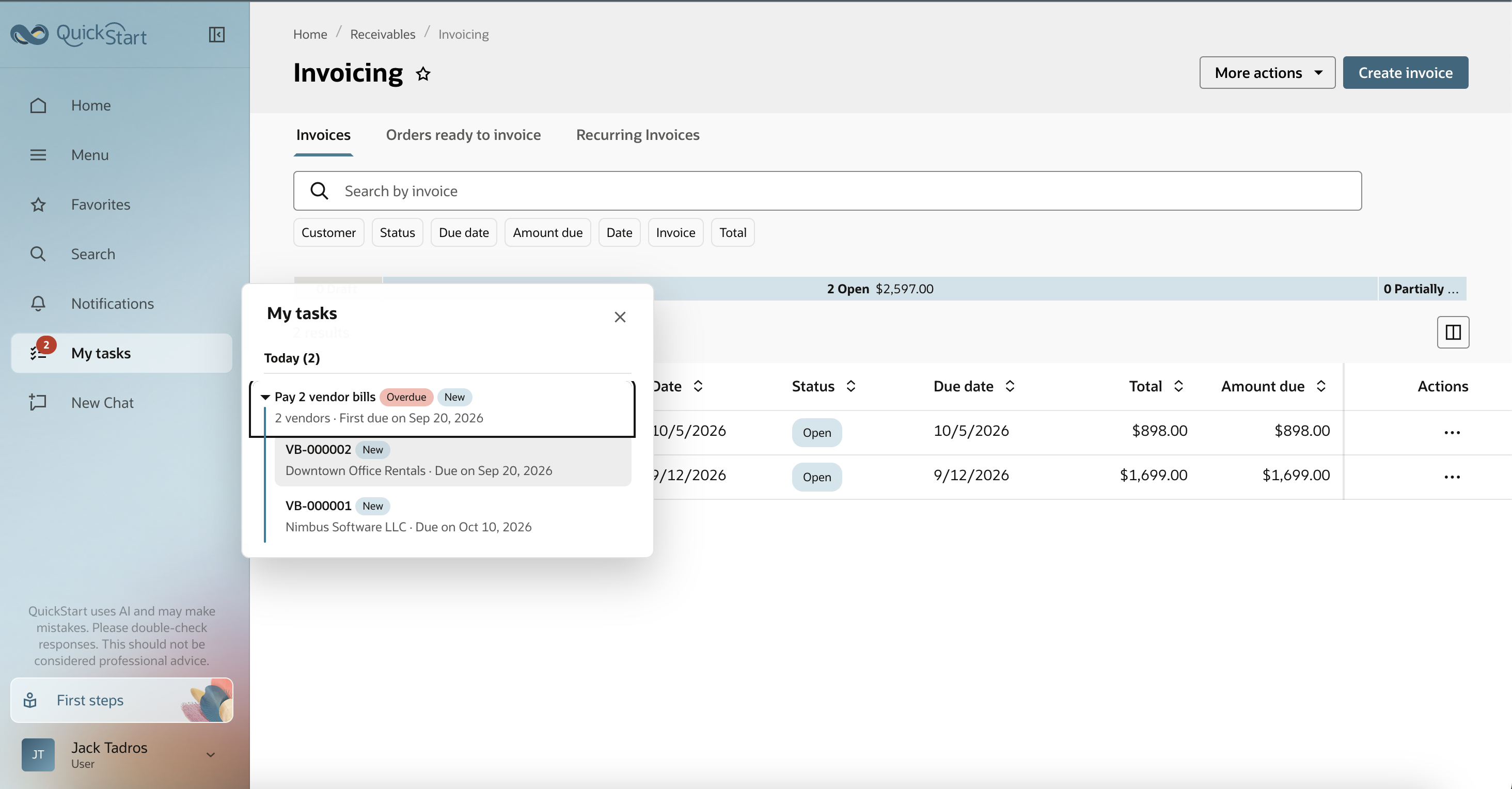
Customer invoices and supplier payment tasks in one workspace.
In a small business, one person may handle invoicing, collections, expenses, and cash monitoring. Bringing these activities together is useful because an overdue invoice or unexpected bill can affect the same cash position. We would still test payment allocation, bank matching, and reconciliation before assessing the complete workflow.
Startup Metrics and Financial Visibility
The dashboards include MRR, burn rate, runway, customer acquisition cost, and customer lifetime value. These measures help founders look beyond financial statements to understand recurring income, spending, and the sustainability of customer growth.
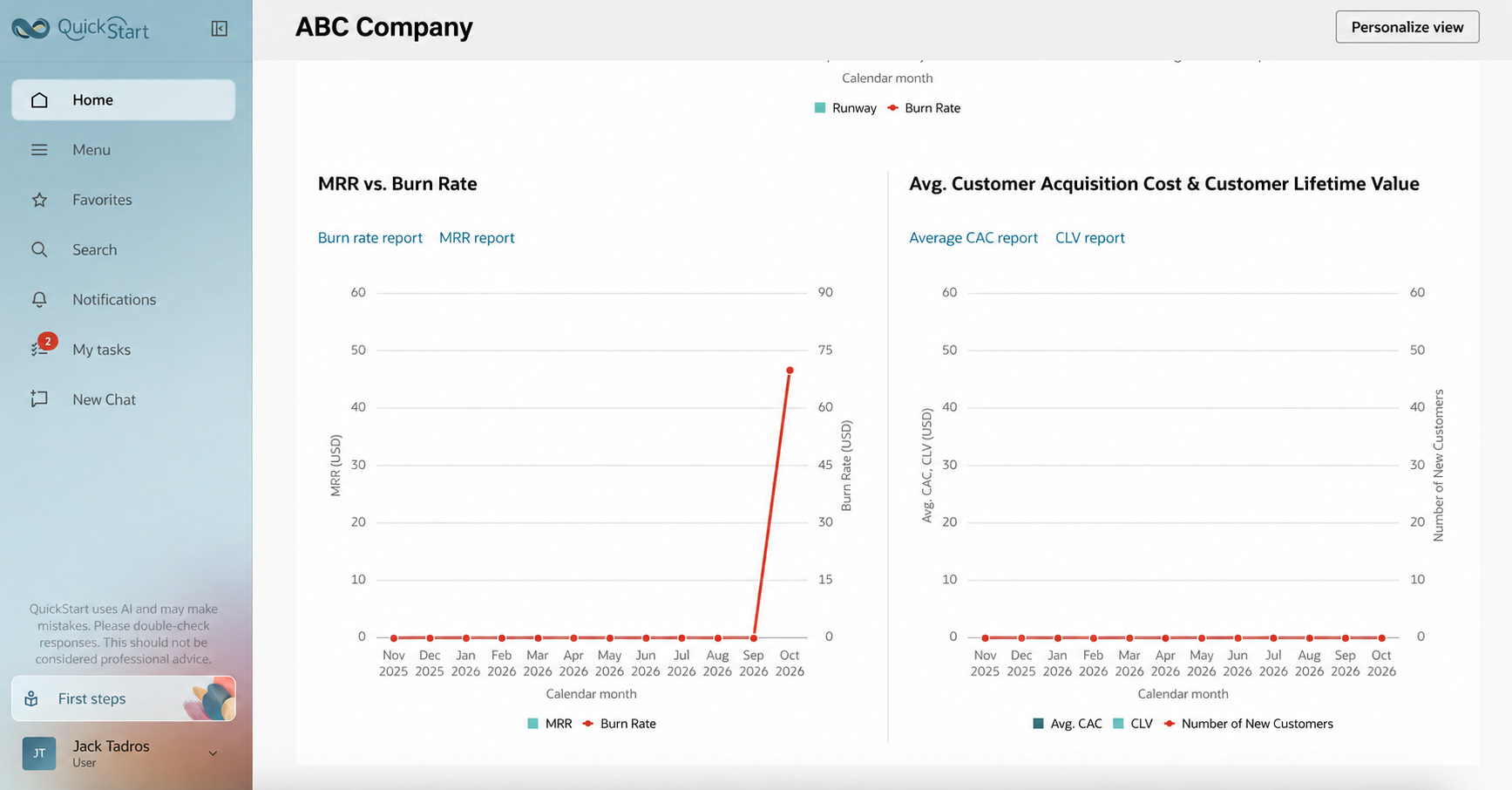
Startup reporting dashboards in the example account.
The example charts are largely unpopulated, so they demonstrate the reporting structure rather than business performance. Reliable results will depend on clean transaction data and clear metric definitions, particularly when subscriptions include discounts, usage charges, or cancellations.
Ask Oracle and External AI Tools
We asked Ask Oracle, “Who are top paying customers this Q?” It returned Acme Logistics with $898 in invoiced sales and linked to the supporting report. This shows how conversational reporting can help users find financial information without first locating the relevant report.
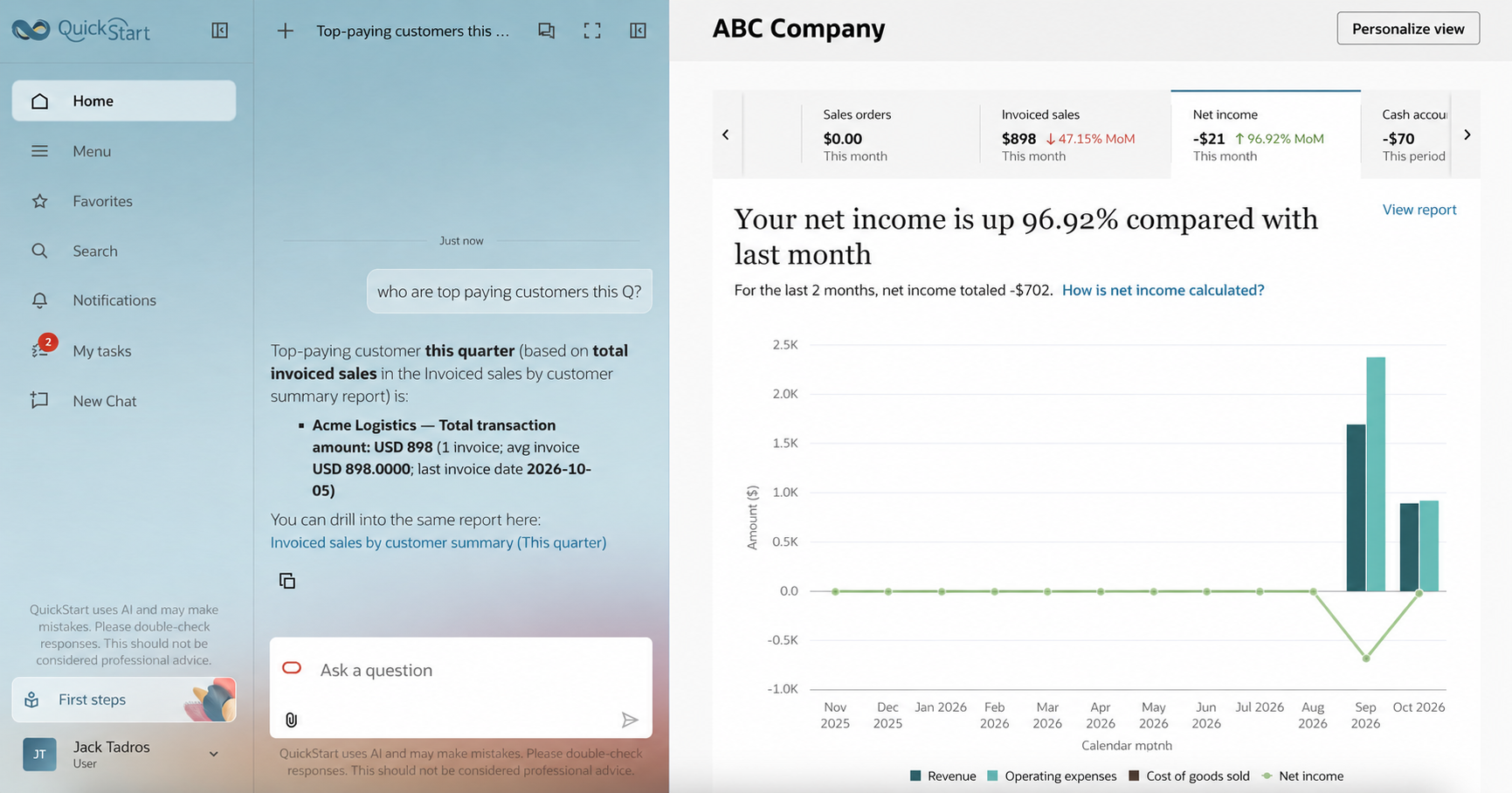
Ask Oracle’s response with a link to supporting financial information.
The distinction between invoiced sales and collected cash matters: the response used sales figures, which do not necessarily identify the customer who paid the most cash. Users should check the underlying records and confirm that an AI answer matches the question.
QuickStart also supports connectivity with compatible external AI tools through MCP. Our first-day test covered the built-in Ask Oracle interaction; we have not independently validated the ChatGPT or Claude workflows end to end. Their use depends on supported connections, configuration, and permissions.
Free Plan: Limits to Check
The free offering has defined capacity limits, so founders should estimate their workload before adopting it. According to Oracle’s QuickStart service description, the allowances include:
- Five users and four connected bank or credit card accounts.
- 2,500 new business records, 800 outbound emails, and 175 new documents per month.
- 20 GB of document storage and two concurrent integration requests.
Monthly allowances reset without unused capacity carrying forward. Record usage includes more than invoices: customers, items, subscriptions, bills, and journal entries can also contribute. Two concurrent integration requests limits simultaneous activity, rather than necessarily limiting the number of configured integrations.
Watch: Evan Goldberg on QuickStart
In this NYSE interview, Oracle NetSuite co-founder Evan Goldberg discusses QuickStart, AI-powered startup finance, and the path toward broader NetSuite capabilities as businesses grow.
Watch the NYSE interview with Evan Goldberg.
Azdan’s Assessment
QuickStart is worth evaluating for eligible technology startups that need core financial workflows, recurring billing, and startup reporting. Its potential advantage is establishing a foundation in the NetSuite ecosystem early, although moving to full NetSuite may still require configuration and additional investment.
Businesses with multiple entities, complex inventory costing, advanced revenue recognition, or demanding integrations should assess full NetSuite against their requirements. QuickBooks, Odoo, and Zoho may also remain appropriate choices; the decision should reflect both current needs and expected growth.
Our initial assessment is positive, with further validation needed around financial controls, AI accuracy, subscriptions, and the upgrade path. For a startup choosing its first financial system, QuickStart deserves a place on the shortlist.