A publisher runs more process areas than most businesses its size, because it sells through the trade, takes stock back, holds stock in other people's shops, and pays the people who made the product a share of what it earned. Every one of those has a documented leading practice, and two of them hide traps that are easy to walk into. This is the leading practice reference for publishing: every process area, the flow it follows, the rules that govern it, and a copy-ready skill file for each one.
How to Use This
Each process area below carries three things. A flow, which is the sequence the process actually runs in. A short set of rules specific to publishing rather than generic ERP advice. And a skill file you can copy straight out of the page, written as markdown so it can be handed to an AI assistant, dropped into a project repository, or used as the basis for a design document.
The skill files are deliberately short. They are checklists for people who already know the domain, not tutorials. Each one names the roles that own the process, the flow, the rules, what to verify before go-live, and the failure modes that recur.
Methodology note. This reflects the Publishing Standard edition as applied by Azdan across its NetSuite delivery in the UAE, Saudi Arabia, and Egypt. Module availability differs by edition and license, so confirm against your own before treating any rule as available. Where a point is a recommendation from delivery experience rather than a documented rule, it is labeled as one.
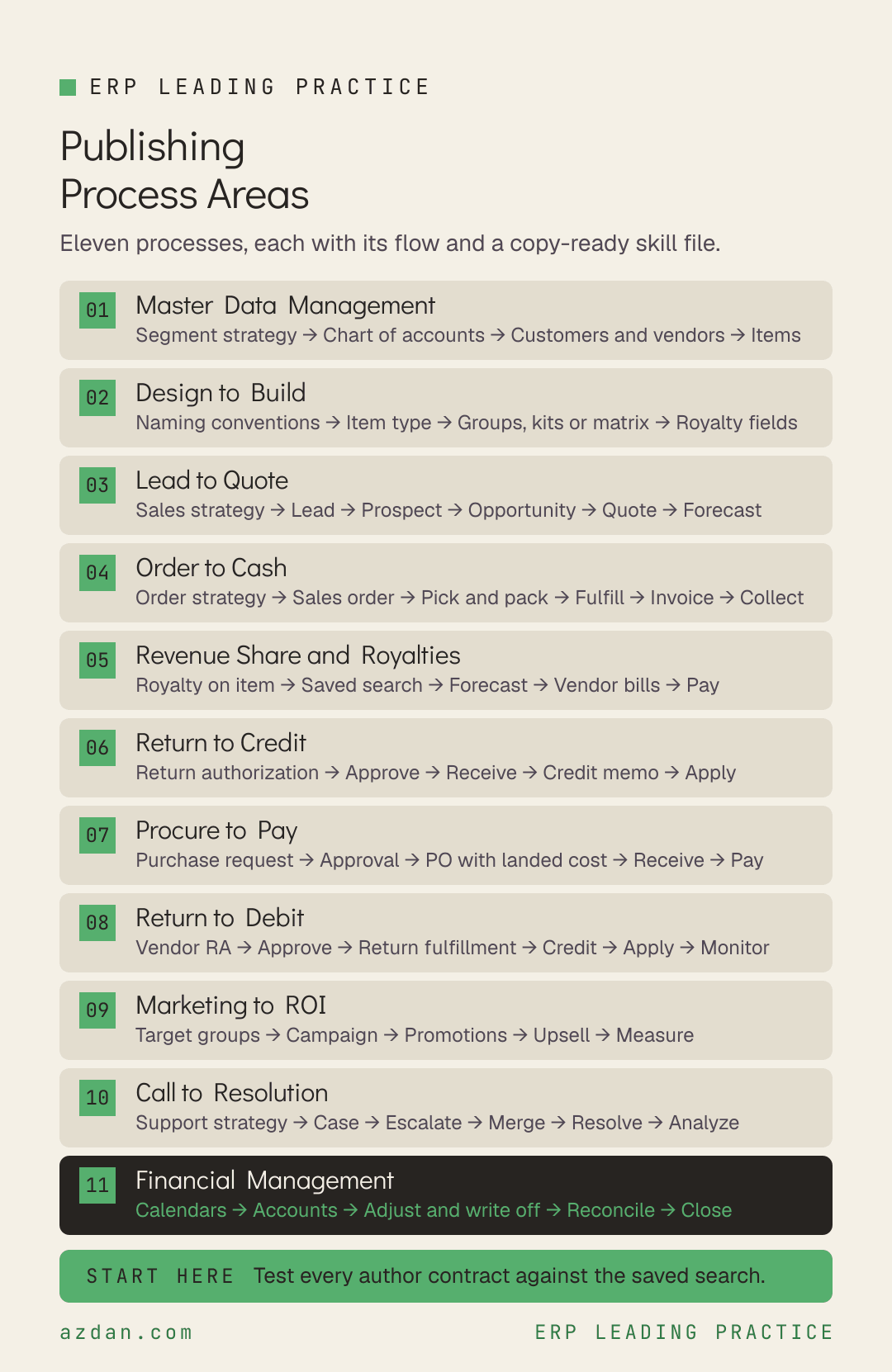
The 11 Process Areas
Master Data Management → Design to Build → Lead to Quote → Order to Cash → Revenue Share and Royalties → Return to Credit → Procure to Pay → Return to Debit → Marketing to ROI → Call to Resolution → Financial Management
Process area
Primary owner
What it covers
Master Data Management
Controller
Accounts, customers, vendors and items, plus the company structure they sit in.
Design to Build
Inventory Manager
Item records, and the structures that sit on them.
Lead to Quote
Sales
Recording and managing the selling activities that bring in new trade customers, and keeping the pipeline honest enough to forecast from.
Order to Cash
Sales
Transacting with trade customers, fulfilling, billing and collecting, including stock that is placed in a customer's shop but still belongs to the publisher.
Revenue Share and Royalties
Controller
Record to Pay for the people who made the product.
Return to Credit
Customer Service
Customer returns, credits and refunds.
Procure to Pay
Purchasing Manager
Purchasing and vendor management, covering printers, paper, freight and the services a list needs, as well as the author vendors paid through the royalty process.
Return to Debit
Inventory Manager
Vendor returns, credits and refunds, including the credits that arise from late or damaged print deliveries rather than from returns.
Marketing to ROI
Sales Manager
Campaigns, target groups, promotions and upsell.
Call to Resolution
Customer Service
Customer support through case management.
Financial Management
Controller
Accounts, periods, close and reporting.
1. Master Data Management
Accounts, customers, vendors and items, plus the company structure they sit in. The edition is explicit that the subsidiary structure and segmentation strategy are defined in advance of setup, not worked out along the way.
Define subsidiary and segment strategy → Build the chart of accounts → Load customers and vendors → Create items → Validate
Leading practice rules
Define the subsidiary structure and segmentation strategy before setup begins.
The account records are the chart of accounts. Each account type drives its purpose within transactions.
Leads, prospects and customers all live on the customer record, distinguished by its status field. Leads have no quotes or sales orders; prospects have no sales orders.
Authors and other rights holders paid a share of revenue are set up as vendors, because royalties are owed to a vendor.
Skill file: Master Data Management
---
name: publishing-master-data-management
description: NetSuite leading practice for Master Data Management in publishing
---

# Master Data Management - Publishing

## Roles
Controller, Chief Financial Officer, Sales, Purchasing Manager

## Process flow
Define subsidiary and segment strategy → Build the chart of accounts → Load customers and vendors → Create items → Validate

## Leading practice rules
- Define the subsidiary structure and segmentation strategy before setup begins.
- The account records are the chart of accounts. Each account type drives its purpose within transactions.
- Leads, prospects and customers all live on the customer record, distinguished by its status field. Leads have no quotes or sales orders; prospects have no sales orders.
- Authors and other rights holders paid a share of revenue are set up as vendors, because royalties are owed to a vendor.

## Check before go-live
- [ ] Subsidiary and segment strategy signed off before configuration starts
- [ ] Every royalty-bearing author or rights holder created as a vendor

## Known failure modes
- Segmentation designed during configuration, so reporting dimensions change after data has been loaded against them

## Scope note
This reflects the Publishing Standard edition. Confirm against your own licensed
modules and edition before treating any rule as available.
2. Design to Build
Item records, and the structures that sit on them. In publishing the item record carries the royalty rate as well as the price, so item design is also royalty design.
Define naming conventions → Choose item type → Structure groups, kits or matrix → Add royalty fields → Release
Leading practice rules
Item records hold the accounting information, pricing and attributes for everything bought and sold.
Use inventory status codes to make stock unavailable for commitment without defining separate virtual locations, which suits quarantined returns and embargoed titles.
Use lot numbered items where stock needs lots and expiry dates, and serialized items where each unit has its own serial number.
Use item groups to add several items to an order at once, and kit items for multi-component items fulfilled without assembly. A kit's price can be set independently; a group's cannot.
Use matrix items where a parent carries options, and discount items for line-level discounts.
Maintain item integrity: check for duplicates, and define company-specific naming conventions for every item type.
Skill file: Design to Build
---
name: publishing-design-to-build
description: NetSuite leading practice for Design to Build in publishing
---

# Design to Build - Publishing

## Roles
Inventory Manager, Sales Manager, Controller, Administrator

## Process flow
Define naming conventions → Choose item type → Structure groups, kits or matrix → Add royalty fields → Release

## Leading practice rules
- Item records hold the accounting information, pricing and attributes for everything bought and sold.
- Use inventory status codes to make stock unavailable for commitment without defining separate virtual locations, which suits quarantined returns and embargoed titles.
- Use lot numbered items where stock needs lots and expiry dates, and serialized items where each unit has its own serial number.
- Use item groups to add several items to an order at once, and kit items for multi-component items fulfilled without assembly. A kit's price can be set independently; a group's cannot.
- Use matrix items where a parent carries options, and discount items for line-level discounts.
- Maintain item integrity: check for duplicates, and define company-specific naming conventions for every item type.

## Check before go-live
- [ ] Naming convention agreed per item type before the item load
- [ ] A duplicate-item saved search in place after activation

## Known failure modes
- Duplicate items for the same title, which split its sales history and therefore its royalty calculation

## Scope note
This reflects the Publishing Standard edition. Confirm against your own licensed
modules and edition before treating any rule as available.
3. Lead to Quote
Recording and managing the selling activities that bring in new trade customers, and keeping the pipeline honest enough to forecast from.
Leadership defines the strategy for growing and managing sales before the pipeline is configured.
Keep one opportunity per prospect or customer to maintain the integrity of the pipeline, with variations handled as separate quotes against it.
Sales rep forecasts update automatically from the opportunities, quotes and sales orders the reps enter, so the forecast is only as current as that data.
Monitor lead to prospect conversion against the rates set in the sales strategy.
Skill file: Lead to Quote
---
name: publishing-lead-to-quote
description: NetSuite leading practice for Lead to Quote in publishing
---

# Lead to Quote - Publishing

## Roles
Sales, Sales Manager, Chief Executive Officer, Chief Financial Officer

## Process flow
Define sales strategy → Lead → Prospect → Opportunity → Quote → Forecast

## Leading practice rules
- Leadership defines the strategy for growing and managing sales before the pipeline is configured.
- Keep one opportunity per prospect or customer to maintain the integrity of the pipeline, with variations handled as separate quotes against it.
- Sales rep forecasts update automatically from the opportunities, quotes and sales orders the reps enter, so the forecast is only as current as that data.
- Monitor lead to prospect conversion against the rates set in the sales strategy.

## Check before go-live
- [ ] Target conversion rates written into the sales strategy, so there is something to monitor against

## Known failure modes
- Several open opportunities for one customer, producing a pipeline that overstates itself

## Scope note
This reflects the Publishing Standard edition. Confirm against your own licensed
modules and edition before treating any rule as available.
4. Order to Cash
Transacting with trade customers, fulfilling, billing and collecting, including stock that is placed in a customer's shop but still belongs to the publisher.
Define order strategy → Sales order → Pick and pack → Fulfill → Invoice → Collect
Leading practice rules
Define the order management and returns strategy, and its reporting, before configuring the flow.
Drop ship purchase orders are created from the sales order rather than from a supply plan.
Where there is a separation of duties or an extended lead time between picking and shipping, use a multi-step pick, pack and ship process.
For consignment or concession stock, add the customer's location as a NetSuite location and move stock there on a transfer order. You still own it.
When the customer reports what sold, import the sales order data for that quantity, by CSV or through a partner integration, then fulfill and bill it.
Return unsold consignment stock to your main location with a transfer order.
Configure Ship Central packing rules, carton and pallet sizes and labels where packing is done on the mobile pack station.
Skill file: Order to Cash
---
name: publishing-order-to-cash
description: NetSuite leading practice for Order to Cash in publishing
---

# Order to Cash - Publishing

## Roles
Sales, Sales Manager, Customer Service, Warehouse Manager, Warehouse Operator

## Process flow
Define order strategy → Sales order → Pick and pack → Fulfill → Invoice → Collect

## Leading practice rules
- Define the order management and returns strategy, and its reporting, before configuring the flow.
- Drop ship purchase orders are created from the sales order rather than from a supply plan.
- Where there is a separation of duties or an extended lead time between picking and shipping, use a multi-step pick, pack and ship process.
- For consignment or concession stock, add the customer's location as a NetSuite location and move stock there on a transfer order. You still own it.
- When the customer reports what sold, import the sales order data for that quantity, by CSV or through a partner integration, then fulfill and bill it.
- Return unsold consignment stock to your main location with a transfer order.
- Configure Ship Central packing rules, carton and pallet sizes and labels where packing is done on the mobile pack station.

## Check before go-live
- [ ] Every consignment customer set up as its own location
- [ ] A cadence agreed with consignment customers for reporting what sold

## Known failure modes
- Consignment stock billed when it is shipped rather than when it sells, which recognizes revenue for books still on someone else's shelf

## Scope note
This reflects the Publishing Standard edition. Confirm against your own licensed
modules and edition before treating any rule as available.
5. Revenue Share and Royalties
Record to Pay for the people who made the product. There is no dedicated royalty engine in the standard edition. Royalties are calculated from a field on the item and a saved search, and paid through accounts payable.
Set royalty rate on the item → Calculate by saved search → Forecast what is accruing → Export and import vendor bills → Pay → Report
Leading practice rules
A royalty is a percentage or flat amount owed to a vendor, calculated from the sale of specific items.
Record the royalty percentage or amount for the specific vendor in a custom field on the item record.
The saved search Rev Share and Royalties Calculated This Month calculates both the forecasted royalty and the final amount owed, from sales invoices, credit memos, cash sales and return authorizations. Returns reduce what is owed.
Create the vendor bills by export and import rather than by hand, which removes manual calculation and manual bill entry.
The standard reports cover vendors with royalties, top royalties this year, royalties calculated this month, royalties to be paid, royalties paid as a communication to the vendor, and agreements up for renewal this year.
Where contracts outgrow a single rate on the item, the Rebate Management add-on sets up each contract as a rebate agreement, accrues royalties, and pays them out through the same process.
Skill file: Revenue Share and Royalties
---
name: publishing-revenue-share-and-royalties
description: NetSuite leading practice for Revenue Share and Royalties in publishing
---

# Revenue Share and Royalties - Publishing

## Roles
Controller, Sales Manager, Purchasing Manager, Administrator

## Process flow
Set royalty rate on the item → Calculate by saved search → Forecast what is accruing → Export and import vendor bills → Pay → Report

## Leading practice rules
- A royalty is a percentage or flat amount owed to a vendor, calculated from the sale of specific items.
- Record the royalty percentage or amount for the specific vendor in a custom field on the item record.
- The saved search Rev Share and Royalties Calculated This Month calculates both the forecasted royalty and the final amount owed, from sales invoices, credit memos, cash sales and return authorizations. Returns reduce what is owed.
- Create the vendor bills by export and import rather than by hand, which removes manual calculation and manual bill entry.
- The standard reports cover vendors with royalties, top royalties this year, royalties calculated this month, royalties to be paid, royalties paid as a communication to the vendor, and agreements up for renewal this year.
- Where contracts outgrow a single rate on the item, the Rebate Management add-on sets up each contract as a rebate agreement, accrues royalties, and pays them out through the same process.

## Check before go-live
- [ ] Every author contract tested against one question: can its terms be held as a percentage or flat amount on the item
- [ ] A decision on the Rebate Management add-on made at design, for any contract that cannot
- [ ] Royalties accrued monthly rather than only at statement time

## Known failure modes
- Escalating rates, split rights or earn-out advances discovered in testing, when the saved search approach cannot express them
- Royalties calculated from invoices only, ignoring credit memos and returns, so authors are overpaid on books that came back

## Scope note
This reflects the Publishing Standard edition. Confirm against your own licensed
modules and edition before treating any rule as available.
6. Return to Credit
Customer returns, credits and refunds. In trade publishing returns are a commercial term rather than an exception, and each one also moves the royalty owed on that title.
Create return authorization → Approve → Receive returned items → Credit memo → Apply credit or replace
Leading practice rules
Start the customer return with a return authorization, and review dashboard reminders for those awaiting approval.
Create item receipts for returned goods against the open return authorization.
Where a replacement is requested, process the return normally and add the replacement to a new sales order, then apply the credit from the return to it.
Credit memos are generated from the return authorization. Where no authorization is needed, create the credit memo from the invoice or from the credit memo form, and apply it or post it unapplied to the customer.
Apply open credits to open invoices; with none open, hold the credit on the customer record.
Track and analyze customer returns performance.
Skill file: Return to Credit
---
name: publishing-return-to-credit
description: NetSuite leading practice for Return to Credit in publishing
---

# Return to Credit - Publishing

## Roles
Customer Service, Sales Manager, Warehouse Operator, A/R Analyst, Controller

## Process flow
Create return authorization → Approve → Receive returned items → Credit memo → Apply credit or replace

## Leading practice rules
- Start the customer return with a return authorization, and review dashboard reminders for those awaiting approval.
- Create item receipts for returned goods against the open return authorization.
- Where a replacement is requested, process the return normally and add the replacement to a new sales order, then apply the credit from the return to it.
- Credit memos are generated from the return authorization. Where no authorization is needed, create the credit memo from the invoice or from the credit memo form, and apply it or post it unapplied to the customer.
- Apply open credits to open invoices; with none open, hold the credit on the customer record.
- Track and analyze customer returns performance.

## Check before go-live
- [ ] Returns flowing into the royalty calculation, confirmed on a test title

## Known failure modes
- Returns credited to the customer but excluded from the royalty search, so the author keeps a royalty on a sale that reversed

## Scope note
This reflects the Publishing Standard edition. Confirm against your own licensed
modules and edition before treating any rule as available.
7. Procure to Pay
Purchasing and vendor management, covering printers, paper, freight and the services a list needs, as well as the author vendors paid through the royalty process.
Purchase request → Approval → Purchase order with landed cost → Receive → Vendor bill → Pay
Leading practice rules
Operational purchasing covers creating and maintaining purchase orders, assigning landed costs, and line-level reason codes.
A purchase request records a needed purchase and keeps it within policy and budget, then converts to a purchase order after approval.
Hold vendor pricing in price lists and schedules.
Use vendor categories so vendor performance is evaluated consistently in searches, lists and reporting.
Use in-transit vendor payments to show payments initiated but not yet confirmed.
Skill file: Procure to Pay
---
name: publishing-procure-to-pay
description: NetSuite leading practice for Procure to Pay in publishing
---

# Procure to Pay - Publishing

## Roles
Purchasing Manager, Controller, A/P Analyst, Inventory Manager, Warehouse Manager

## Process flow
Purchase request → Approval → Purchase order with landed cost → Receive → Vendor bill → Pay

## Leading practice rules
- Operational purchasing covers creating and maintaining purchase orders, assigning landed costs, and line-level reason codes.
- A purchase request records a needed purchase and keeps it within policy and budget, then converts to a purchase order after approval.
- Hold vendor pricing in price lists and schedules.
- Use vendor categories so vendor performance is evaluated consistently in searches, lists and reporting.
- Use in-transit vendor payments to show payments initiated but not yet confirmed.

## Check before go-live
- [ ] Vendor categories separating print, freight, services and royalty vendors

## Known failure modes
- Royalty vendors mixed into general supplier reporting, so author payments cannot be analyzed on their own

## Scope note
This reflects the Publishing Standard edition. Confirm against your own licensed
modules and edition before treating any rule as available.
8. Return to Debit
Vendor returns, credits and refunds, including the credits that arise from late or damaged print deliveries rather than from returns.
Create vendor return authorizations from the originating purchase transaction for unwanted or damaged items.
Approve or reject them according to policy, prompted by dashboard alerts or email.
Generate the return item fulfillments from the dashboard to send goods back.
Raise vendor credits for contract breaches such as late deliveries or damaged items, as well as for returns and negotiated discounts.
Apply vendor credits to reduce accounts payable, and track vendor return performance through alerts, KPIs, scorecards and searches.
Skill file: Return to Debit
---
name: publishing-return-to-debit
description: NetSuite leading practice for Return to Debit in publishing
---

# Return to Debit - Publishing

## Roles
Inventory Manager, Purchasing Manager, Warehouse Manager, A/P Analyst, Controller

## Process flow
Vendor return authorization → Approve → Return fulfillment → Vendor credit → Apply → Monitor

## Leading practice rules
- Create vendor return authorizations from the originating purchase transaction for unwanted or damaged items.
- Approve or reject them according to policy, prompted by dashboard alerts or email.
- Generate the return item fulfillments from the dashboard to send goods back.
- Raise vendor credits for contract breaches such as late deliveries or damaged items, as well as for returns and negotiated discounts.
- Apply vendor credits to reduce accounts payable, and track vendor return performance through alerts, KPIs, scorecards and searches.

## Check before go-live
- [ ] Vendor scorecard defined for print and freight suppliers

## Known failure modes
- Damaged print runs absorbed as write-offs with no vendor credit raised against the printer

## Scope note
This reflects the Publishing Standard edition. Confirm against your own licensed
modules and edition before treating any rule as available.
9. Marketing to ROI
Campaigns, target groups, promotions and upsell. Documented in full in this edition, and closely tied to the title and item structure it promotes.
Roles: Sales Manager, Sales
Process flow
Define target groups → Build campaign → Set promotions → Configure upsell → Measure
Leading practice rules
Set up target groups so each campaign reaches the right audience without excessive marketing traffic.
Create, monitor and maintain marketing campaigns in the system rather than alongside it.
Use the Standard Promotions feature to assign promotional discounts to items.
Use Upsell Manager to define upsell opportunities, recommendations and criteria for targeted customer groups.
Skill file: Marketing to ROI
---
name: publishing-marketing-to-roi
description: NetSuite leading practice for Marketing to ROI in publishing
---

# Marketing to ROI - Publishing

## Roles
Sales Manager, Sales

## Process flow
Define target groups → Build campaign → Set promotions → Configure upsell → Measure

## Leading practice rules
- Set up target groups so each campaign reaches the right audience without excessive marketing traffic.
- Create, monitor and maintain marketing campaigns in the system rather than alongside it.
- Use the Standard Promotions feature to assign promotional discounts to items.
- Use Upsell Manager to define upsell opportunities, recommendations and criteria for targeted customer groups.

## Check before go-live
- [ ] Every campaign linked to identifiable titles so its effect can be measured

## Known failure modes
- Promotions run on titles without measuring the sales they produced, so they are repeated whether they worked or not

## Scope note
This reflects the Publishing Standard edition. Confirm against your own licensed
modules and edition before treating any rule as available.
10. Call to Resolution
Customer support through case management. Documented in this edition where several others leave it empty, and worth using for the trade customer queries that otherwise live in email.
Define support strategy → Create case → Escalate → Merge → Resolve → Analyze performance
Leading practice rules
Define the customer support strategy, and the reporting that will assess the support team, before configuring cases.
Use case management to track customer questions, issues, concerns and special requests.
Escalate a case where it needs another employee or group, using the escalation message to send private information to them by email.
Merge similar cases from an existing case with the Merge button.
Maintain open cases with reminders and dashboard searches.
Track support performance through dashboard alerts, KPIs and native reports. Daily analysis is recommended so issues are caught early.
Skill file: Call to Resolution
---
name: publishing-call-to-resolution
description: NetSuite leading practice for Call to Resolution in publishing
---

# Call to Resolution - Publishing

## Roles
Customer Service, Sales Manager, Chief Executive Officer, Chief Financial Officer

## Process flow
Define support strategy → Create case → Escalate → Merge → Resolve → Analyze performance

## Leading practice rules
- Define the customer support strategy, and the reporting that will assess the support team, before configuring cases.
- Use case management to track customer questions, issues, concerns and special requests.
- Escalate a case where it needs another employee or group, using the escalation message to send private information to them by email.
- Merge similar cases from an existing case with the Merge button.
- Maintain open cases with reminders and dashboard searches.
- Track support performance through dashboard alerts, KPIs and native reports. Daily analysis is recommended so issues are caught early.

## Check before go-live
- [ ] Support reporting defined before go-live, so performance can be measured from day one

## Known failure modes
- Trade queries handled in personal inboxes, so nobody can see volume, response time or recurring causes

## Scope note
This reflects the Publishing Standard edition. Confirm against your own licensed
modules and edition before treating any rule as available.
11. Financial Management
Accounts, periods, close and reporting. In publishing the close is most exposed through inventory valuation, because returns and damage are routine, and one inventory tool can quietly destroy costing history.
Set calendars and periods → Maintain accounts → Adjust and write off inventory → Reconcile → Close → Report
Leading practice rules
Consolidate accounts where possible and use segmentation for reporting dimensions. Use parent and child accounts at two levels, three at most.
A single accounting period is shared across all subsidiaries. Enable multiple calendars where a subsidiary needs a different fiscal year start or end. This does not allow different period structures across subsidiaries.
When recorded inventory is out of step with the count, use an inventory adjustment and give each line a reason code, which drives both reporting and the GL impact.
Under FIFO or LIFO costing, do not use the Adjust Inventory Worksheet. It averages the cost of any item adjusted, ignores FIFO or LIFO, and loses the costing history. Use the Adjust Inventory transaction instead.
Run a monthly write-off from the Damaged Stock location, using an inventory adjustment with the write-off account as the adjustment account.
Use a cycle count strategy that classifies items by movement velocity and sets count intervals per class.
Where the bank supplies data in an unsupported format, use a third-party conversion tool before import.
Skill file: Financial Management
---
name: publishing-financial-management
description: NetSuite leading practice for Financial Management in publishing
---

# Financial Management - Publishing

## Roles
Controller, Chief Financial Officer, Inventory Manager, A/R Analyst, A/P Analyst

## Process flow
Set calendars and periods → Maintain accounts → Adjust and write off inventory → Reconcile → Close → Report

## Leading practice rules
- Consolidate accounts where possible and use segmentation for reporting dimensions. Use parent and child accounts at two levels, three at most.
- A single accounting period is shared across all subsidiaries. Enable multiple calendars where a subsidiary needs a different fiscal year start or end. This does not allow different period structures across subsidiaries.
- When recorded inventory is out of step with the count, use an inventory adjustment and give each line a reason code, which drives both reporting and the GL impact.
- Under FIFO or LIFO costing, do not use the Adjust Inventory Worksheet. It averages the cost of any item adjusted, ignores FIFO or LIFO, and loses the costing history. Use the Adjust Inventory transaction instead.
- Run a monthly write-off from the Damaged Stock location, using an inventory adjustment with the write-off account as the adjustment account.
- Use a cycle count strategy that classifies items by movement velocity and sets count intervals per class.
- Where the bank supplies data in an unsupported format, use a third-party conversion tool before import.

## Check before go-live
- [ ] Access to the Adjust Inventory Worksheet restricted where FIFO or LIFO is in use
- [ ] Monthly damaged stock write-off scheduled with a named owner
- [ ] Reason codes defined for every type of inventory adjustment

## Known failure modes
- Using the Adjust Inventory Worksheet under FIFO or LIFO, which averages cost and permanently loses the costing history
- Damaged returns accumulating in a location that is never written off, so inventory is overstated

## Scope note
This reflects the Publishing Standard edition. Confirm against your own licensed
modules and edition before treating any rule as available.
Where to Start
Master data first, including the subsidiary structure and segmentation strategy, which the edition says must be defined before setup rather than during it. Then design to build and the royalty fields on the item record, because royalties are calculated from the item. Order to cash next, including consignment, then the two return processes. Lead to quote, marketing and support run alongside, and financial management runs throughout.
The single highest-value check across all of them: take your ten most recent author contracts and ask whether each royalty term can be expressed as a percentage or flat amount on the item and calculated by a saved search. Where the answer is no, because of escalating bands, split rights or advances that must earn out, plan for the Rebate Management add-on at design rather than discovering the gap in testing.
Published by Azdan, an Oracle NetSuite Solution Provider operating across the UAE, Saudi Arabia, and Egypt. Guidance in this article reflects Azdan's process design work with publishing businesses. Content checked August 2026.
Blog
News & Insights
Fresh thinking and real-world advice to help you scale smarter, faster, and with more clarity
.svg)