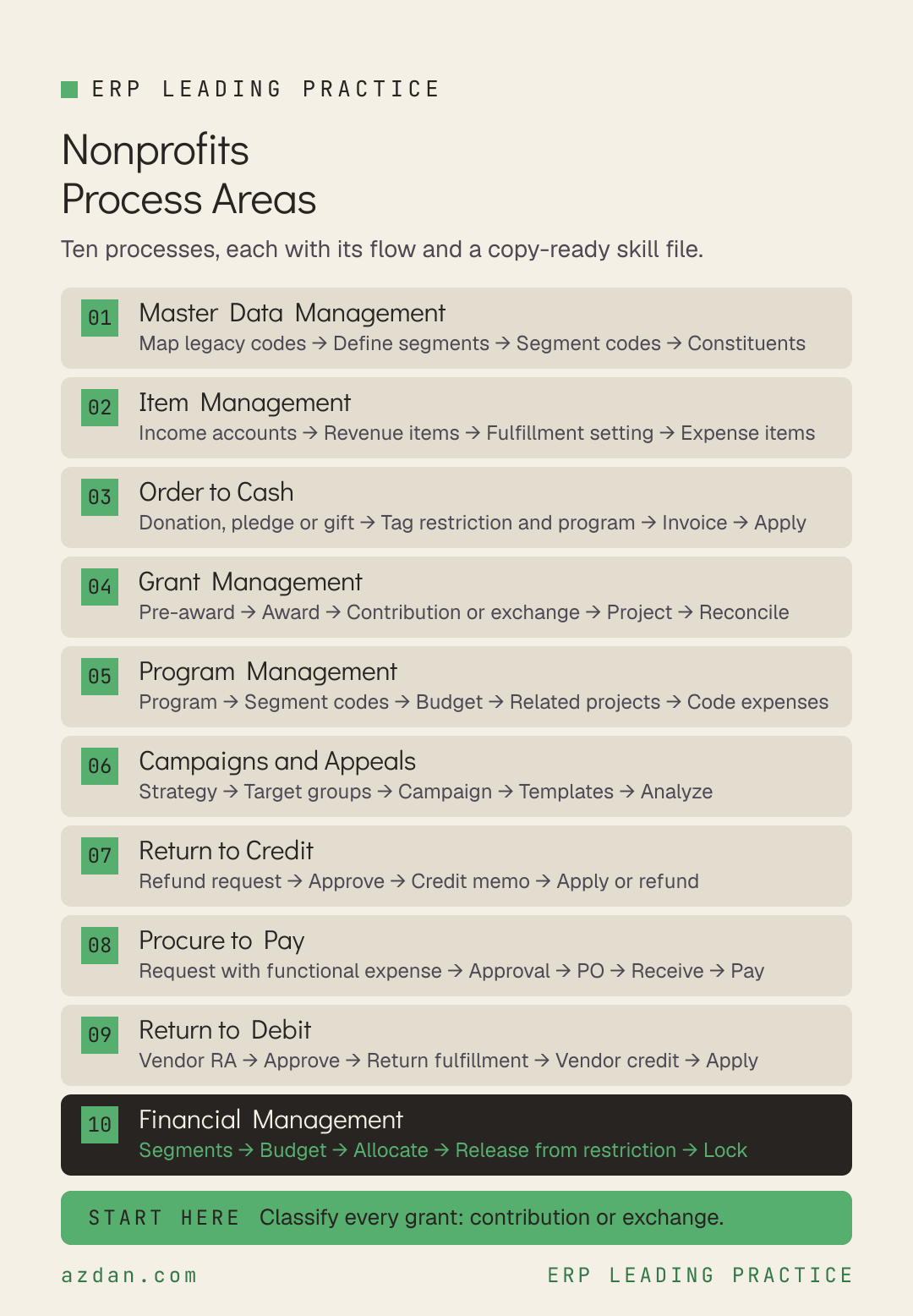
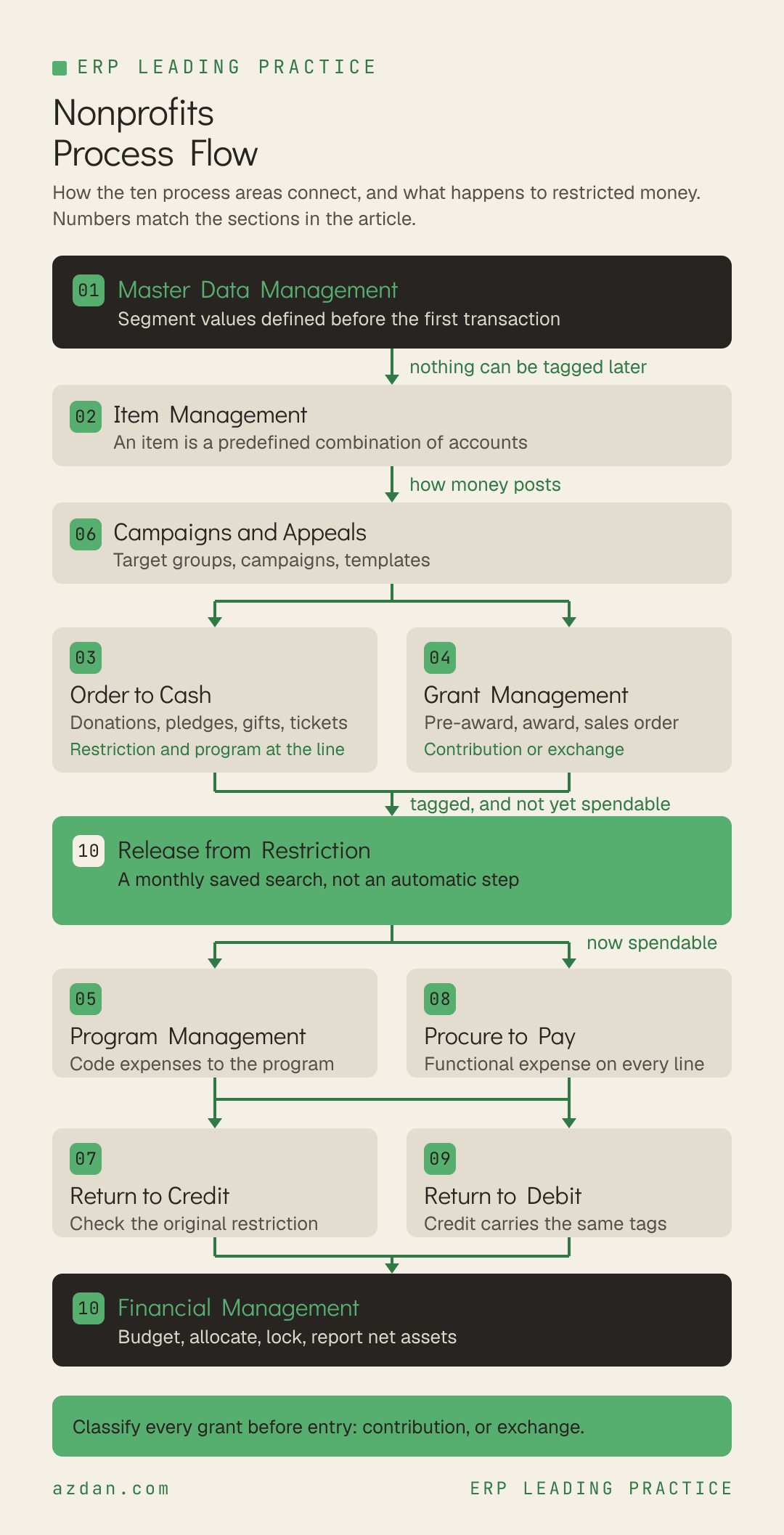
A nonprofit takes money in more ways than almost any business, as donations, pledges, gifts in kind, grants, memberships and event tickets, and most of that money arrives carrying a promise about how it will be spent. Each kind of income has its own documented entry path, and the most consequential distinction among them, between a grant that is a contribution and a grant that is an exchange, is the one most often entered the same way. This is the leading practice reference for nonprofit organizations: every process area, the flow it follows, the rules that govern it, and a copy-ready skill file for each one.
How to Use This
Each process area below carries three things. A flow, which is the sequence the process actually runs in. A short set of rules specific to nonprofit organizations rather than generic ERP advice. And a skill file you can copy straight out of the page, written as markdown so it can be handed to an AI assistant, dropped into a project repository, or used as the basis for a design document.
The skill files are deliberately short. They are checklists for people who already know the domain, not tutorials. Each one names the roles that own the process, the flow, the rules, what to verify before go-live, and the failure modes that recur.
Methodology note. This reflects the Social Impact Standard edition as applied by Azdan across its NetSuite delivery in the UAE, Saudi Arabia, and Egypt. Module availability differs by edition and license, so confirm against your own before treating any rule as available. Where a point is a recommendation from delivery experience rather than a documented rule, it is labeled as one.
The 10 Process Areas
Master Data Management → Item Management → Order to Cash → Grant Management → Program Management → Campaigns and Appeals → Return to Credit → Procure to Pay → Return to Debit → Financial Management
Process area
Primary owner
What it covers
Master Data Management
Controller
Constituents, households, vendors, accounts and the nonprofit segmentation that everything reports against.
Item Management
Controller
Items, which in a nonprofit are less about what is sold than about how money posts.
Order to Cash
A/R Clerk
Every route by which money comes in: donations, pledges, gifts, memberships, merchandise and event tickets.
Grant Management
Grant Administrator
Grants from proposal to award to spend, and the one classification that decides how each grant's money is accounted for.
Program Management
Program Manager
Programs are what a nonprofit actually delivers, and the program record is where their funding and geography meet.
Campaigns and Appeals
Development Director
Fundraising campaigns and appeals, owned by the development function and measured against what they raise.
Return to Credit
A/R Clerk
Constituent refunds and credits.
Procure to Pay
Employee Center
Purchasing and payment, where the nonprofit-specific rule is simple and absolute: every expense carries a functional expense tag.
Return to Debit
A/P Clerk
Vendor returns, credits and refunds, including those against program purchases that must reverse against the same program.
Financial Management
Controller
Segments, release from restriction, budgeting, allocation and the close.
1. Master Data Management
Constituents, households, vendors, accounts and the nonprofit segmentation that everything reports against. Segment values have to exist before the first transaction, because nothing entered without them can be reported properly afterwards.
Roles: Controller, A/R Clerk, Administrator
Process flow
Map legacy account codes → Pre-define segment values → Decide on segment codes → Load constituents and households → Validate
Leading practice rules
Nonprofit segment values must be pre-defined: Restrictions, Grants, Programs, Regions, Revenue Types and Subtypes, and Functional Expenses.
Where account codes, code blocks or account strings are already in use, decide how they map onto the prebuilt nonprofit segmentation before the chart of accounts is built.
Create and manage both individuals and organizations as constituents.
Use Households to aggregate the constituents of one family, and Constituent Relationships to track relationships between individuals and organizations.
Decide whether to use segment codes, which store prebuilt combinations of segment values and populate them together on a transaction. Not every organization will want them.
Skill file: Master Data Management
---
name: nonprofit-master-data-management
description: NetSuite leading practice for Master Data Management in nonprofit organizations
---

# Master Data Management - Nonprofits

## Roles
Controller, A/R Clerk, Administrator

## Process flow
Map legacy account codes → Pre-define segment values → Decide on segment codes → Load constituents and households → Validate

## Leading practice rules
- Nonprofit segment values must be pre-defined: Restrictions, Grants, Programs, Regions, Revenue Types and Subtypes, and Functional Expenses.
- Where account codes, code blocks or account strings are already in use, decide how they map onto the prebuilt nonprofit segmentation before the chart of accounts is built.
- Create and manage both individuals and organizations as constituents.
- Use Households to aggregate the constituents of one family, and Constituent Relationships to track relationships between individuals and organizations.
- Decide whether to use segment codes, which store prebuilt combinations of segment values and populate them together on a transaction. Not every organization will want them.

## Check before go-live
- [ ] Every segment value defined and approved before go-live
- [ ] A documented mapping from legacy account codes to the nonprofit segments

## Known failure modes
- Legacy account strings carried over unmapped, so reports split between the old codes and the new segments

## Scope note
This reflects the Social Impact Standard edition. Confirm against your own licensed
modules and edition before treating any rule as available.
2. Item Management
Items, which in a nonprofit are less about what is sold than about how money posts. On the revenue side an item is best thought of as a predefined combination of accounts.
Roles: Controller, Administrator
Process flow
Map income accounts → Create a revenue item per account → Set fulfillment preference → Create expense items → Release
Leading practice rules
An item on a nonprofit revenue transaction is a predefined combination of accounts that dictates how the transaction posts to the general ledger.
Create at least one revenue item for each income account used to record revenue, preferably as non-inventory for sale, covering contributions, membership dues, grant income, pledges and other income.
Use the Can be fulfilled or received preference on the item to decide whether it needs a fulfillment step.
Expense items can be as generic or as specific as needed, from a miscellaneous program expense to a named piece of equipment.
Depending on whether an item is for sale, for purchase or for resale, it needs an income account, an expense account or both, set on the accounting subtab.
Skill file: Item Management
---
name: nonprofit-item-management
description: NetSuite leading practice for Item Management in nonprofit organizations
---

# Item Management - Nonprofits

## Roles
Controller, Administrator

## Process flow
Map income accounts → Create a revenue item per account → Set fulfillment preference → Create expense items → Release

## Leading practice rules
- An item on a nonprofit revenue transaction is a predefined combination of accounts that dictates how the transaction posts to the general ledger.
- Create at least one revenue item for each income account used to record revenue, preferably as non-inventory for sale, covering contributions, membership dues, grant income, pledges and other income.
- Use the Can be fulfilled or received preference on the item to decide whether it needs a fulfillment step.
- Expense items can be as generic or as specific as needed, from a miscellaneous program expense to a named piece of equipment.
- Depending on whether an item is for sale, for purchase or for resale, it needs an income account, an expense account or both, set on the accounting subtab.

## Check before go-live
- [ ] A revenue item exists for every income account in use

## Known failure modes
- Several income types posted through one generic item, so revenue cannot be separated by type without journals

## Scope note
This reflects the Social Impact Standard edition. Confirm against your own licensed
modules and edition before treating any rule as available.
3. Order to Cash
Every route by which money comes in: donations, pledges, gifts, memberships, merchandise and event tickets. Each carries a restriction and a program, set at the line.
Roles: A/R Clerk, Controller, Development Director
Process flow
Record donation, pledge, gift or sale → Tag restriction and program at line level → Invoice where needed → Receive payment → Apply
Leading practice rules
Record cash donations manually, by bulk import, or online by credit card. Each must specify the restriction and program, so revenue and restriction are visible at fund level and release from restriction can find it.
Set unrestricted donations and pledges to Unrestricted for both restriction type and program type.
Record pledges as sales orders, with the required segmentation set at the line.
Set multi-year pledges to Time-Restricted, with the time segment set to the year in the invoice due date field.
Record gifts in kind, stock gifts and tribute gifts as cash sales, manually or by bulk import.
Record merchandise and event tickets as sales orders.
On stand-alone invoices, tag grant, program, restriction and department at the line level.
Write off pledge balances that have not been collected.
Skill file: Order to Cash
---
name: nonprofit-order-to-cash
description: NetSuite leading practice for Order to Cash in nonprofit organizations
---

# Order to Cash - Nonprofits

## Roles
A/R Clerk, Controller, Development Director

## Process flow
Record donation, pledge, gift or sale → Tag restriction and program at line level → Invoice where needed → Receive payment → Apply

## Leading practice rules
- Record cash donations manually, by bulk import, or online by credit card. Each must specify the restriction and program, so revenue and restriction are visible at fund level and release from restriction can find it.
- Set unrestricted donations and pledges to Unrestricted for both restriction type and program type.
- Record pledges as sales orders, with the required segmentation set at the line.
- Set multi-year pledges to Time-Restricted, with the time segment set to the year in the invoice due date field.
- Record gifts in kind, stock gifts and tribute gifts as cash sales, manually or by bulk import.
- Record merchandise and event tickets as sales orders.
- On stand-alone invoices, tag grant, program, restriction and department at the line level.
- Write off pledge balances that have not been collected.

## Check before go-live
- [ ] Restriction and program required at line level on every revenue transaction type
- [ ] Multi-year pledges tested end to end, including the time segment on the due date

## Known failure modes
- Multi-year pledges recorded without a time restriction, so revenue for future years appears available now
- Uncollected pledges left open indefinitely, which overstates receivables

## Scope note
This reflects the Social Impact Standard edition. Confirm against your own licensed
modules and edition before treating any rule as available.
4. Grant Management
Grants from proposal to award to spend, and the one classification that decides how each grant's money is accounted for.
Roles: Grant Administrator, Controller, Program Manager
Process flow
Pre-award opportunity → Award → Contribution or exchange sales order → Create project from template → Charge expenses → Reconcile balance
Leading practice rules
Use the opportunity record for pre-award grant tracking, linked to the grantor constituent for reporting, proposals and forecasting.
Create grants, grant opportunities and grant milestones to track proposals and awarded grants.
Enter a grant contribution as a sales order from the grant opportunity.
Enter a grant exchange agreement as a sales order from the grant opportunity as well, but where the payment is an advance or deposit, use Create Deposits on that sales order. It records the payment against the agreement and creates the liability.
Where grant requirements include task-level reporting, timesheets or billable expenses, create a project from the grant opportunity using a project template.
Grant administrators approve or reject timesheets charged to grants.
All journal entries and expense transactions tagged with the grant segment at the line level, including expense allocations, are included in grant reporting and metrics.
Where funders allow indirect costs, the Indirect Cost Allocation for Grants SuiteApp defines rates such as a negotiated rate or a de minimis rate, separates allowable from unallowable costs, and allocates by custom segment.
Skill file: Grant Management
---
name: nonprofit-grant-management
description: NetSuite leading practice for Grant Management in nonprofit organizations
---

# Grant Management - Nonprofits

## Roles
Grant Administrator, Controller, Program Manager

## Process flow
Pre-award opportunity → Award → Contribution or exchange sales order → Create project from template → Charge expenses → Reconcile balance

## Leading practice rules
- Use the opportunity record for pre-award grant tracking, linked to the grantor constituent for reporting, proposals and forecasting.
- Create grants, grant opportunities and grant milestones to track proposals and awarded grants.
- Enter a grant contribution as a sales order from the grant opportunity.
- Enter a grant exchange agreement as a sales order from the grant opportunity as well, but where the payment is an advance or deposit, use Create Deposits on that sales order. It records the payment against the agreement and creates the liability.
- Where grant requirements include task-level reporting, timesheets or billable expenses, create a project from the grant opportunity using a project template.
- Grant administrators approve or reject timesheets charged to grants.
- All journal entries and expense transactions tagged with the grant segment at the line level, including expense allocations, are included in grant reporting and metrics.
- Where funders allow indirect costs, the Indirect Cost Allocation for Grants SuiteApp defines rates such as a negotiated rate or a de minimis rate, separates allowable from unallowable costs, and allocates by custom segment.

## Check before go-live
- [ ] Every grant classified as contribution or exchange before entry
- [ ] The indirect cost rate for each grant recorded against its terms

## Known failure modes
- An exchange agreement advance recognized as revenue instead of held as a liability through Create Deposits
- Unallowable costs included in an indirect cost calculation that a funder later disallows

## Scope note
This reflects the Social Impact Standard edition. Confirm against your own licensed
modules and edition before treating any rule as available.
5. Program Management
Programs are what a nonprofit actually delivers, and the program record is where their funding and geography meet.
Roles: Program Manager, Controller
Process flow
Create program → Link grants and regions with segment codes → Build program budget → Create related projects → Code expenses at line level
Leading practice rules
Maintain program records once created, adding fields as the organization's reporting requires.
The program record usually relates to both grants and regions. Where a program is funded by one or more grants, or delivered in one or more regions, segment codes can store those combinations for better transaction coding.
Create program budgets where needed.
Create related project records where program tracking needs time, expense or task detail.
Enter and code program expenses to the right program at the line level on the purchase order, receipt, vendor bill and payment.
Program managers approve or reject program expenses.
Skill file: Program Management
---
name: nonprofit-program-management
description: NetSuite leading practice for Program Management in nonprofit organizations
---

# Program Management - Nonprofits

## Roles
Program Manager, Controller

## Process flow
Create program → Link grants and regions with segment codes → Build program budget → Create related projects → Code expenses at line level

## Leading practice rules
- Maintain program records once created, adding fields as the organization's reporting requires.
- The program record usually relates to both grants and regions. Where a program is funded by one or more grants, or delivered in one or more regions, segment codes can store those combinations for better transaction coding.
- Create program budgets where needed.
- Create related project records where program tracking needs time, expense or task detail.
- Enter and code program expenses to the right program at the line level on the purchase order, receipt, vendor bill and payment.
- Program managers approve or reject program expenses.

## Check before go-live
- [ ] Program to grant and program to region combinations defined as segment codes where they recur

## Known failure modes
- Program coded on the vendor bill but not on the purchase order, so commitments and actuals report against different programs

## Scope note
This reflects the Social Impact Standard edition. Confirm against your own licensed
modules and edition before treating any rule as available.
6. Campaigns and Appeals
Fundraising campaigns and appeals, owned by the development function and measured against what they raise.
Roles: Development Director, Chief Executive Officer, Program Manager
Process flow
Define marketing strategy → Set up target groups → Build campaign → Create templates → Run → Analyze performance
Leading practice rules
Define the marketing strategy and the reporting it needs at leadership level before building campaigns.
Set up target groups to reach the right audience and reduce excessive marketing traffic.
Create, monitor and maintain all marketing campaigns in the system.
Create and maintain marketing templates for reuse and consistency.
Analyze marketing performance against what each campaign raised.
Skill file: Campaigns and Appeals
---
name: nonprofit-campaigns-and-appeals
description: NetSuite leading practice for Campaigns and Appeals in nonprofit organizations
---

# Campaigns and Appeals - Nonprofits

## Roles
Development Director, Chief Executive Officer, Program Manager

## Process flow
Define marketing strategy → Set up target groups → Build campaign → Create templates → Run → Analyze performance

## Leading practice rules
- Define the marketing strategy and the reporting it needs at leadership level before building campaigns.
- Set up target groups to reach the right audience and reduce excessive marketing traffic.
- Create, monitor and maintain all marketing campaigns in the system.
- Create and maintain marketing templates for reuse and consistency.
- Analyze marketing performance against what each campaign raised.

## Check before go-live
- [ ] Every appeal linked to the revenue it produced, so performance can be measured

## Known failure modes
- Appeals repeated because they feel successful rather than because the income they raised was measured

## Scope note
This reflects the Social Impact Standard edition. Confirm against your own licensed
modules and edition before treating any rule as available.
7. Return to Credit
Constituent refunds and credits. Less common than in a trading business, but each one touches a restricted or unrestricted balance.
Create a credit memo for a constituent requesting a refund.
Monitor dashboard reminders for return authorizations awaiting approval.
Apply open credits to open invoices; where none are open, hold the credit on the constituent record.
Generate the refund from the credit memo so the records link and the audit trail holds, and select the payment method when processing it.
Skill file: Return to Credit
---
name: nonprofit-return-to-credit
description: NetSuite leading practice for Return to Credit in nonprofit organizations
---

# Return to Credit - Nonprofits

## Roles
A/R Clerk, Controller

## Process flow
Refund request → Approve → Credit memo → Apply credit or refund → Monitor

## Leading practice rules
- Create a credit memo for a constituent requesting a refund.
- Monitor dashboard reminders for return authorizations awaiting approval.
- Apply open credits to open invoices; where none are open, hold the credit on the constituent record.
- Generate the refund from the credit memo so the records link and the audit trail holds, and select the payment method when processing it.

## Check before go-live
- [ ] Refunds on restricted gifts reviewed against the original restriction

## Known failure modes
- A refund processed without reference to the original gift, so the restricted balance it came from is never adjusted

## Scope note
This reflects the Social Impact Standard edition. Confirm against your own licensed
modules and edition before treating any rule as available.
8. Procure to Pay
Purchasing and payment, where the nonprofit-specific rule is simple and absolute: every expense carries a functional expense tag.
Roles: Employee Center, A/P Clerk, Controller, Program Manager
Process flow
Purchase request with functional expense → Program or non-program approval → Purchase order → Receive → Vendor bill → Pay
Leading practice rules
A purchase request records a needed purchase within policy and budget, and converts to a purchase order after approval.
All expenses posted to the general ledger must be tagged with a functional expense.
Purchase requests and vendor bills route to the relevant approver depending on whether the spend is program or non-program.
Use the Purchase Orders to Bill dashboard alert to find orders pending billing.
Where the Expense Commitments and Budget Validation SuiteApp is used, purchase requests and orders are checked against available budget. An amount over budget produces a warning, and the user is still allowed to save.
Pay vendors and employees electronically: set entity bank details on the record, generate the payment file, import it to the bank portal, and have the designated approver release the run.
Skill file: Procure to Pay
---
name: nonprofit-procure-to-pay
description: NetSuite leading practice for Procure to Pay in nonprofit organizations
---

# Procure to Pay - Nonprofits

## Roles
Employee Center, A/P Clerk, Controller, Program Manager

## Process flow
Purchase request with functional expense → Program or non-program approval → Purchase order → Receive → Vendor bill → Pay

## Leading practice rules
- A purchase request records a needed purchase within policy and budget, and converts to a purchase order after approval.
- All expenses posted to the general ledger must be tagged with a functional expense.
- Purchase requests and vendor bills route to the relevant approver depending on whether the spend is program or non-program.
- Use the Purchase Orders to Bill dashboard alert to find orders pending billing.
- Where the Expense Commitments and Budget Validation SuiteApp is used, purchase requests and orders are checked against available budget. An amount over budget produces a warning, and the user is still allowed to save.
- Pay vendors and employees electronically: set entity bank details on the record, generate the payment file, import it to the bank portal, and have the designated approver release the run.

## Check before go-live
- [ ] Functional expense mandatory on every expense transaction
- [ ] A decision on whether budget warnings are enough, since the budget validation SuiteApp does not block the save

## Known failure modes
- Treating budget validation as a hard control when it warns and still allows the transaction to be saved
- Expenses posted without a functional expense tag, so the statement of functional expenses cannot be produced

## Scope note
This reflects the Social Impact Standard edition. Confirm against your own licensed
modules and edition before treating any rule as available.
9. Return to Debit
Vendor returns, credits and refunds, including those against program purchases that must reverse against the same program.
Create vendor return authorizations from the originating purchase transaction.
Approve or reject them according to policy, prompted by dashboard alerts or email.
Raise vendor credits for returns, negotiated discounts and breaches of contract terms.
Apply vendor credits to reduce accounts payable, carrying the same program and functional expense tags as the original purchase.
Skill file: Return to Debit
---
name: nonprofit-return-to-debit
description: NetSuite leading practice for Return to Debit in nonprofit organizations
---

# Return to Debit - Nonprofits

## Roles
A/P Clerk, Controller, Program Manager

## Process flow
Vendor return authorization → Approve → Return fulfillment → Vendor credit → Apply

## Leading practice rules
- Create vendor return authorizations from the originating purchase transaction.
- Approve or reject them according to policy, prompted by dashboard alerts or email.
- Raise vendor credits for returns, negotiated discounts and breaches of contract terms.
- Apply vendor credits to reduce accounts payable, carrying the same program and functional expense tags as the original purchase.

## Check before go-live
- [ ] Vendor credits inherit the program and functional expense of the purchase they reverse

## Known failure modes
- A vendor credit posted without its program tag, so the program shows the cost but never the recovery

## Scope note
This reflects the Social Impact Standard edition. Confirm against your own licensed
modules and edition before treating any rule as available.
10. Financial Management
Segments, release from restriction, budgeting, allocation and the close. The statements a nonprofit publishes are built here, and two of them depend entirely on tags applied upstream.
Roles: Controller, Chief Financial Officer, Grant Administrator
Process flow
Maintain segmentation → Budget by nonprofit segment → Allocate labor and indirect costs → Release from restriction → Lock period → Report net assets
Leading practice rules
Tag all expenses and non-contributed revenue as without donor restrictions. Restriction belongs on contributed revenue.
Release restricted net assets to unrestricted using a transaction saved search on the release from restriction type or the time restriction segment. Monthly release is recommended.
Budget by grant, program, region or any nonprofit segment. Item and customer fields are also available for budgeting.
The NFP Labor Expense Allocation Bundle allocates labor by importing employee pay, setting allocation periods and importing timesheet data. The roles that run it can see payroll data, so assign them carefully.
Lock accounting periods as part of month end to prevent further posting.
Review the year-end process so that net asset start and end values can be reported over time.
Skill file: Financial Management
---
name: nonprofit-financial-management
description: NetSuite leading practice for Financial Management in nonprofit organizations
---

# Financial Management - Nonprofits

## Roles
Controller, Chief Financial Officer, Grant Administrator

## Process flow
Maintain segmentation → Budget by nonprofit segment → Allocate labor and indirect costs → Release from restriction → Lock period → Report net assets

## Leading practice rules
- Tag all expenses and non-contributed revenue as without donor restrictions. Restriction belongs on contributed revenue.
- Release restricted net assets to unrestricted using a transaction saved search on the release from restriction type or the time restriction segment. Monthly release is recommended.
- Budget by grant, program, region or any nonprofit segment. Item and customer fields are also available for budgeting.
- The NFP Labor Expense Allocation Bundle allocates labor by importing employee pay, setting allocation periods and importing timesheet data. The roles that run it can see payroll data, so assign them carefully.
- Lock accounting periods as part of month end to prevent further posting.
- Review the year-end process so that net asset start and end values can be reported over time.

## Check before go-live
- [ ] Release from restriction in the month-end checklist with a named owner
- [ ] Labor allocation roles restricted to people cleared to see payroll
- [ ] Periods locked monthly

## Known failure modes
- Release from restriction skipped, so restricted net assets are overstated and spendable funds understated
- Labor allocation access granted broadly, exposing payroll data to roles that should not see it

## Scope note
This reflects the Social Impact Standard edition. Confirm against your own licensed
modules and edition before treating any rule as available.
Where to Start
Master data first, and within it the segment values, all of which have to be defined before the first transaction because line-level tagging is what every nonprofit report depends on. Item management next, because items decide how revenue posts. Then order to cash and grant management together, since grants enter through the same sales order route as other income. Program management, campaigns and the purchasing processes follow, with financial management, release from restriction and period locking running throughout.
The single highest-value check comes before any grant is entered: classify each one as a contribution or an exchange agreement. They take different sales order paths, and an advance on an exchange agreement goes through Create Deposits so that it is held as a liability rather than recognized. Entered the same way, they misstate revenue in a way that is hard to find later and harder to explain to a funder.
Published by Azdan, an Oracle NetSuite Solution Provider operating across the UAE, Saudi Arabia, and Egypt. Guidance in this article reflects Azdan's process design work with nonprofit organizations. Content checked August 2026.
Blog
News & Insights
Fresh thinking and real-world advice to help you scale smarter, faster, and with more clarity
.svg)


.png)