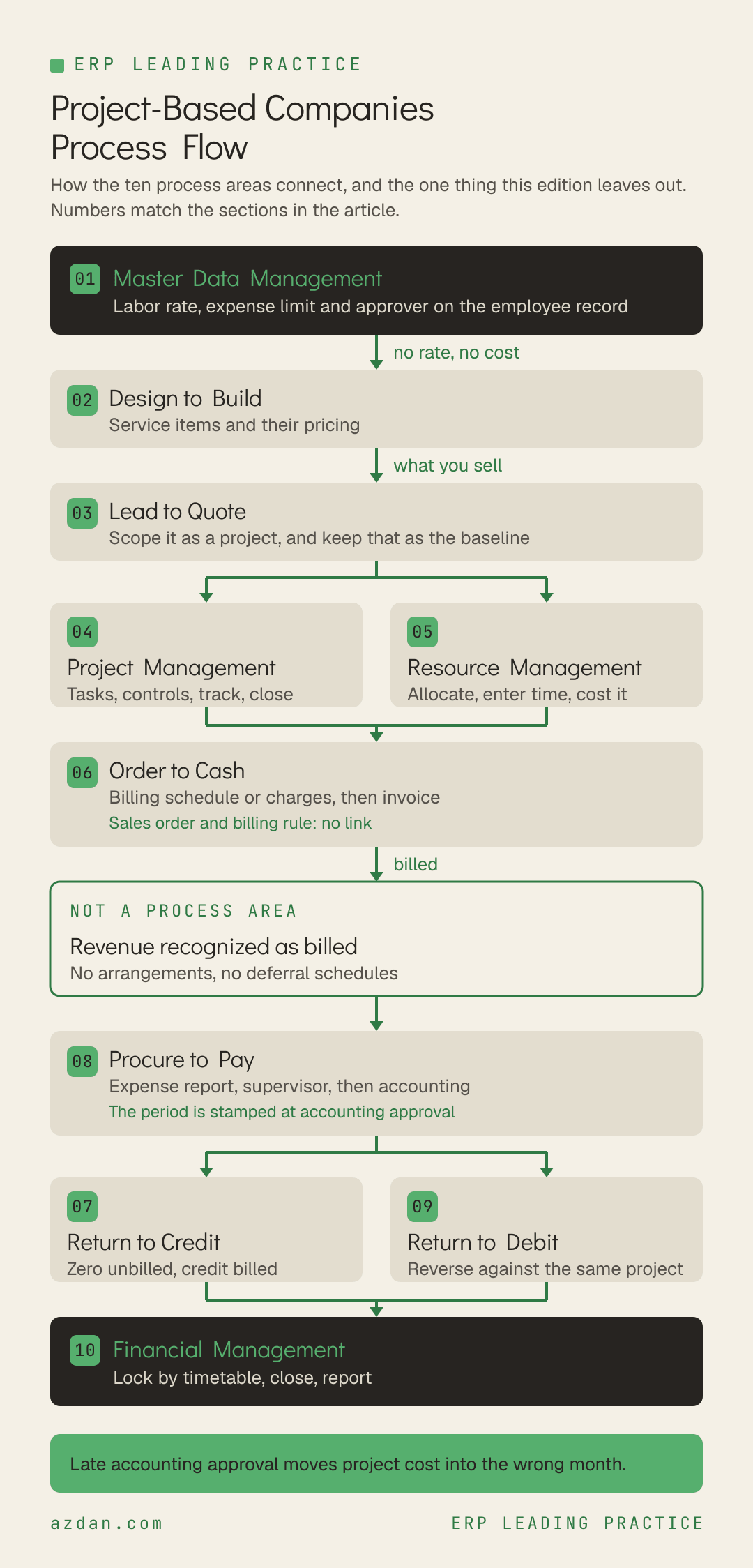
A project-based business sells a scope, staffs it, delivers it and bills it, and its margin is decided by how closely those four stay aligned. The edition behind this reference is worth understanding for what it leaves out before what it contains: it carries no revenue recognition engine. It is built for project businesses whose revenue can be recognized as it is billed. If your contracts need milestone or percent-complete recognition, revenue arrangements or deferral schedules, you are describing a different edition, and that is the first decision to get right. This is the leading practice reference for project-based businesses: every process area, the flow it follows, the rules that govern it, and a copy-ready skill file for each one.
How to Use This
Each process area below carries three things. A flow, which is the sequence the process actually runs in. A short set of rules specific to project-based businesses rather than generic ERP advice. And a skill file you can copy straight out of the page, written as markdown so it can be handed to an AI assistant, dropped into a project repository, or used as the basis for a design document.
The skill files are deliberately short. They are checklists for people who already know the domain, not tutorials. Each one names the roles that own the process, the flow, the rules, what to verify before go-live, and the failure modes that recur.
Methodology note. This reflects the Project Based Standard edition as applied by Azdan across its NetSuite delivery in the UAE, Saudi Arabia, and Egypt. Module availability differs by edition and license, so confirm against your own before treating any rule as available. Where a point is a recommendation from delivery experience rather than a documented rule, it is labeled as one.
The 10 Process Areas
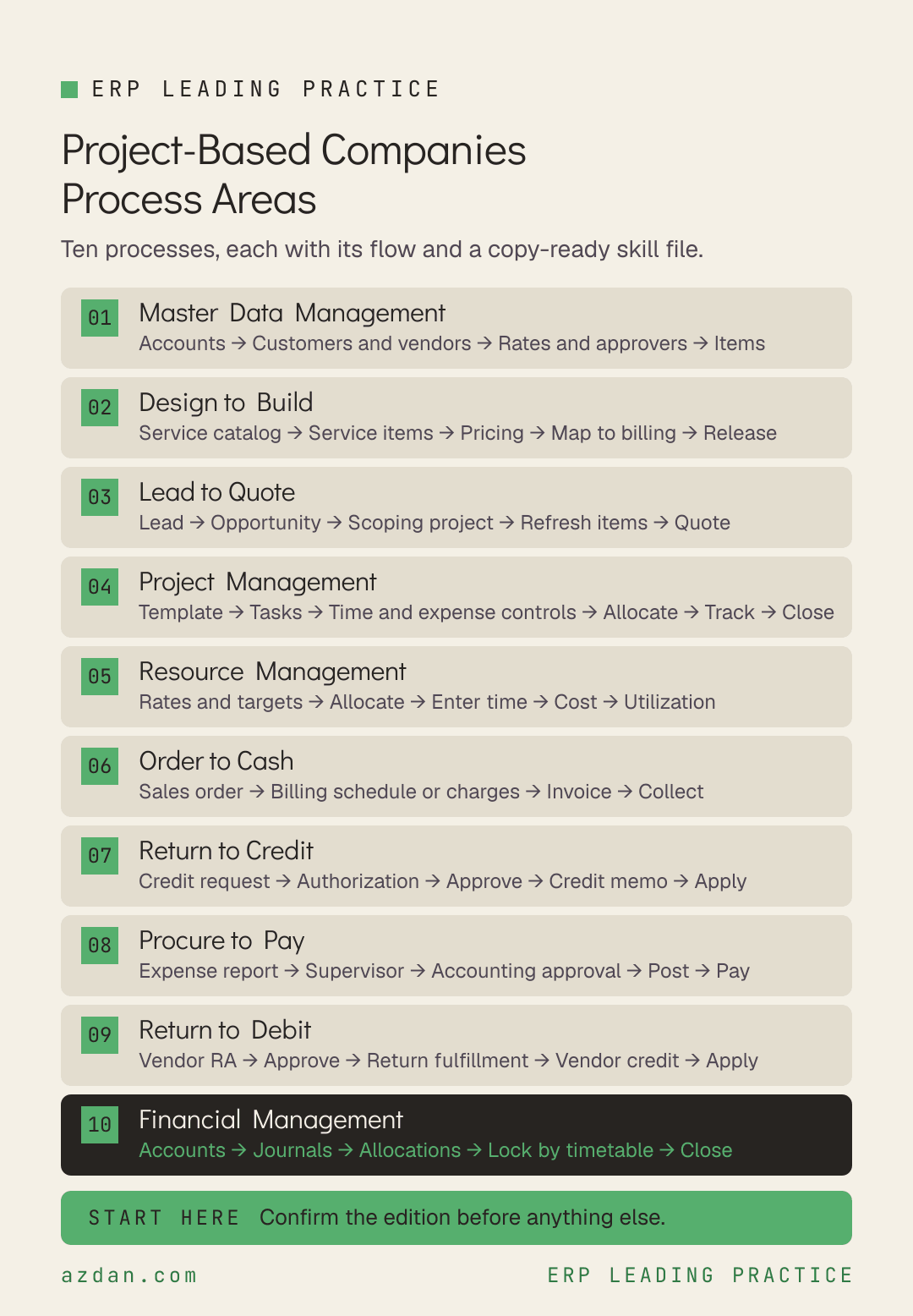
Master Data Management → Design to Build → Lead to Quote → Project Management → Resource Management → Order to Cash → Return to Credit → Procure to Pay → Return to Debit → Financial Management
Process area
Primary owner
What it covers
Master Data Management
Controller
Accounts, customers, vendors, employees, contacts and items.
Design to Build
Sales Rep
Service items and the pricing that billing runs on.
Lead to Quote
Sales Rep
Recording and managing the selling activities that win projects, and building the estimate as a project rather than a document so there is something to measure delivery against.
Project Management
Operations
The delivery engine.
Resource Management
Project Manager
Labor cost, allocation and utilization.
Order to Cash
Accounts Receivable
Billing and collecting for the work, including contracts billed over a term rather than on completion, and the scope changes that happen on almost every project.
Return to Credit
Sales Rep
Customer credits and refunds.
Procure to Pay
Accounts Payable
Purchasing, vendor bills and employee expenses.
Return to Debit
Accounts Payable
Vendor returns, credits and refunds, including credits for contract breaches such as late or defective subcontracted work.
Financial Management
Controller
Accounts, journals, allocations, the close and reporting.
1. Master Data Management
Accounts, customers, vendors, employees, contacts and items. In a project business the employee record is a costing and approval record as much as an HR one, because it carries the labor rate, the expense limit and the approver.
Define accounts and segments → Load customers, vendors and contacts → Set employee rates, limits and approvers → Create items → Validate
Leading practice rules
Master data must be maintained before process area transactions can be carried out.
Employee records hold contact details, HR data and access, and in a project business they also carry the labor cost rate, the expense limit, the expense approver and, for approvers, their approval limit.
Use contact records for individuals attached to leads, prospects, customers, vendors or partners.
Customer, vendor, employee and item data can be loaded in bulk from CSV using the provided import templates.
Skill file: Master Data Management
---
name: project-based-master-data-management
description: NetSuite leading practice for Master Data Management in project-based businesses
---

# Master Data Management - Project-Based Companies

## Roles
Controller, Administrator, Accounts Payable, Sales Rep

## Process flow
Define accounts and segments → Load customers, vendors and contacts → Set employee rates, limits and approvers → Create items → Validate

## Leading practice rules
- Master data must be maintained before process area transactions can be carried out.
- Employee records hold contact details, HR data and access, and in a project business they also carry the labor cost rate, the expense limit, the expense approver and, for approvers, their approval limit.
- Use contact records for individuals attached to leads, prospects, customers, vendors or partners.
- Customer, vendor, employee and item data can be loaded in bulk from CSV using the provided import templates.

## Check before go-live
- [ ] A labor cost rate on every employee who will enter time, before time entry opens
- [ ] Expense limit and expense approver set on every employee who will submit expenses

## Known failure modes
- Time entered against an employee with no cost rate, which produces no cost at all, with no error and no warning

## Scope note
This reflects the Project Based Standard edition. Confirm against your own licensed
modules and edition before treating any rule as available.
2. Design to Build
Service items and the pricing that billing runs on. In a project business the item list is a statement of what you sell, and it decides what can be compared across projects.
Roles: Sales Rep, Controller, Operations
Process flow
Define the service catalog → Create service items → Set pricing → Map to billing → Release
Leading practice rules
Item records hold the accounting, pricing and attributes for the goods and services you buy and sell.
Service item pricing is the basis for pricing work under charge based billing, so the strategy for creating service items has to be defined before the first quote.
Keep the service catalog stable across projects, so the same work is sold under the same item and can be compared.
Skill file: Design to Build
---
name: project-based-design-to-build
description: NetSuite leading practice for Design to Build in project-based businesses
---

# Design to Build - Project-Based Companies

## Roles
Sales Rep, Controller, Operations

## Process flow
Define the service catalog → Create service items → Set pricing → Map to billing → Release

## Leading practice rules
- Item records hold the accounting, pricing and attributes for the goods and services you buy and sell.
- Service item pricing is the basis for pricing work under charge based billing, so the strategy for creating service items has to be defined before the first quote.
- Keep the service catalog stable across projects, so the same work is sold under the same item and can be compared.

## Check before go-live
- [ ] Service item list agreed between sales, delivery and finance before the first quote

## Known failure modes
- A new service item created per project, so no two projects can be compared on the same work

## Scope note
This reflects the Project Based Standard edition. Confirm against your own licensed
modules and edition before treating any rule as available.
3. Lead to Quote
Recording and managing the selling activities that win projects, and building the estimate as a project rather than a document so there is something to measure delivery against.
Roles: Sales Rep, Operations, Project Manager
Process flow
Lead → Opportunity → Scoping project → Refresh items from project → Quote
Leading practice rules
Where an opportunity needs scoping before a quote, build it as a project: a work breakdown structure, generic resource assignments and billing rules.
That structure yields the hours required, the expected timeline and the cost to the customer.
Use Refresh Items from Project to update the opportunity or estimate with the forecast charges generated from the task assignments and billing rules.
Keep one opportunity per customer, with variations handled as separate quotes, so the pipeline does not overstate itself.
Skill file: Lead to Quote
---
name: project-based-lead-to-quote
description: NetSuite leading practice for Lead to Quote in project-based businesses
---

# Lead to Quote - Project-Based Companies

## Roles
Sales Rep, Operations, Project Manager

## Process flow
Lead → Opportunity → Scoping project → Refresh items from project → Quote

## Leading practice rules
- Where an opportunity needs scoping before a quote, build it as a project: a work breakdown structure, generic resource assignments and billing rules.
- That structure yields the hours required, the expected timeline and the cost to the customer.
- Use Refresh Items from Project to update the opportunity or estimate with the forecast charges generated from the task assignments and billing rules.
- Keep one opportunity per customer, with variations handled as separate quotes, so the pipeline does not overstate itself.

## Check before go-live
- [ ] The scoping project kept as the baseline after the win, not overwritten by the working plan

## Known failure modes
- Quoting from a spreadsheet, so there is no baseline to compare actual hours against once the project starts

## Scope note
This reflects the Project Based Standard edition. Confirm against your own licensed
modules and edition before treating any rule as available.
4. Project Management
The delivery engine. Several settings here look like preferences and behave like accounting policy, and they are rarely revisited once projects are running.
Roles: Operations, Project Manager, Controller
Process flow
Create from template → Set tasks and milestones → Configure time and expense controls → Allocate → Track → Close
Leading practice rules
Create projects from a template so tasks and milestones arrive with estimated hours.
Limit project tasks to those needed for reporting and billing. They are accounting controls, not a detailed schedule.
Restrict who can enter time and expense to the project's resources, and enable time entry and expenses on the project to make it available.
Percent complete uses the Percent Complete Denominator: planned time only, or planned plus actual where actuals have overrun. The two diverge on a late project.
Budget by project and activity code only, one line per code. Project tasks are not available on invoices, revenue arrangements or journal entries, so task-level budgets cannot be matched to actuals.
When a task is fully complete, set its status to completed to close it for time tracking.
Skill file: Project Management
---
name: project-based-project-management
description: NetSuite leading practice for Project Management in project-based businesses
---

# Project Management - Project-Based Companies

## Roles
Operations, Project Manager, Controller

## Process flow
Create from template → Set tasks and milestones → Configure time and expense controls → Allocate → Track → Close

## Leading practice rules
- Create projects from a template so tasks and milestones arrive with estimated hours.
- Limit project tasks to those needed for reporting and billing. They are accounting controls, not a detailed schedule.
- Restrict who can enter time and expense to the project's resources, and enable time entry and expenses on the project to make it available.
- Percent complete uses the Percent Complete Denominator: planned time only, or planned plus actual where actuals have overrun. The two diverge on a late project.
- Budget by project and activity code only, one line per code. Project tasks are not available on invoices, revenue arrangements or journal entries, so task-level budgets cannot be matched to actuals.
- When a task is fully complete, set its status to completed to close it for time tracking.

## Check before go-live
- [ ] Percent Complete Denominator chosen deliberately and documented
- [ ] Budgets built at project and activity code level with no repeated codes

## Known failure modes
- Tasks left open after completion, so time keeps landing on work that has finished

## Scope note
This reflects the Project Based Standard edition. Confirm against your own licensed
modules and edition before treating any rule as available.
5. Resource Management
Labor cost, allocation and utilization. This decides whether project margin is real, and it depends on one field being populated before anyone enters a timesheet.
Roles: Project Manager, Operations, Controller
Process flow
Set rates and targets → Allocate → Enter and approve time → Cost the time → Report utilization
Leading practice rules
Labor cost is the hourly cost on the employee record multiplied by hours worked, overridable on the project task assignment.
Ensure labor costs are on the employee before time entry, otherwise there will be no cost for labor.
Classify time as productive without utilized for pre-sales and training, and as neither for administration and bench time.
Most project businesses do not post time to the ledger, because payroll is journaled separately. In that case, set project profitability to include approved time entries as actual costs.
Where time is posted to the ledger, an adjustment journal is needed so labor is not counted twice against journaled salary.
The Available Hours column on utilization reports uses the target on the employee record.
Skill file: Resource Management
---
name: project-based-resource-management
description: NetSuite leading practice for Resource Management in project-based businesses
---

# Resource Management - Project-Based Companies

## Roles
Project Manager, Operations, Controller

## Process flow
Set rates and targets → Allocate → Enter and approve time → Cost the time → Report utilization

## Leading practice rules
- Labor cost is the hourly cost on the employee record multiplied by hours worked, overridable on the project task assignment.
- Ensure labor costs are on the employee before time entry, otherwise there will be no cost for labor.
- Classify time as productive without utilized for pre-sales and training, and as neither for administration and bench time.
- Most project businesses do not post time to the ledger, because payroll is journaled separately. In that case, set project profitability to include approved time entries as actual costs.
- Where time is posted to the ledger, an adjustment journal is needed so labor is not counted twice against journaled salary.
- The Available Hours column on utilization reports uses the target on the employee record.

## Check before go-live
- [ ] A recorded decision on whether time posts to the ledger, with the matching configuration applied

## Known failure modes
- Bench time classified as utilized, which flatters utilization and hides spare capacity

## Scope note
This reflects the Project Based Standard edition. Confirm against your own licensed
modules and edition before treating any rule as available.
6. Order to Cash
Billing and collecting for the work, including contracts billed over a term rather than on completion, and the scope changes that happen on almost every project.
Sales order → Billing schedule or charges → Invoice → Deliver invoice → Collect → Apply payment
Leading practice rules
Invoices can be raised from an individual sales order, created standalone where there is no order or fulfillment step, or generated individually or in bulk from the Invoice Sales Orders page.
Use advance billing and billing schedules to bill a sales order over a range of time or a contract term. The schedule can be overridden on each sales order.
Charge based billing supports labor, expenses and fixed fees in one engine. If the sales order amount changes, change the billing rule too, because the two are not linked.
Where scope is reduced or a price is clawed back, zero the charges that have not been billed yet, and issue a credit for any that already have.
Deliver invoices by the customer's preferred method, including email, print or EDI, and apply payments on the customer payment page.
Skill file: Order to Cash
---
name: project-based-order-to-cash
description: NetSuite leading practice for Order to Cash in project-based businesses
---

# Order to Cash - Project-Based Companies

## Roles
Accounts Receivable, Sales Rep, Project Manager, Controller

## Process flow
Sales order → Billing schedule or charges → Invoice → Deliver invoice → Collect → Apply payment

## Leading practice rules
- Invoices can be raised from an individual sales order, created standalone where there is no order or fulfillment step, or generated individually or in bulk from the Invoice Sales Orders page.
- Use advance billing and billing schedules to bill a sales order over a range of time or a contract term. The schedule can be overridden on each sales order.
- Charge based billing supports labor, expenses and fixed fees in one engine. If the sales order amount changes, change the billing rule too, because the two are not linked.
- Where scope is reduced or a price is clawed back, zero the charges that have not been billed yet, and issue a credit for any that already have.
- Deliver invoices by the customer's preferred method, including email, print or EDI, and apply payments on the customer payment page.

## Check before go-live
- [ ] A defined route for scope reductions, covering both unbilled and billed charges
- [ ] Billing schedules set up for every contract billed over a term

## Known failure modes
- Scope reduced on the project but the unbilled charges left in place, so the client is invoiced for work that was removed

## Scope note
This reflects the Project Based Standard edition. Confirm against your own licensed
modules and edition before treating any rule as available.
7. Return to Credit
Customer credits and refunds. In a project business these usually correct a charge rather than reverse a return, so they have to reach back to the project that produced them.
Raise the credit from the originating transaction so it reconciles back to the project and charge it corrects.
Apply open credits to open invoices; where none are open, hold the credit on the customer record.
Where a credit corrects a billed charge, check whether the charge rule behind it also needs changing, or the error repeats next cycle.
Skill file: Return to Credit
---
name: project-based-return-to-credit
description: NetSuite leading practice for Return to Credit in project-based businesses
---

# Return to Credit - Project-Based Companies

## Roles
Sales Rep, Accounts Receivable, Controller

## Process flow
Credit request → Authorization → Approve → Credit memo → Apply or refund

## Leading practice rules
- Raise the credit from the originating transaction so it reconciles back to the project and charge it corrects.
- Apply open credits to open invoices; where none are open, hold the credit on the customer record.
- Where a credit corrects a billed charge, check whether the charge rule behind it also needs changing, or the error repeats next cycle.

## Check before go-live
- [ ] Credit approval thresholds agreed and configured

## Known failure modes
- Crediting the invoice while the charge rule stays unchanged, so the same error is billed again

## Scope note
This reflects the Project Based Standard edition. Confirm against your own licensed
modules and edition before treating any rule as available.
8. Procure to Pay
Purchasing, vendor bills and employee expenses. For a project business the expense flow matters most, because travel and site costs land on projects and the timing of approval decides which month they land in.
Roles: Accounts Payable, Controller, Employee Center, Purchasing
Process flow
Expense report → Supervisor approval → Accounting approval → Post to period → Process payment
Leading practice rules
Enable expense reports, and set each employee's expense limit, expense approver and, for approvers, their approval limit on the employee record.
Use expense categories such as transportation, lodging and mileage. Each links to an account, and a category is only available to subsidiaries assigned to that account.
Expense reports can be entered and paid in a currency other than the employee's subsidiary base currency. Mark corporate card expenses at line level.
After supervisor approval an expense report sits in Pending Accounting Approval, and only posts once accounting approves it.
The posting period is set at accounting approval. If that happens after the expense date's period has closed, the report posts to the first open period instead.
Where a vendor bill rate differs from the receipt rate, update the receipt rate to reflect cost accurately rather than posting a vendor bill variance, and update the vendor rate on the item if the change is permanent.
Use a role-based vendor bill approval so a bill without a purchase order cannot post until it has been reviewed.
Skill file: Procure to Pay
---
name: project-based-procure-to-pay
description: NetSuite leading practice for Procure to Pay in project-based businesses
---

# Procure to Pay - Project-Based Companies

## Roles
Accounts Payable, Controller, Employee Center, Purchasing

## Process flow
Expense report → Supervisor approval → Accounting approval → Post to period → Process payment

## Leading practice rules
- Enable expense reports, and set each employee's expense limit, expense approver and, for approvers, their approval limit on the employee record.
- Use expense categories such as transportation, lodging and mileage. Each links to an account, and a category is only available to subsidiaries assigned to that account.
- Expense reports can be entered and paid in a currency other than the employee's subsidiary base currency. Mark corporate card expenses at line level.
- After supervisor approval an expense report sits in Pending Accounting Approval, and only posts once accounting approves it.
- The posting period is set at accounting approval. If that happens after the expense date's period has closed, the report posts to the first open period instead.
- Where a vendor bill rate differs from the receipt rate, update the receipt rate to reflect cost accurately rather than posting a vendor bill variance, and update the vendor rate on the item if the change is permanent.
- Use a role-based vendor bill approval so a bill without a purchase order cannot post until it has been reviewed.

## Check before go-live
- [ ] An accounting approval deadline for expenses, set inside the close timetable
- [ ] Expense categories mapped to the correct accounts and subsidiaries

## Known failure modes
- Expenses approved by accounting after the period closes, so project costs move into a later month and monthly project margin is wrong in both periods

## Scope note
This reflects the Project Based Standard edition. Confirm against your own licensed
modules and edition before treating any rule as available.
9. Return to Debit
Vendor returns, credits and refunds, including credits for contract breaches such as late or defective subcontracted work.
Create vendor return authorizations from the originating purchase transaction.
Approve or reject them according to policy, prompted by dashboard alerts or email.
Raise vendor credits where contract terms are breached, such as late deliveries or defective work, as well as for returns and negotiated discounts.
Apply vendor credits to reduce accounts payable, and where the original cost was charged to a project, make sure the credit reaches the same project.
Skill file: Return to Debit
---
name: project-based-return-to-debit
description: NetSuite leading practice for Return to Debit in project-based businesses
---

# Return to Debit - Project-Based Companies

## Roles
Accounts Payable, Controller, Purchasing

## Process flow
Vendor return authorization → Approve → Return fulfillment → Vendor credit → Apply

## Leading practice rules
- Create vendor return authorizations from the originating purchase transaction.
- Approve or reject them according to policy, prompted by dashboard alerts or email.
- Raise vendor credits where contract terms are breached, such as late deliveries or defective work, as well as for returns and negotiated discounts.
- Apply vendor credits to reduce accounts payable, and where the original cost was charged to a project, make sure the credit reaches the same project.

## Check before go-live
- [ ] Open vendor credits reviewed within the close

## Known failure modes
- A vendor credit applied to overhead when the cost was charged to a project, which quietly flatters that project's margin

## Scope note
This reflects the Project Based Standard edition. Confirm against your own licensed
modules and edition before treating any rule as available.
10. Financial Management
Accounts, journals, allocations, the close and reporting. In a project business the close timetable matters more than usual, because late time and late expenses both move cost between periods.
Maintain accounts → Post and approve journals → Run allocations and amortization → Lock by timetable → Close → Report
Leading practice rules
Consolidate accounts where possible and use segmentation for reporting dimensions.
Journal entries are approved by the creator's supervisor before they post to the general ledger.
Use allocation schedules to distribute costs across departments, classes and locations, and amortization schedules for costs paid in advance.
Run the close to an agreed month-end timetable that locks accounts payable, accounts receivable and the general ledger in good time, so prior periods cannot be changed by accident.
Where there are several subsidiaries, lock them individually or all together as the timetable requires.
Use the automated period and year end feature, which closes the year, posts retained earnings and calculates the CTA.
Skill file: Financial Management
---
name: project-based-financial-management
description: NetSuite leading practice for Financial Management in project-based businesses
---

# Financial Management - Project-Based Companies

## Roles
Controller, Accounts Payable, Accounts Receivable, Executive

## Process flow
Maintain accounts → Post and approve journals → Run allocations and amortization → Lock by timetable → Close → Report

## Leading practice rules
- Consolidate accounts where possible and use segmentation for reporting dimensions.
- Journal entries are approved by the creator's supervisor before they post to the general ledger.
- Use allocation schedules to distribute costs across departments, classes and locations, and amortization schedules for costs paid in advance.
- Run the close to an agreed month-end timetable that locks accounts payable, accounts receivable and the general ledger in good time, so prior periods cannot be changed by accident.
- Where there are several subsidiaries, lock them individually or all together as the timetable requires.
- Use the automated period and year end feature, which closes the year, posts retained earnings and calculates the CTA.

## Check before go-live
- [ ] A written close timetable with the expense and timesheet approval deadlines inside it
- [ ] Subsidiary-level period locking tested before the first close

## Known failure modes
- No close timetable, so late timesheets and late expense approvals keep changing periods that were meant to be final

## Scope note
This reflects the Project Based Standard edition. Confirm against your own licensed
modules and edition before treating any rule as available.
Where to Start
Master data first, including a labor cost rate on every employee who will enter time, because time entered without one produces no cost at all. Then design to build and the service item strategy that billing runs on. Project and resource management next, designed together. Order to cash and the expense process follow, then the returns processes, with financial management and its close timetable running throughout.
The single highest-value check comes before any of that: confirm this is the right edition. List how each of your contract types recognizes revenue. If every one can recognize as billed, this edition fits. If any needs milestone or percent-complete recognition, or revenue that must be deferred and released on a schedule, plan for revenue recognition capability from the start rather than discovering the gap after the first multi-period project closes.
Published by Azdan, an Oracle NetSuite Solution Provider operating across the UAE, Saudi Arabia, and Egypt. Guidance in this article reflects Azdan's process design work with project-based businesses. Content checked August 2026.
Blog
News & Insights
Fresh thinking and real-world advice to help you scale smarter, faster, and with more clarity
.svg)