
11. Data
Managing real estate data and government portal integrations
Prepare and validate data imports, then connect the applicable government portal processes to leasing, sales, development, community charges, and invoicing.
Government portal integrations · Official API documentation and access
Import preparation helps preserve consistent customer, property, and unit information when data is brought into NetSuite Real Estate. Validate the record type and relationships before loading a file.
Navigation: Launch page > Data > Import hub.
Workspace overview
Before you begin
Confirm the authorized migration scope, source data owner, duplicate-handling approach, identifiers, field mapping, and reconciliation totals.
Procedure
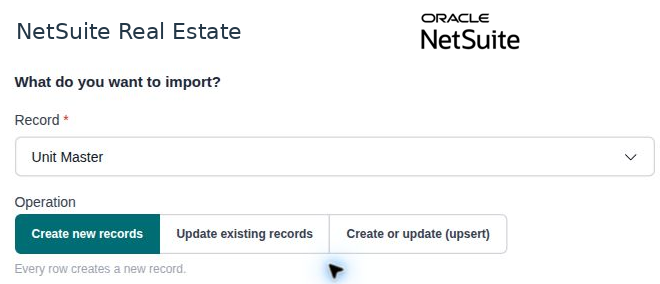
- Open Import hub and select the appropriate supported record type. The observed selector includes Account, Sales Lead, and Unit Master.
- Prepare source values to match the selected record type. Confirm required identifiers and related property or customer references.
- Review duplicates, dates, area units, currencies where applicable, and controlled-list values before importing.
- Use the import controls available for the selected type and follow the account's approved import procedure.
- Review any validation or processing results, correct exceptions, and reconcile the resulting records to the source counts and key values.
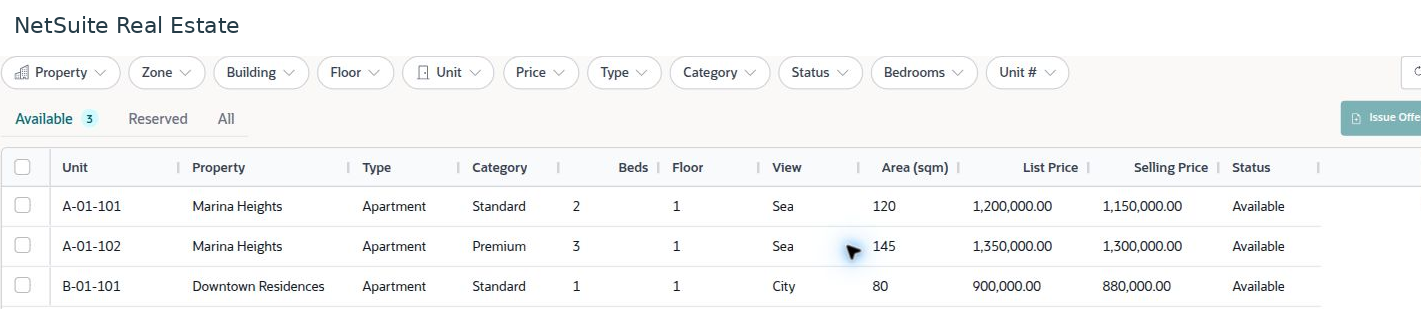
- Open representative imported records in the normal business lists to verify that their relationships and classifications are usable.
Result
The imported records can be reconciled to the approved source and used by business workflows.
Important
Do not assume that every record type or opening balance is supported by this hub. Select only the types available in the account and use the approved migration method for other data. A successful file upload is not sufficient evidence of a completed and reconciled import.
Government portal integrations for NetSuite Real Estate
Government portal integrations connect real estate ERP records with external registration, licensing, community-management, and electronic-invoicing processes. Select the portal for the property's jurisdiction and the business activity. A rental contract, an off-plan sale, an owners' association charge, and a tax invoice follow different external processes.
Integration scope: The workflow mappings below describe how to connect these processes to NetSuite Real Estate when the relevant integration is enabled. Availability depends on your implementation, the authority's approval, and the operations included in your subscription. An official portal API does not by itself confirm that a connector is installed in your NetSuite account. Ask your administrator to confirm the enabled services and submission method before using this procedure.
Select a portal for the ERP lifecycle
Use the following selection to scope integrations for leasing, property development, ownership records, community accounting, and invoicing. The ERP handoffs are recommended business mappings; they are not a list of guaranteed API endpoints.
| Jurisdiction and portal | Where it fits | ERP handoff and completion evidence |
|---|---|---|
| Dubai, UAE — Ejari | Tenancy registration. | Link the approved lease, parties, unit, and rental terms to the external contract reference. Reconcile the returned registration status with the lease record. |
| Abu Dhabi, UAE — DARI / Tawtheeq | Lease registration and subsequent tenancy services. | Match the property and unit identifiers, parties, term, and rent. Retain the registered contract or service outcome against the source lease. |
| Ajman, UAE — Tasdeeq | Tenancy contract authentication. | Prepare the approved lease and supporting property and party information. Retain the authenticated contract reference and evidence on the lease record. |
| Saudi Arabia — Ejar | Rental contract registration and documentation. | Reconcile the lease, parties, units, financial terms, and external contract number. Follow up on party acceptance before treating documentation as complete. |
| Dubai, UAE — Oqood / TAS | Off-plan development and trust-account processes. | Associate project, unit, buyer, sale, and payment records with the approved integration scope. Reconcile external references and trust-account payment results. |
| Saudi Arabia — Wafi / REGA Off-Plan | Developer qualification, project licensing, and post-licensing services. | Link project and licence references to development records. Prepare approved project information and retain the authority's decision and reporting evidence. |
| Saudi Arabia — Real Estate Registry (RER) | Property registration and ownership transactions. | Match registry identifiers to the property, unit, and owner. Reconcile the completed registration or ownership outcome with the sales and handover records. |
| Dubai, UAE — Mollak | Jointly owned property and service-charge accounting. | Reconcile approved budgets, owner charges, invoices, and receipts using consistent community, owner, and unit identifiers. |
| Saudi Arabia — Mullak | Owners' associations and shared-property management. | Associate community and unit records with the owners' association. Reconcile approved subscription charges and collection evidence through the authorized process. |
| Saudi Arabia — ZATCA Fatoora | Electronic invoicing and associated credit or debit notes. | Submit applicable invoice documents through the configured e-invoicing solution. Retain the authority response and reconcile the result with the ERP invoice. |
Selection guidance: Choose the applicable tenancy portal for a rental portfolio; add the off-plan and registry processes for a developer; add the community portal for an owners' association manager; and include e-invoicing where it applies to the invoicing entity. Not every company needs every connection.
Official API documentation and access links
Use the links below to verify the current interface and obtain access. API documentation describes implementation requirements; an API catalogue or access page describes available services or enrollment; a service guide explains the portal's business process. These resources are labelled separately so that a user guide is not mistaken for an API specification. Public documentation reviewed on 20 October 2026.
| Portal | Official resource | Access and documentation status |
|---|---|---|
| Ejari | DLD API catalogue Ejari API access and prerequisites | Official API listed. Confirm the approved account and obtain the detailed integration specification through DLD onboarding. |
| Oqood / TAS | Oqood/TAS API access and prerequisites | Official integration route. Developer and bank eligibility differ; confirm the permitted services and technical documentation with DLD. |
| Mollak | DLD API catalogue and Mollak service scope Mollak API access | Official API listed. Obtain the subscribed interface specification; bank-specific services are separate from management-company services. |
| DARI / Tawtheeq | ADREC API subscription Corporate integration request Tenancy registration guide | ADREC advertises API modules, including leasing. Confirm Tawtheeq operations, eligibility, and access to the detailed API specification for your organization. |
| Tasdeeq | Official tenancy services guide | A public official API specification was not located during this review. Confirm the authorized integration route with Ajman Municipality. |
| Ejar | Official digital integration service Rental contract documentation guide | An official real estate platform integration service is listed. Request eligibility, technical specifications, and supported operations; a public endpoint reference was not located. |
| Wafi / REGA Off-Plan | Official off-plan services REGA platform manuals | Business services are documented. Public API specifications were not located; confirm integration access and reporting scope with REGA. |
| Mullak | Official association services Portal user guide | Service and user guidance, not API documentation. Confirm whether an approved interface is available for your management organization. |
| Real Estate Registry — RER | Official registry services | Registration and ownership services are documented. A public API specification was not located; confirm access, eligible properties, and transaction scope with RER. |
| ZATCA Fatoora | Developer portal manual and API documentation access Detailed technical guideline Official developer resources | Official technical documentation is available. The integration sandbox provides API references; sign-in and onboarding may be required. Production access is separate from testing. |
Complete the ERP and portal cycle
- Identify the source record. Start from the approved lease, sales contract, project, community charge, ownership record, or invoice. Confirm the subsidiary, property jurisdiction, and responsible business team.
- Validate the shared data. Check external property and unit identifiers, party details, dates, amounts, and supporting documents against the source record. Use the values required by the selected service.
- Submit through the enabled process. Use your account's approved connector, integration service, or authorized portal procedure. Record the submission reference. Do not assume that the Data Import Hub submits government applications.
- Review the external outcome. Separate a technical acknowledgment from registration, certification, approval, or invoice clearance. Where another party must accept a contract, track that step separately.
- Reconcile the result. Match the external reference, effective dates, amounts, and final status to the original ERP record. Retain the returned document or response through the configured record fields or document attachments.
- Continue the business workflow. Release the next activity only when the evidence required by your process is complete. Track later amendments, renewals, cancellations, and credit notes as linked changes to the original transaction.
Example: A property manager approves a lease in NetSuite Real Estate, submits it through the applicable tenancy-registration process, follows up on pending acceptance, and records the completed registration reference. Finance then reconciles the rent schedule, invoices, and receipts using the same lease and unit references. Registration does not itself prove that rent has been received.
Review exceptions and reconciliation
- Rejected information: Read the returned reason, correct the source record through the approval process, and resubmit using the configured retry procedure.
- Timeout or uncertain result: Check the existing submission reference before trying again to avoid creating a duplicate transaction.
- Different balances: Compare the period, transaction type, currency, fees, and payment allocation. Do not overwrite an approved ERP balance merely to match a portal total.
- Expired or missing access: Ask the authorized administrator to resolve the access issue. Keep the business record pending until its external outcome is known.
- Lifecycle distinctions: Project licensing, sale registration, title transfer, handover, invoicing, and payment are separate milestones. Completion of one does not automatically complete the others.
Optional brokerage and advertising connections
Trakheesi — Dubai: Include this connection when the scope covers real estate listings, licensing, or permit validation before advertising. It supports the marketing stage rather than rent collection or project accounting. See the official API catalogue and Trakheesi API access page; obtain detailed specifications through the approved access process.
FAL / REGA — Saudi Arabia: Include licence and advertisement checks when brokerage or property marketing is part of the implementation. See the official FAL service overview and advertisement licence service. Public API specifications were not located during this review; confirm the authorized interface with REGA.
Government integration questions
Are Ejari and Ejar the same integration?
No. Ejari serves Dubai tenancy processes; Ejar serves Saudi rental processes. Select the service by jurisdiction and maintain separate external identifiers and access arrangements.
Are Mollak and Mullak interchangeable?
No. Dubai's Mollak and Saudi Arabia's Mullak are different platforms. Use the applicable community or association process and its approved data exchange.
Does an available API mean the connection is active?
No. Confirm your organization's access, the installed integration, supported transactions, and successful acceptance testing. Until these are confirmed, treat the connection as an implementation scope item.
Does a portal approval post a transaction to the general ledger?
Only if your configured workflow explicitly performs that step. Review the ERP posting and accounting status separately from the external service result.