
5. After-sales & Handover
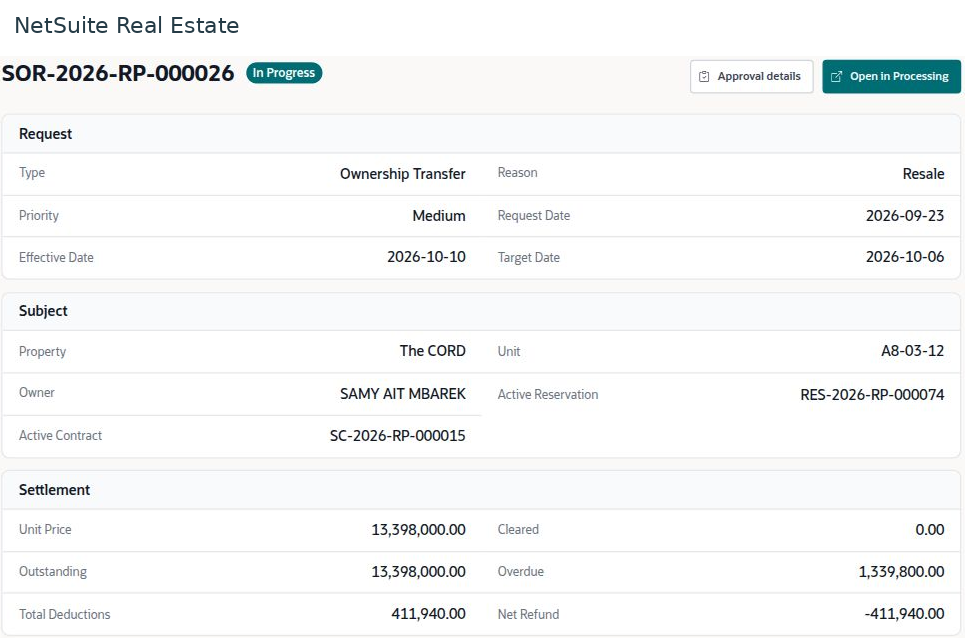
Reviewing sales contract termination and settlement
Sales contract termination combines the reason for cancellation, a settlement calculation, approval, and resulting operational and financial changes.
Navigation: Launch page > After-sales & Handover > Contract termination (SOR).
Workspace overview
Before you begin
Reconcile the contract, collected amounts, outstanding installments, cheques, and authorized termination terms before reviewing the settlement.

Procedure
- Open the termination request and confirm the customer, contract, unit, reason, and current status.
- Review the settlement components separately: paid amount, forfeiture or retained amount, penalties, refund, and cheques to return where applicable.
- Review the approval history and identify the current decision maker. Check supporting collection, Finance, and legal reviews required by your workflow.
- Review the proposed GL impact and operational effects, such as installment cancellations or unit availability changes.
- After authorized approval and processing, verify actual posted transactions, refund handling, cheque returns, and the final unit status.
Result
The terminated contract has a reconciled settlement and a traceable approval and processing history.
Important
The demo request is pending CFO approval. Its GL information and proposed unit release must not be described as completed postings. Forfeiture caps, penalty rates, refund rules, and approval roles depend on the agreement and approved company policy.