3. Reservations & Contracts
Checking property unit availability
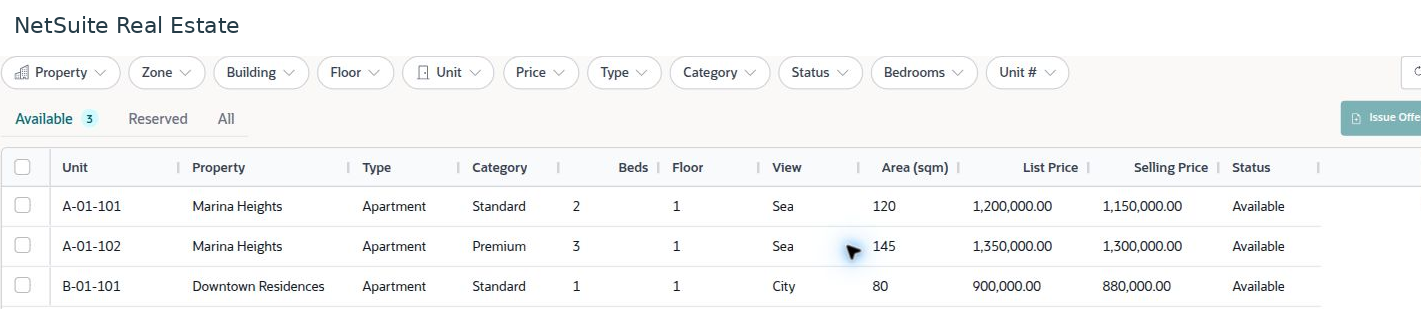
Unit availability lets sales users compare available property inventory by location within the property, unit characteristics, area, and price before preparing an offer or reservation.
Navigation: Launch page > Reservations & Contracts > Units availability.
Before you begin
Confirm the intended property and buyer requirements. Use the current inventory view rather than an older exported availability sheet.

Procedure
- Open Available to review units currently shown as available. Use Reserved or All when investigating an existing reservation or another unit status.
- Apply the relevant filters, such as property, zone, building, floor, unit, price, type, category, status, bedrooms, or unit number.
- Compare the unit identifier, area, unit type, list price, selling price, and current status. Confirm the unit of measure used by the property.
- Select the intended unit before using Issue Offer. Review the selected unit again when preparing the reservation.
- If the unit does not appear, remove conflicting filters and review its current record and status before proceeding.
Result
The sales team identifies the correct unit and commercial starting point for the property sales transaction.
Important
List price and selling price may differ. Neither value should be treated as an approved exception without the required commercial review. Availability is a current operational status; refresh the view before committing to a buyer.
Screen walkthrough