
3. Reservations & Contracts
Reviewing payment plan NPV exceptions
Net present value review helps Finance assess the timing of a property sale's expected collections. A payment plan can require additional approval when its NPV result falls below the configured threshold.
Navigation: Launch page > Reservations & Contracts > Reservation & NPV.
Before you begin
Confirm the unit, customer, selling price, payment plan, and the financial assumptions approved for the property. NPV is a valuation measure, not a cash receipt.
Procedure
- Review Unit & Customer and confirm the selected unit, customer ownership, and sales responsibility.
- Open Payment Plan & NPV and review the proposed installment timing and resulting NPV measure.
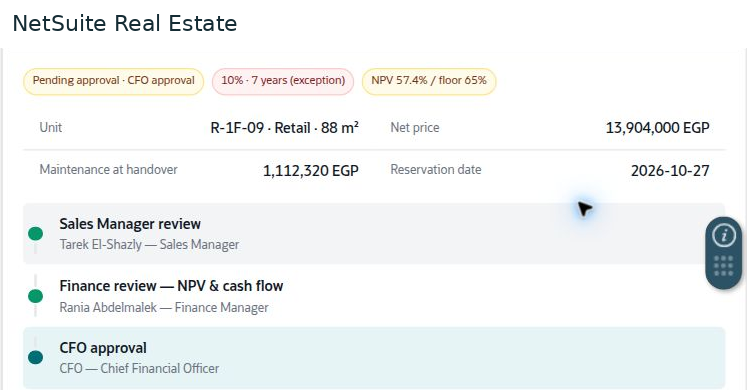
- Compare the result with the configured floor. If the proposal is an exception, document its commercial justification and verify the required approval route.
- In Review & Submit, verify price, additional charges, and dates before submitting the proposal.
- Open the reservation approval details to identify completed reviews and the current approver. Follow the exception to an approved or returned outcome.
Result
The commercial proposal and its cash-flow implications are presented to the required decision makers.
Important
In the illustrated demo, NPV is 57.4 percent against a 65 percent floor and CFO approval is pending after Sales and Finance review. These values and roles are examples, not a universal approval policy. Do not convert this displayed percentage into an accounting discount rate.