4. Collections & PDC
Reviewing sales receipts and payment allocation
A sales receipt records money received from a customer. Allocation identifies which obligations the receipt settles; posting and allocation must be reviewed separately.
Navigation: Launch page > Collections & PDC > Sales receipts. Use Browse to open an existing receipt.
Before you begin
Have the customer, property, receipt type, payment method, received date, amount, currency, bank or cash account, and payment reference available.

Procedure
- Open the receipt and verify the customer, property, payment method, and source context.
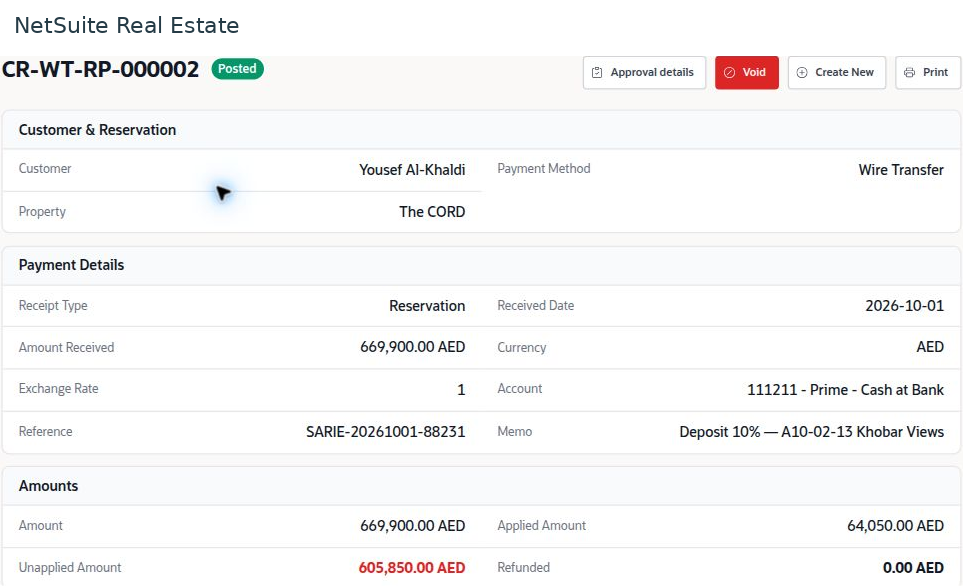
- Review the received amount, currency, exchange rate, received date, account, and reference against the payment evidence.
- Open Allocations and confirm that each allocation relates to the correct unit and obligation. Compare the total applied amount with the receipt amount.
- Review unapplied and refunded amounts. Determine whether unapplied money should remain on account or be allocated through the authorized process.
- Check approval and posting status. For a posted receipt, review Posted GL and the related transactions before treating the accounting process as complete.
Result
The receipt, its allocation, and its financial entries can be reconciled to the actual payment.
Important
The example receipt is Posted but only 64,050 of 669,900 is applied; 605,850 remains unapplied and refunded is zero. Posted does not mean fully allocated. Do not create another receipt to resolve an allocation issue.
Screen walkthrough