
10. Documents
Reviewing customer document templates and print output
Template Studio manages the presentation of supported customer documents. Preview a populated business record to verify the document before using it with a customer.
Navigation: Launch page > Documents > Template studio.
Workspace overview
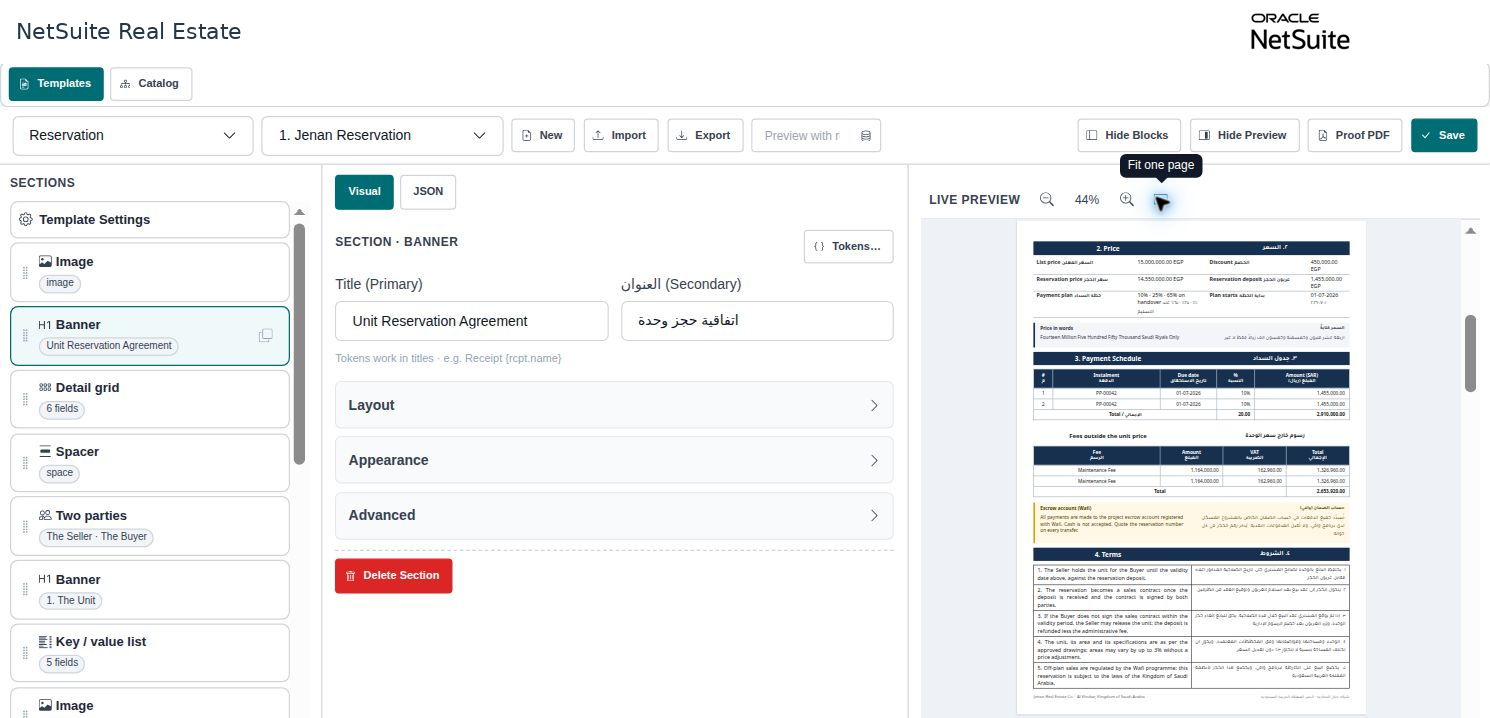
Before you begin
Use an approved template, document language, legal wording, and a representative populated record. The available record types include Reservation, Sales Offer, Customer Receipt, and Sales Contract.
Procedure
- Select the record type and template relevant to the document.
- Load the intended populated record into Preview.
- Review customer and ownership details, property and unit, dates, currency, totals, installment information, and charges.
- Review terms, language, layout, and page breaks. Check that repeated parties or totals do not appear incorrectly.
- Use Proof PDF to inspect the rendered document. An authorized template user can save approved changes after review.
- Reopen or re-preview the final version with a populated record before issuing the document through the company process.
Result
The printed document reflects the correct business record and approved presentation.
Important
Do not use a preview as proof that a contract is approved or signed. Keep legal text and localization requirements under the company's document-control process. Confirm numerical consistency across the source record and print output.