
Property Management
Rental property and lease management lifecycle
The rental property lifecycle connects the proposed lease terms to a leasing contract, scheduled rental charges, billing and collections, tenant occupancy, and renewal or exit.
Navigation: Property Management > Lease Management, Lease Transactions, Move In/Out, and Reporting.
Workspace overview
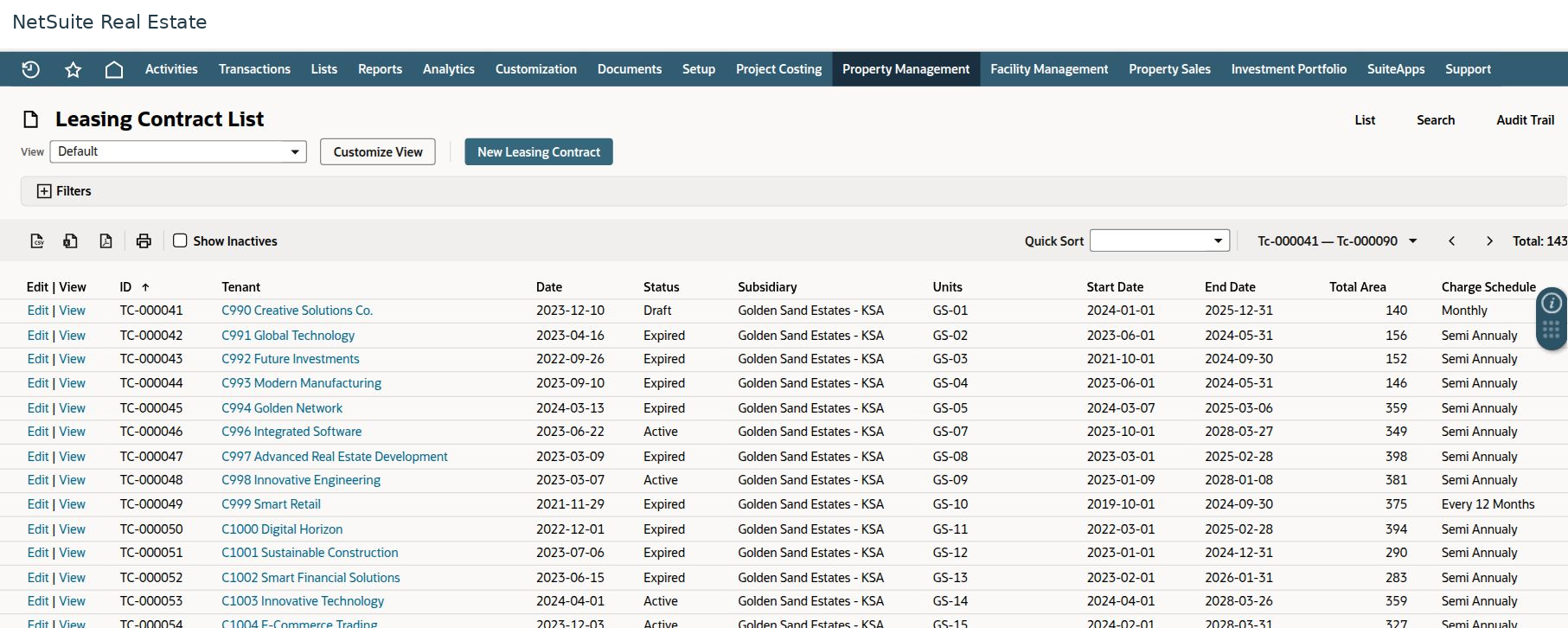
Before you begin
Confirm the property and units, tenant record, approved lease terms, charge types, billing schedule, deposits, and company policy.
Procedure
- Prepare and review the lease proposal, including units, term, rent, increases, and additional charges.
- Create or review the leasing contract and confirm the approved dates, tenant, units, and financial terms.
- Review Lease Charges and annual financial information. Confirm rent and service-charge schedules before billing.
- Use the configured lease claims, charge batches, invoices, receipts, and payment processes. Reconcile charge status with related financial transactions.
- Complete the tenant move-in request and required checklist evidence.
- Monitor occupancy, expiring contracts, outstanding charges, and upcoming billing. Renew the contract or process termination and move-out through the applicable workflow.
Result
Property managers can follow the tenancy from commercial proposal through occupancy and final settlement.
Important
Lease status, occupancy status, charge status, invoice status, and payment status answer different questions. An Active lease can still have Draft charges, and an Approved move-in request can still have pending tasks.
Lease transactions
The Lease Transactions menu includes sales orders, invoices, customer payments, customer deposits, credit memos, customer refunds, finance charges, approval lists, and Create Lease Receipt. Use the transaction that matches the business event and reconcile it to the contract. Do not substitute a credit memo or refund for an allocation correction.