Property Management
Reviewing leasing contracts and renewals
A leasing contract is the operational reference for the tenant, leased units, term, rental obligations, additional charges, and renewal history.
Navigation: Property Management > Lease Management > Leasing Contract. Create Lease Contract is a separate entry point for the configured creation process.
Before you begin
Confirm the approved proposal or agreement, tenant, property, units, lease dates, rent, additional charges, deposit, and required documents.
Procedure
- Open the contract and verify its number, type, status, tenant, property, and subsidiary.
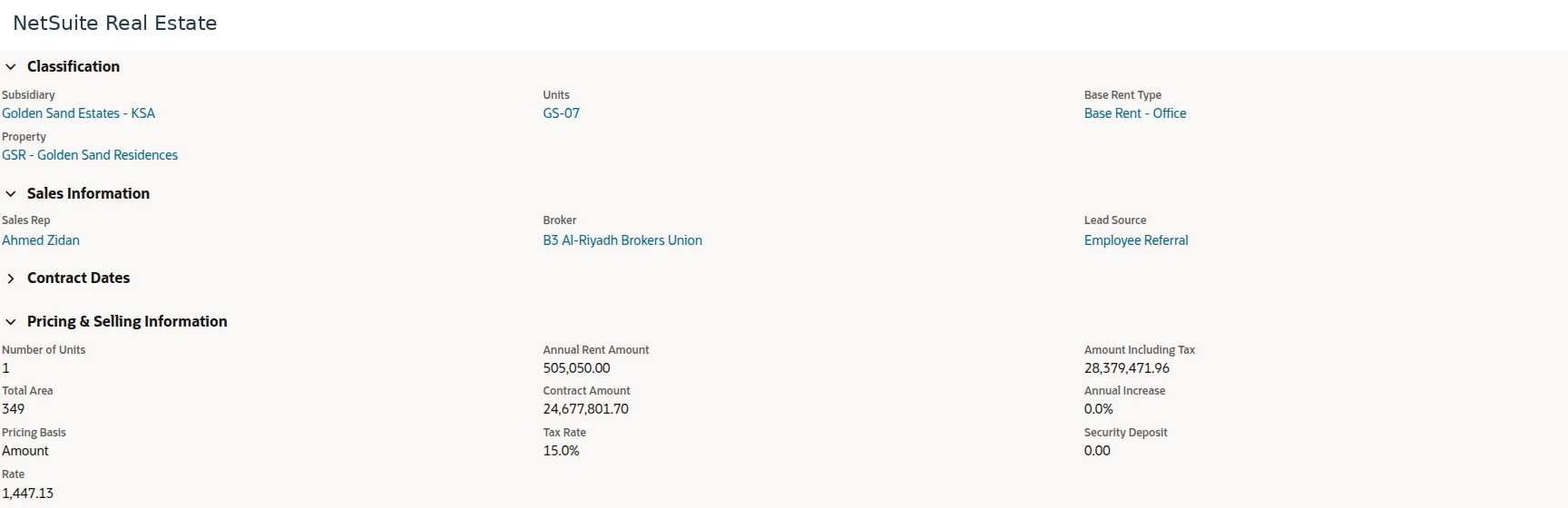
- Review the Units and Additional Charges subtabs, then compare the contract dates, term, pricing basis, annual rent, increases, and deposit with the approved agreement.
- Review TC Annual Financials and Lease Charges to understand the obligations by period and charge type.
- Open Related Transactions to reconcile billing and collection activity. Review Approval, Files, Notes, and Workflow when investigating changes.
- Before using Renew, review Contract Renewals and the current end date. Confirm the next term, revised pricing, and any outstanding balance through the authorized renewal process.
- After a renewal is processed, verify the new record and its link to the previous contract.
Result
The tenancy has a consistent commercial and operational reference across billing, occupancy, and renewal.
Important
Do not assume that the contract's headline total equals annual rent multiplied by a rounded term. Reconcile the detailed schedule and additional charges. Generate Lease Claim, Start Move In, and Renew are business actions; review eligibility and existing related records before using them.
Screen walkthrough