
1. Executive dashboard
Using real estate dashboards and reconciling KPIs
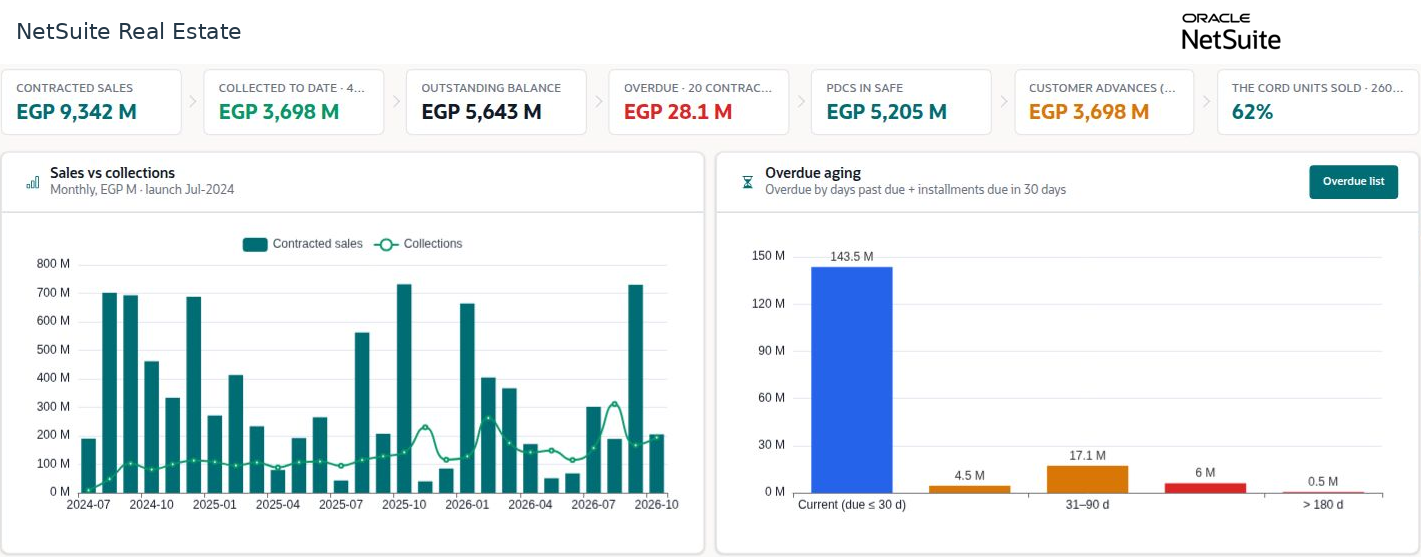
Real estate dashboards summarize sales, collections, overdue balances, cheque custody, project cost, and operational performance. Open the source records to explain a total before using it for a business decision.
Navigation: Launch page > Executive dashboard or Projects > Portfolio dashboard. Property Management > Reporting provides rental-property reports.
Workspace overview
Before you begin
Confirm the company or property scope, as-of date, currency, amount scale, and whether a page is a demo illustration or an operational report.

Procedure
- Identify the business question: sales performance, collections, occupancy, project cost, procurement progress, or maintenance workload.
- Review the displayed measure and its date basis. Separate contracted value, collected value, outstanding value, overdue value, and cheque custody.
- Drill into the underlying records where available. Reconcile source amounts and statuses before comparing dashboards.
- For project reporting, compare current budget, estimate at completion, and variance, then investigate package exceptions.
- For leasing reporting, compare charge schedules, invoices, collections, and expiries using a consistent property and period scope.
Result
Managers can connect summary indicators to the records and actions that explain them.
Important
Contracted sales are not revenue recognition, collections are not automatically profit, and cheques in custody are not cleared cash. Do not add overlapping measures. Rounded dashboard values can differ from exact ledger totals.
Screen walkthrough
