Property Management
Reviewing tenant move in requests and checklists
A move-in request coordinates the tenant's planned move and the checks required before access is released. Review the request status and checklist status separately.
Navigation: Property Management > Move In/Out > Move In Request, or the relevant leasing contract's Start Move In action.
Before you begin
Confirm the tenant, lease, property, unit, planned move date and time, required deposit evidence, and applicable checklist template.

Procedure
- Open the request and confirm tenant, unit, property, lease reference, and planned move details.
- Review mover and access information required by your company and property. Check deposit details where they apply.
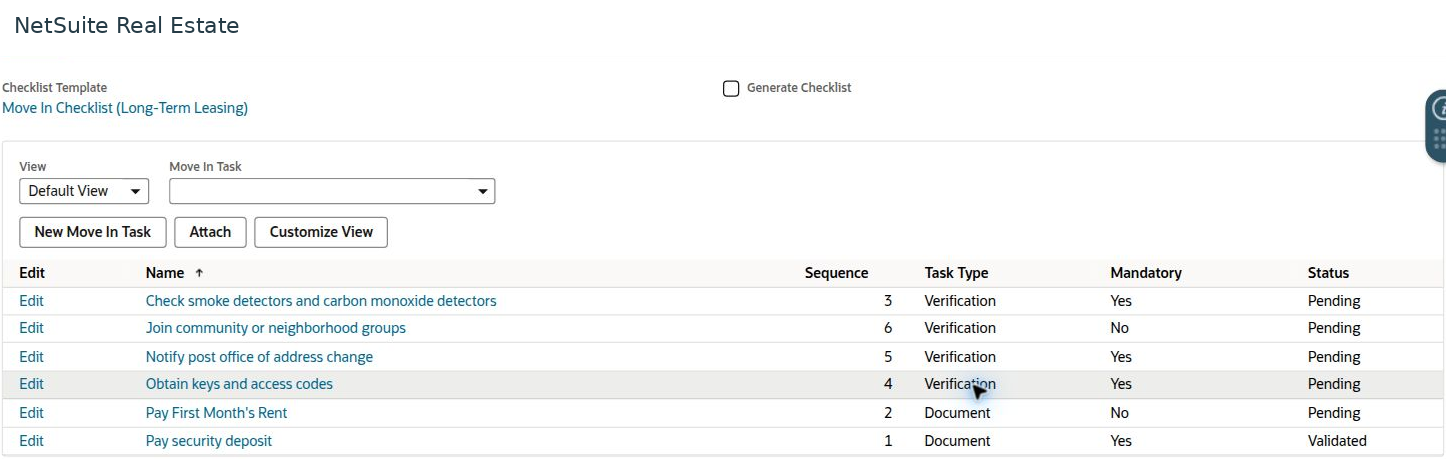
- Open Checklist and review the selected template, task sequence, task type, mandatory flag, and task status.
- Complete each required document or verification task through its authorized process and retain supporting evidence.
- Review Approval and Workflow, then confirm that mandatory tasks and any access-release conditions are satisfied before the move is treated as complete.
Result
The move-in record provides both approval evidence and a task-level readiness record.
Important
In the example, the request is Approved but several checklist items remain Pending; only the deposit task is Validated. Request approval must not be used as a substitute for completing mandatory checklist items.
Screen walkthrough