
Start here
NetSuite Real Estate overview
Browse by business activity
Choose a stage in the launcher lifecycle, or open Property Management, Facility Management, or Help and reference below. Expand a group to view its topics.
Workspace overview
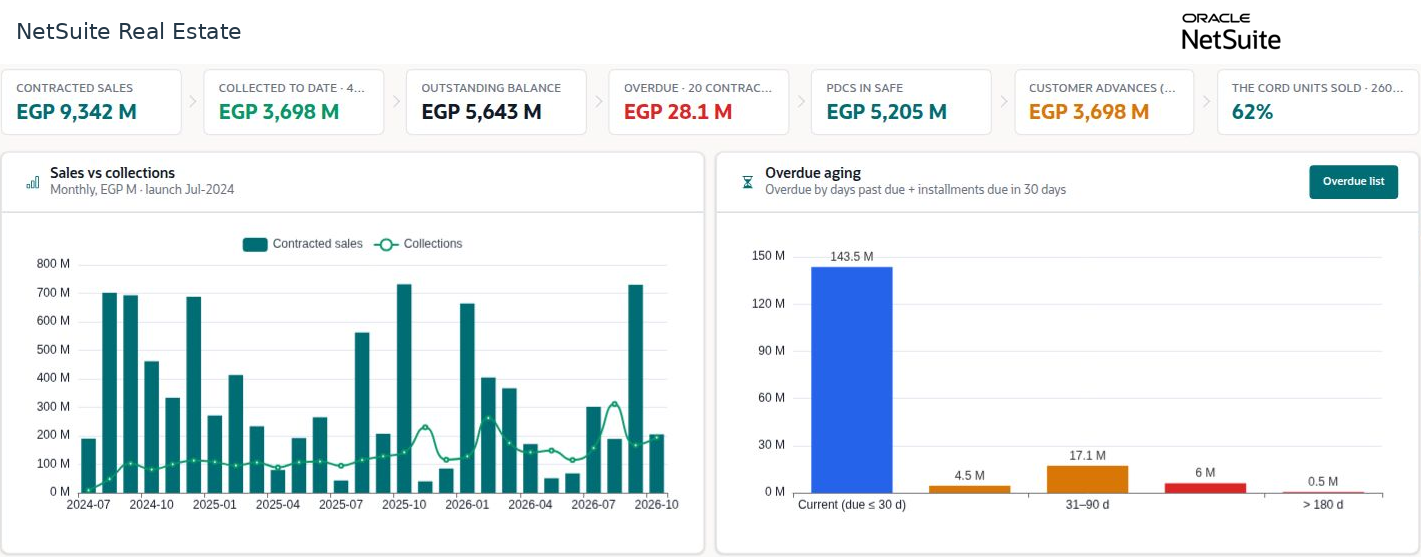
NetSuite Real Estate brings property inventory, property sales, leasing, collections, real estate development projects, and facilities operations into connected business workflows. Use this knowledge base to find the record you need, complete the required review, and confirm the next stage of the property lifecycle.
Navigation: NetSuite Real Estate launch page, Property Management menu, and Facility Management menu.
Before you begin
Use a role with access to the relevant subsidiary, property, and business function. Menu visibility, required fields, approval routes, and available actions depend on your account configuration.
Procedure
- Choose the business cycle. For a unit sale, begin with availability and reservation. For rental property management, begin with the lease proposal or leasing contract. For development costs, begin with the project and its approved budget.
- Follow the related records through the cycle. Keep the property, unit, customer or tenant, subsidiary, and source document consistent.
- Review the current status before taking action. A draft, a submitted request, an approval, a posting, and a payment represent different business events.
- Use the verification instructions in each article before handing work to the next team. Open the underlying record when a dashboard total requires explanation.
Result
A traceable chain of records connects commercial terms, operational activity, and financial results.
Important
Examples illustrate configured records. Names, dates, currencies, rates, tax fields, and approval roles in screenshots are example values. Apply the policies, accounting framework, and local requirements approved for your company. Demo examples are identified in captions.
Who should use this guide
Sales teams use availability, reservations, and sales contracts. Collections teams use receipts, payment allocations, statements, and post-dated cheque records. Property managers use leases, rent schedules, occupancy, and tenant movements. Project and procurement teams use budgets, tenders, construction contracts, and payment certificates. Facilities teams use service cases, work requests, work orders, and preventive schedules.