
Property Management
Reviewing rent schedules and lease charges
Lease charges represent scheduled rental or other tenant obligations. A charge schedule must be reconciled to invoices and receipts to determine what has actually been billed and collected.
Navigation: Property Management > Lease Management > Leasing Contract > Lease Charges. Related menu entries include Lease Claim and Lease Charge Batch.
Before you begin
Confirm the contract, charge type, period, annual amount, installment amount, and applicable billing rules.
Procedure
- Open the contract's Lease Charges subtab and review each charge's start and end dates.
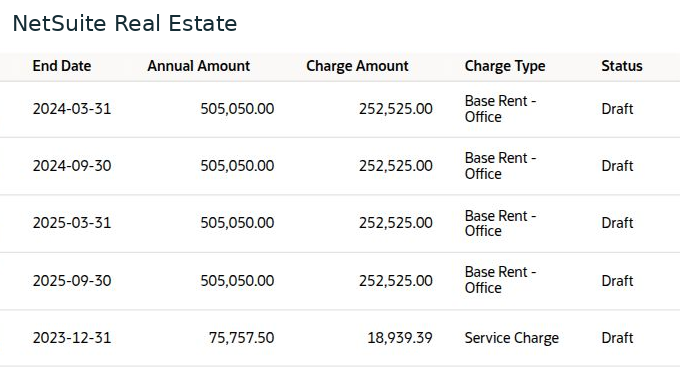
- Compare annual amount with charge amount and billing frequency. Review base rent and service charges separately.
- Check charge status and related invoice references. Identify draft, unbilled, or otherwise incomplete items before preparing billing.
- Review existing Lease Claim and Lease Charge Batch records where your process uses them. Check the source contract and period before generating additional records.
- Follow the related invoice and receipt or payment records. Reconcile outstanding charges and collection reports after processing.
Result
The tenant's schedule, billing, and payment position can be explained by period and charge type.
Important
The example shows semiannual base-rent charges of 252,525 and quarterly service charges of 18,939.39, all in Draft status. Scheduled charges are not evidence that invoices exist or that money has been collected.